
LighterWise Pack
An optimization modpack with QoL and graphical upgrades 🏳️🌈
Screenshots
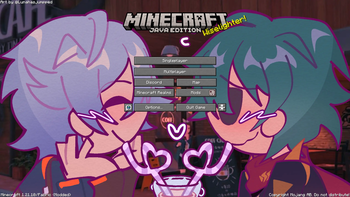

About this Modpack
Lighterwise Pack 🧡🔦

⚠️ This pack includes InvMove which WILL trigger anti-cheat on some public servers if not disabled. ⚠️
This pack is meant to be fast with optimized settings out of the box but also provide beautiful (optional) graphics and quality of life mods and resource packs such as item pickup notifications, A system clock display, Discord rich presence and more useable on any public server with first class support on our own Minecraft SMP Server!
This modpack also includes Distant Horizons with compatible shaders, The Visuality Mod, The Ambient Sounds Mods and more to improve visual fidelity & immersion while providing an optimized experience.
If you would like to join our public SMP server, access can be gained by joining our Discord and agreeing to the rules. Any feedback or issues about this modpack can be provided to me on GitHub
Credits
Art & Backgrounds 🎨
Included, beautiful art for multiple menus and loading screens! All art is used with permission from the artists and their socials can be found below!
If you're interested in adding your art to this project, please contact me on Discord.
If for any reason you need to hide the loading screen art this can be done so by disabling FancyMenu & Drippy Loading Screen in the mod list
Vanilla Tweaks 🔧
Versions 1.5.0 and above include Vanilla Tweaks which can be found here.
Pretty Optimized 🌺
If you're interested in a similar modpack without all the branding check out Pretty Optimized!
🏳️🌈
Available Versions
How to Set Up a LighterWise Pack Server
Order Server
Choose at least 4 GB RAM (6 GB recommended for LighterWise Pack). Based on player count: per 8 players.
Install Modpack in Dashboard
Open the modpack browser in the dashboard, search for "LighterWise Pack" and click "Install". The fabric loader and Minecraft 1.21.11 are configured automatically.
Start Server & Play
Start the server – all mods are loaded automatically. Share the server IP with friends and play together!
Frequently Asked Questions
LighterWise Pack server crashes or won't start – what to do?
Most common causes: insufficient RAM or wrong fabric loader. Check latest.log for "OutOfMemoryError" → increase RAM to at least 6 GB. For "Mixin" or "ClassNotFoundException" errors: modpack version and loader don't match. With Mado Hosting, loader and Minecraft version are auto-configured on modpack install – preventing most startup issues.
How much RAM does a LighterWise Pack server really need?
Minimum 4 GB, recommended 6 GB for stable performance. per 8 players. Important: Minecraft modpacks need more RAM than vanilla – plan extra per additional player. With Mado Hosting, you can scale RAM up live at any time without data loss (from €8/month).
Can I add custom mods to LighterWise Pack without conflicts?
Yes, but check compatibility: only use mods for the same loader (fabric) and same Minecraft version (1.21.11). Common issues: ID conflicts with recipe mods and incompatible coremod versions. The Mado dashboard mod browser only shows compatible mods and warns about known conflicts.
LighterWise Pack server lagging – performance tips
1) Increase RAM to 6 GB+. 2) Reduce server view-distance to 8 (server.properties). 3) Pre-generate chunks with the "Chunky" plugin. 4) Use /spark profiler to check which mods consume the most tick time. With Mado Hosting, all servers run on NVMe SSDs with dedicated CPU cores – eliminating hardware as a bottleneck.
Similar Modpacks
![Better MC [FABRIC] - BMC2](https://cdn.modrinth.com/data/shFhR8Vx/a19c2bcb51d38f32f138d3607e91cb2b7b8e387f_96.webp)
![Better MC [FORGE] - BMC4](https://cdn.modrinth.com/data/4BV47HRn/7f5ef7cc61b2593609aabef3ed07a866a4f11b73_96.webp)


![Better MC [FABRIC] - BMC3](https://cdn.modrinth.com/data/NHUidpfR/327e0749bb6d160c41799fd77bf6d3d631569dc8_96.webp)

Rent LighterWise Pack Server
Start your own server with automatic modpack installation.
Details
- License
- BSD 3-Clause "New" or "Revised" License
- Server-side
- Unsupported
- Client-side
- Required
Supported Versions
Start your LighterWise Pack Server now
From €8.00/month with 6 GB RAM for the best performance.
Configure Server →