
Llohgun's Lodgings
A personal modpack designed with the intent for friends to easily download & join with no hassles or commitments.
Screenshots

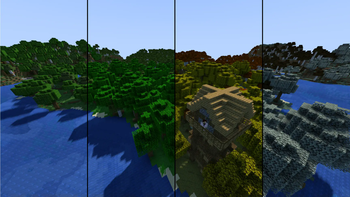
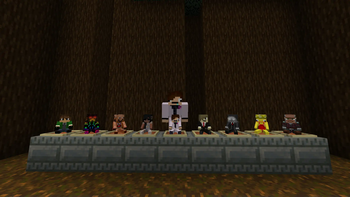
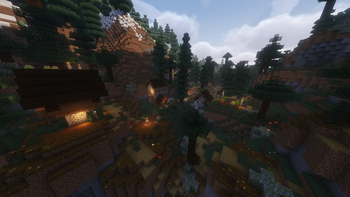
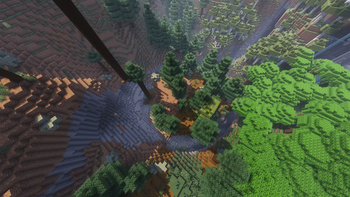
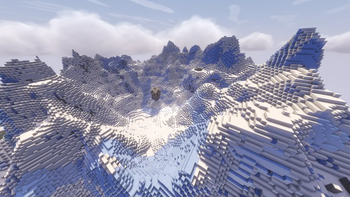
About this Modpack
DESCRIPTION:
This is a Vanilla+ pack designed with Atmosphere, Exploration, Quality of life, and fun in mind! The intention is for easy access for p2p play on a forever world!
Below are a list of keybinds & mods you should be aware of. Highly recommend you look through the mod list to see what else there is to offer!
KEYBINDS:
- Toggle Shaders - F7
- Shader Selection - F6
- Zoom - C
- Backpack Open/Close - B
- Freecam - Num3
- Show/Hide Roughly Enough Items - Ctrl + O
- Show Accessories: H
CONTENT MODS:
Accessories: Equip items into an accessory slot, such as hats, lantern, elytra's, & more!
Do a Barrel Roll: Use your Elytra like a plane! Fairly difficult to use but very fun and rewarding. Feel free to toggle off.
Exposure: Take pictures in minecraft! Adds a highly in-depth camera!
Fabric Seasons: Seasons change every 28 days, affecting the look of biomes & crop growth speed!
Falling Tree: Instantly chop trees with a new axe enchantment!
Farmer's Delight: Adds more crops and cooking recipes!
Hang Glider: Early form of an Elytra! Not compatable with rockets.
Joy of Painting: Paint on a canvas! My personal favorite mod.
Map Atlases: Vanilla friendly mini/world map overhaul using vanilla maps!
Music Maker Mod: Create music using instruments and music sheets!
Simple Hats: Adds a ton of cosmetic hats to wear!
True Ending: A Ender Dragon Overhaul!
QUALITY OF LIFE MODS:
Better Ladders: Place ladders without supporting blocks!
Bridging Mod: Holding Shift while bridging allows you to place block in front of you!
Easy Magic: Reroll enchants for cheap!
Horse Buff: Various QOL changes to horses.
Inventory Management: Sort your Inventory!
Magnum Torch: Prevent mob spawning in a large radius.
Mine Spawners: with a Silk Touch pick!
Right Click Harvest: Use a hoe to instantly replant crops. The better the hoe the bigger the area!
XPlus Autofish: Automatically cast and reel your fishing rod!
You're in Grave Danger: Adds graves at your death location, allowing you to retrieve your lost items!
OTHER MODS:
Better Nether Map: Map out the Nether!
Better Third Person: Third person camera overhaul! May be disorienting at first, so feel free to toggle off.
Breaking Bedrock: Break Bedrock with a netherite pickaxe!
Freecam: Press Num3 to go into freecam mode and view the world!
Lootr: Instanced per-player chests!
Superb Steeds: Horses get better as you use them!
Zoomify: Optifine zoom!
Various Decorations Mods: Another Furniture, Dark Paintings,
Various Immersion Mods: Ambient Sounds, Falling Leaves, Particle Rain, & more!
CURRENT ISSUES
- Structure doors will sometimes only open bottom/top half
- Floating Vines
Credits:
Vanilla Tweaks: https://vanillatweaks.net/
Available Versions
How to Set Up a Llohgun's Lodgings Server
Order Server
Choose at least 6 GB RAM (8 GB recommended for Llohgun's Lodgings). Based on player count: per 5 players.
Install Modpack in Dashboard
Open the modpack browser in the dashboard, search for "Llohgun's Lodgings" and click "Install". The fabric loader and Minecraft 1.21.1 are configured automatically.
Start Server & Play
Start the server – all mods are loaded automatically. Share the server IP with friends and play together!
Frequently Asked Questions
Llohgun's Lodgings server crashes or won't start – what to do?
Most common causes: insufficient RAM or wrong fabric loader. Check latest.log for "OutOfMemoryError" → increase RAM to at least 8 GB. For "Mixin" or "ClassNotFoundException" errors: modpack version and loader don't match. With Mado Hosting, loader and Minecraft version are auto-configured on modpack install – preventing most startup issues.
How much RAM does a Llohgun's Lodgings server really need?
Minimum 6 GB, recommended 8 GB for stable performance. per 5 players. Important: Minecraft modpacks need more RAM than vanilla – plan extra per additional player. With Mado Hosting, you can scale RAM up live at any time without data loss (from €12/month).
Can I add custom mods to Llohgun's Lodgings without conflicts?
Yes, but check compatibility: only use mods for the same loader (fabric) and same Minecraft version (1.21.1). Common issues: ID conflicts with recipe mods and incompatible coremod versions. The Mado dashboard mod browser only shows compatible mods and warns about known conflicts.
Llohgun's Lodgings server lagging – performance tips
1) Increase RAM to 8 GB+. 2) Reduce server view-distance to 8 (server.properties). 3) Pre-generate chunks with the "Chunky" plugin. 4) Use /spark profiler to check which mods consume the most tick time. With Mado Hosting, all servers run on NVMe SSDs with dedicated CPU cores – eliminating hardware as a bottleneck.
Similar Modpacks
![Cobblemon Official Modpack [Fabric]](https://cdn.modrinth.com/data/5FFgwNNP/e7f9ee2e9d361623847853fe2ddce42f519ee64f.png)
![COBBLEVERSE - Pokemon Adventure [Cobblemon]](https://cdn.modrinth.com/data/Jkb29YJU/581ecf54530972afb18a04660afd820f2f24f6c7.png)
![Better MC [FABRIC] - BMC2](https://cdn.modrinth.com/data/shFhR8Vx/a19c2bcb51d38f32f138d3607e91cb2b7b8e387f_96.webp)


![Better MC [FORGE] - BMC4](https://cdn.modrinth.com/data/4BV47HRn/7f5ef7cc61b2593609aabef3ed07a866a4f11b73_96.webp)
Rent Llohgun's Lodgings Server
Start your own server with automatic modpack installation.
Supported Versions
Start your Llohgun's Lodgings Server now
From €12.00/month with 8 GB RAM for the best performance.
Configure Server →