
Loafly
Transforming your world with improved performance and an enhanced gameplay experience!
Screenshots
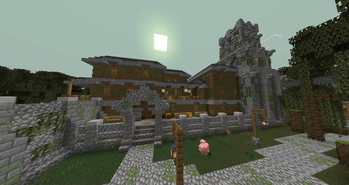


About this Modpack
Step into a polished and immersive Minecraft experience that enhances vanilla gameplay without straying too far from the original charm. This modpack focuses on exploration, combat, performance, and immersion while keeping things accessible and lightweight.
⚠️ Note: You must manually install Cupboard Library for this modpack to work properly. It is not included in the modpack by default.
🧭 Features:
- Vast world generation with new biomes and dungeons
- Enhanced first-person visuals and animations
- Improved combat inspired by Minecraft Dungeons
- Tons of QoL upgrades and UI enhancements
- Vanilla-friendly visual and sound effects
- Native voice chat support
- Optimized performance for smooth gameplay
- Controller support with Midnight Controls
- Built-in replay and Discord Rich Presence
Whether you're exploring alone or with friends, this pack delivers a crisp, immersive survival experience.
⚠️ Compatibility Warning
This modpack is not compatible with Sodium or Iris.
It uses Embeddium and NeOculus instead. Mixing rendering mods may cause crashes or graphical bugs.
If you want to change performance or graphics mods, do so very carefully and at your own risk.
⚠️ Multiplayer Warning
Joining online servers will not work unless it's a LAN server created using the included mod E4MC.
This modpack is designed for singleplayer or local multiplayer (LAN) only.
📡 LAN Multiplayer Notice:
LAN multiplayer is only supported if all players have this modpack installed. It has not been tested with only one player using the modpack, and it's very likely it will not work properly in that case. However, if both players have the full modpack installed, LAN play should work seamlessly.
💡 Suggestions & 🐛 Bug Reports
Got an idea for a new feature? Found a bug?
Feel free to DM me on Discord: @thefard1
I’m always open to feedback and improvements!
📦 Mod List
Here’s a list of all mods included in the pack:
Advancement Plaques

AppleSkin

Architectury API

Balm

Bartering Station

Better Combat

Better ModList

Better Third Person

Carry On

Cloth Config API

CraftPresence

Dungeons and Taverns

Easy Anvils

Embeddium

Entity Culling

Falling Leaves

FerriteCore

First-person Model

Forgematica

Forgified Fabric API

GlitchCore

Hardcore Revival

Hey Wiki

Iceberg

ImmediatelyFast

Jade Addons

Jade

Just Enough Items (JEI)

Kotlin for Forge

Legendary Tooltips

M.R.U

MaFgLib

Midnight Controls

ModernFix

Mouse Tweaks

NeOculus

Not Enough Animations

Ok Zoomer

Overflowing Bars

Prism

Puzzles Lib

ReForgedPlay (Replay Mod for NeoForge)

Resourceful Config

Resourcify

Serene Seasons

Simple Voice Chat

Sodium Dynamic Lights

Sounds

Terralith

Tectonic

UniLib

Visuality: Reforged

Xaero's Minimap

YetAnotherConfigLib (YACL)

e4mc

playerAnimator
Available Versions
How to Set Up a Loafly Server
Order Server
Choose at least 6 GB RAM (8 GB recommended for Loafly). Based on player count: per 5 players.
Install Modpack in Dashboard
Open the modpack browser in the dashboard, search for "Loafly" and click "Install". The neoforge loader and Minecraft 1.21.2 are configured automatically.
Start Server & Play
Start the server – all mods are loaded automatically. Share the server IP with friends and play together!
Frequently Asked Questions
Loafly server crashes or won't start – what to do?
Most common causes: insufficient RAM or wrong neoforge loader. Check latest.log for "OutOfMemoryError" → increase RAM to at least 8 GB. For "Mixin" or "ClassNotFoundException" errors: modpack version and loader don't match. With Mado Hosting, loader and Minecraft version are auto-configured on modpack install – preventing most startup issues.
How much RAM does a Loafly server really need?
Minimum 6 GB, recommended 8 GB for stable performance. per 5 players. Important: Minecraft modpacks need more RAM than vanilla – plan extra per additional player. With Mado Hosting, you can scale RAM up live at any time without data loss (from €12/month).
Can I add custom mods to Loafly without conflicts?
Yes, but check compatibility: only use mods for the same loader (neoforge) and same Minecraft version (1.21.2). Common issues: ID conflicts with recipe mods and incompatible coremod versions. The Mado dashboard mod browser only shows compatible mods and warns about known conflicts.
Loafly server lagging – performance tips
1) Increase RAM to 8 GB+. 2) Reduce server view-distance to 8 (server.properties). 3) Pre-generate chunks with the "Chunky" plugin. 4) Use /spark profiler to check which mods consume the most tick time. With Mado Hosting, all servers run on NVMe SSDs with dedicated CPU cores – eliminating hardware as a bottleneck.
Similar Modpacks
![Cobblemon Official Modpack [Fabric]](https://cdn.modrinth.com/data/5FFgwNNP/e7f9ee2e9d361623847853fe2ddce42f519ee64f.png)
![COBBLEVERSE - Pokemon Adventure [Cobblemon]](https://cdn.modrinth.com/data/Jkb29YJU/581ecf54530972afb18a04660afd820f2f24f6c7.png)
![Better MC [FABRIC] - BMC2](https://cdn.modrinth.com/data/shFhR8Vx/a19c2bcb51d38f32f138d3607e91cb2b7b8e387f_96.webp)


![Better MC [FORGE] - BMC4](https://cdn.modrinth.com/data/4BV47HRn/7f5ef7cc61b2593609aabef3ed07a866a4f11b73_96.webp)
Rent Loafly Server
Start your own server with automatic modpack installation.
Details
- License
- Creative Commons Attribution Non Commercial Share Alike 4.0 International
- Server-side
- Required
- Client-side
- Required
Supported Versions
Start your Loafly Server now
From €12.00/month with 8 GB RAM for the best performance.
Configure Server →