
Matt's Fat Pack
Explore mystical dimensions, conquer legendary bosses, and engineer impossible contraptions.
Screenshots
About this Modpack
Matt's Fat Pack
Forge Your Legend: An Epic Journey of Discovery & Creation
Embark on the ultimate Minecraft adventure where ancient mysteries meet industrial innovation. This carefully crafted modpack blends exploration, challenging boss encounters, and sophisticated engineering into one seamless experience.
🗺️ Explore Uncharted Realms
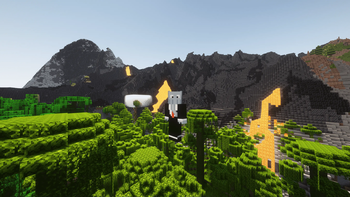
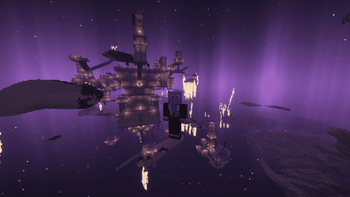
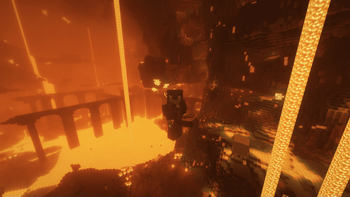
Venture through breathtaking dimensions—from the ethereal Aether's floating islands to the Enderscape's alien landscapes and the Nether's new hidden depths. Navigate with precision using enhanced compasses, discover restructured vanilla dungeons, and uncover massive new structures that dot the landscape. Every biome holds secrets waiting to be found.
⚔️ Conquer Legendary Bosses
Test your mettle against formidable adversaries from Cataclysm and Bosses of Mass Destruction. Craft mystical eyes through alchemical mixing to summon these titans—each requiring strategy, preparation, and skill to overcome. Reforge legendary Aether treasure armor and weapons, transforming rare drops into even more powerful gear through custom smithing recipes.
🔧 Master Engineering & Automation
Harness the power of Create to build magnificent contraptions. Process ancient debris through crushing wheels, automate resource production with heated mixers, and design intricate mechanical systems. Custom integration recipes challenge you to combine magic and machinery—upgrade your backpacks with Create components, craft advanced tools requiring both engineering prowess and mystical materials.
✨ Quality of Life, Without Compromise
Enhanced with EMI recipe viewing, Jade tooltips, performance optimizations like Sodium and Lithium, plus dozens of quality-of-life improvements. Navigate effortlessly with Waystones, organize with Sophisticated Storage, and communicate via Voice Chat.
Your journey begins now—will you rise to become a master explorer, legendary warrior, and engineering genius?
Available Versions
How to Set Up a Matt's Fat Pack Server
Order Server
Choose at least 6 GB RAM (8 GB recommended for Matt's Fat Pack). Based on player count: per 5 players.
Install Modpack in Dashboard
Open the modpack browser in the dashboard, search for "Matt's Fat Pack" and click "Install". The neoforge loader and Minecraft 1.21.1 are configured automatically.
Start Server & Play
Start the server – all mods are loaded automatically. Share the server IP with friends and play together!
Frequently Asked Questions
Matt's Fat Pack server crashes or won't start – what to do?
Most common causes: insufficient RAM or wrong neoforge loader. Check latest.log for "OutOfMemoryError" → increase RAM to at least 8 GB. For "Mixin" or "ClassNotFoundException" errors: modpack version and loader don't match. With Mado Hosting, loader and Minecraft version are auto-configured on modpack install – preventing most startup issues.
How much RAM does a Matt's Fat Pack server really need?
Minimum 6 GB, recommended 8 GB for stable performance. per 5 players. Important: Minecraft modpacks need more RAM than vanilla – plan extra per additional player. With Mado Hosting, you can scale RAM up live at any time without data loss (from €12/month).
Can I add custom mods to Matt's Fat Pack without conflicts?
Yes, but check compatibility: only use mods for the same loader (neoforge) and same Minecraft version (1.21.1). Common issues: ID conflicts with recipe mods and incompatible coremod versions. The Mado dashboard mod browser only shows compatible mods and warns about known conflicts.
Matt's Fat Pack server lagging – performance tips
1) Increase RAM to 8 GB+. 2) Reduce server view-distance to 8 (server.properties). 3) Pre-generate chunks with the "Chunky" plugin. 4) Use /spark profiler to check which mods consume the most tick time. With Mado Hosting, all servers run on NVMe SSDs with dedicated CPU cores – eliminating hardware as a bottleneck.
Similar Modpacks
![Cobblemon Official Modpack [Fabric]](https://cdn.modrinth.com/data/5FFgwNNP/e7f9ee2e9d361623847853fe2ddce42f519ee64f.png)
![COBBLEVERSE - Pokemon Adventure [Cobblemon]](https://cdn.modrinth.com/data/Jkb29YJU/581ecf54530972afb18a04660afd820f2f24f6c7.png)
![Better MC [FABRIC] - BMC2](https://cdn.modrinth.com/data/shFhR8Vx/a19c2bcb51d38f32f138d3607e91cb2b7b8e387f_96.webp)


![Better MC [FORGE] - BMC4](https://cdn.modrinth.com/data/4BV47HRn/7f5ef7cc61b2593609aabef3ed07a866a4f11b73_96.webp)
Rent Matt's Fat Pack Server
Start your own server with automatic modpack installation.
Supported Versions
Start your Matt's Fat Pack Server now
From €12.00/month with 8 GB RAM for the best performance.
Configure Server →