
MC Vibrance
A Vanilla+ Fabric modpack with performance optimizations, visual upgrades, enhanced building, improved biomes, and select backported features from newer Minecraft versions.
Screenshots
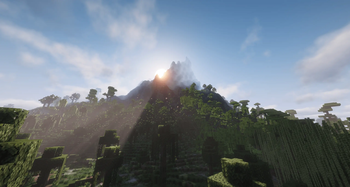
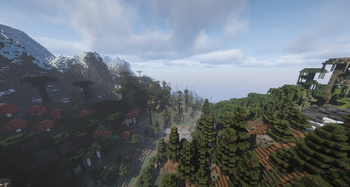
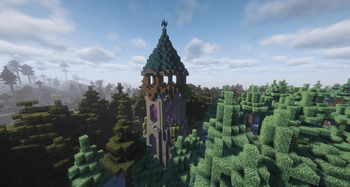


About this Modpack

🧩 Description
This modpack is designed to make Minecraft feel smoother, richer, and more enjoyable, while staying true to the vanilla experience.
It focuses on quality-of-life improvements, performance optimizations, visual polish, and expanded building options, alongside carefully selected backports from newer Minecraft versions. These backported features are integrated in a natural, balanced way, allowing you to enjoy modern conveniences and content without sacrificing the stability of Minecraft 1.20.1.
Gameplay remains familiar — just more refined. Expect a cleaner and more informative UI, improved animations, enhanced lighting and particle effects, and countless small tweaks that quietly remove friction from everyday play. Building is expanded through furniture, decorative blocks, lighting options, and subtle aesthetic upgrades that blend seamlessly with vanilla textures and mechanics.
World generation and exploration are enhanced with richer biome variety, improved structures, and better navigation tools, while preserving vanilla progression and pacing. The result is a world that feels more alive and rewarding to explore, without overwhelming the player or drastically changing how the game is played.
Performance and stability are a core priority. The pack includes modern optimization and bug-fix mods to improve FPS, reduce stutter, and increase overall stability, making it suitable for both mid-range and lower-end systems. Shader support is fully optional, with presets available for different hardware levels.
Overall, this is a Vanilla+ modpack that modernizes Minecraft — smoother performance, better visuals, thoughtfully backported features from newer versions, and more creative freedom, all without turning the game into something unrecognizable.
💻 Recommended System Requirements
CPU: Ryzen 5 3600 / Intel i5-10400 or better
GPU: GTX 1660 / RTX 2060 / RX 5600 XT
RAM: 16 GB system memory
Allocated RAM: 6–8 GB
Storage: SSD strongly recommended
- 5 GB free space minimum
- 10 GB recommended for long-term use
Resolution: 1080p–1440p
Shaders: Mellow or light Complementary settings
Available Versions
How to Set Up a MC Vibrance Server
Order Server
Choose at least 4 GB RAM (6 GB recommended for MC Vibrance). Based on player count: per 8 players.
Install Modpack in Dashboard
Open the modpack browser in the dashboard, search for "MC Vibrance" and click "Install". The fabric loader and Minecraft 1.20.1 are configured automatically.
Start Server & Play
Start the server – all mods are loaded automatically. Share the server IP with friends and play together!
Frequently Asked Questions
MC Vibrance server crashes or won't start – what to do?
Most common causes: insufficient RAM or wrong fabric loader. Check latest.log for "OutOfMemoryError" → increase RAM to at least 6 GB. For "Mixin" or "ClassNotFoundException" errors: modpack version and loader don't match. With Mado Hosting, loader and Minecraft version are auto-configured on modpack install – preventing most startup issues.
How much RAM does a MC Vibrance server really need?
Minimum 4 GB, recommended 6 GB for stable performance. per 8 players. Important: Minecraft modpacks need more RAM than vanilla – plan extra per additional player. With Mado Hosting, you can scale RAM up live at any time without data loss (from €8/month).
Can I add custom mods to MC Vibrance without conflicts?
Yes, but check compatibility: only use mods for the same loader (fabric) and same Minecraft version (1.20.1). Common issues: ID conflicts with recipe mods and incompatible coremod versions. The Mado dashboard mod browser only shows compatible mods and warns about known conflicts.
MC Vibrance server lagging – performance tips
1) Increase RAM to 6 GB+. 2) Reduce server view-distance to 8 (server.properties). 3) Pre-generate chunks with the "Chunky" plugin. 4) Use /spark profiler to check which mods consume the most tick time. With Mado Hosting, all servers run on NVMe SSDs with dedicated CPU cores – eliminating hardware as a bottleneck.
Similar Modpacks

![Cobblemon Official Modpack [Fabric]](https://cdn.modrinth.com/data/5FFgwNNP/e7f9ee2e9d361623847853fe2ddce42f519ee64f.png)
![COBBLEVERSE - Pokemon Adventure [Cobblemon]](https://cdn.modrinth.com/data/Jkb29YJU/581ecf54530972afb18a04660afd820f2f24f6c7.png)
![Better MC [FABRIC] - BMC2](https://cdn.modrinth.com/data/shFhR8Vx/a19c2bcb51d38f32f138d3607e91cb2b7b8e387f_96.webp)


Rent MC Vibrance Server
Start your own server with automatic modpack installation.
Supported Versions
Start your MC Vibrance Server now
From €8.00/month with 6 GB RAM for the best performance.
Configure Server →