
MC But Better
Semi-Vanilla ∙ Enjoy the game how it's meant to be played. 100+ Mods, New Structures, Dungeons and much more!
Screenshots
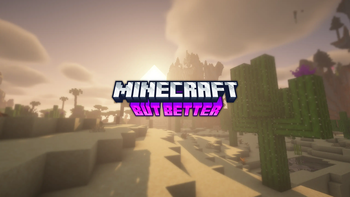
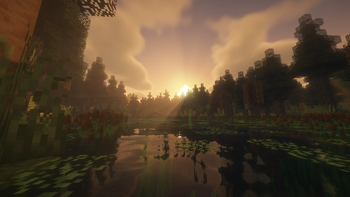
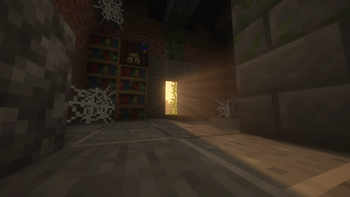

About this Modpack

Enjoy the game how it's meant to be played with New World Generations, Storage Solutions and many more mods!
Disclaimer:
Make sure you backup your World, Configs, Server BEFORE You update to a newer version of this Modpack
⭐ — Overhauled World Generation (Biomes o' Plenty, Regions Unexplored & Formations)
⭐ — Overhauled Strongholds, Monuments & Nether Fortresses
⭐ — New Dungeons to Explore (Rougelike Dungeons & Dungeon Crawl)
⭐ — QoL Improvements with Waystones & XP Tomes
⭐ — New Storage Solutions (Iron Chests, Refined Storage)

For Server Hosting - [IMPORTANT]
To make sure you have no issues when hosting this modpack on your server, you'll need to remove some of these mods to make your server run properly. (I'll be working on a Server Version once I get configs tweaked)
Mods to Remove:
❌ — Oculus
❌ — YUNG's Menu Tweaks
Mods Included (117)
- 🟢 AeroBlender
- 🟢 Aether Addon: Protect Your Moa
- 🟢 Alex's Mobs
- 🟢 Ancient Aether
- 🟢 Another Furniture
- 🟢 Architectury API
- 🟢 AzureLib
- 🟢 BCLib
- 🟢 Balm
- 🟢 Better Advancements
- 🟢 Better Compatibility Checker
- 🟢 BetterEnd
- 🟠 BetterEnd Crashed Ships
- 🟢 BetterNether
- 🟢 Biomes O' Plenty
- 🟢 Bountiful
- 🟢 Bygone Nether
- 🟢 CC: Tweaked
- 🟢 Caelus API
- 🟢 Chat Heads
- 🟢 Chef's Delight
- 🟢 Citadel
- 🟢 Cloth Config API
- 🟢 Forgified Fabric API
- 🟢 Sinytra Connector
- 🟢 Connector Extras
- 🟢 Crabber's Delight
- 🟢 Cristel Lib
- 🟢 Curios API
- 🟢 Deep Aether
- 🟢 Deeper and Darker
- 🟢 Delightful Burgers
- 🟢 Delightful Sandwiches
- 🟠 Dungeon Crawl
- 🟢 Dungeons and Taverns
- 🟢 Dungeons and Taverns Ancient City Overhaul
- 🟢 Dungeons and Taverns Pillager Outpost Rework
- 🟢 Dungeons and Taverns Swamp Hut Rework
- 🟢 Dynamic Lights
- 🟢 Easy Anvils
- 🟢 Eldritch End
- 🟢 ElevatorMod
- 🟢 Elytra Slot
- 🟢 Falling Leaves (NeoForge/Forge)
- 🟢 FancyMenu
- 🟢 Farmer's Delight
- 🟢 Formations (Structure Library)
- 🟢 Formations Nether
- 🟢 Formations Overworld
- 🟢 Geckolib
- 🟢 Geophilic
- 🟢 Geophilic Reforged
- 🟢 Hearths
- 🟢 Inventory Management
- 🟢 Iris/Oculus & GeckoLib Compat
- 🟢 Iron Chests
- 🟢 Jade 🔍
- 🟢 Just Enough Items
- 🟢 Kambrik
- 🟢 Konkrete
- 🟢 Kotlin for Forge
- 🟢 Log Begone
- 🟢 Logical Zoom
- 🟢 Magnum Torch
- 🟢 Melody
- 🟢 Memory Leak Fix
- 🟢 More Axolotl Variants Mod
- 🟢 More Axolotl Variants API
- 🟢 More Geodes Reforged
- 🟢 More Mob Variants
- 🟢 More Mobs
- 🟢 More Music Discs
- 🟢 Necronomicon API
- 🟢 Nether's Delight
- 🟢 NetherPortalFix
- 🟢 No Chat Reports
- 🟢 Ocean's Delight
- 🟢 Oculus
- 🟢 Packet Fixer
- 🟢 Paxi
- 🟢 Philips Ruins
- 🟢 Puzzles Lib
- 🟢 Polymorph
- 🟢 Regions Unexplored
- 🟢 Repurposed Structures - Neoforge/Forge
- 🟢 Resource Pack Overrides
- 🟢 Roguelike Dungeons
- 🟢 Refined Storage
- 🟢 Shield Banner Fix
- 🟢 Snow Under Trees
- 🟢 Stalwart Dungeons
- 🟢 Structure Gel API
- 🟢 TerraBlender
- 🟢 The Aether
- 🟢 The Aether: Redux
- 🟢 The Conjurer
- 🟢 Towns and Towers
- 🟢 Traveler's Backpack
- 🟠 Untamed Wilds
- 🟢 Vein Mining
- 🟢 VillagersPlus
- 🟢 Villages&Pillages
- 🟢 Waystones
- 🟢 XP Tome
- 🟢 Xenon
- 🟢 YUNG's API
- 🟢 YUNG's Better Desert Temples
- 🟢 YUNG's Better Dungeons
- 🟢 YUNG's Better End Island
- 🟢 YUNG's Better Jungle Temples
- 🟢 YUNG's Better Mineshafts
- 🟢 YUNG's Better Nether Fortresses
- 🟢 YUNG's Better Ocean Monuments
- 🟢 YUNG's Better Strongholds
- 🟢 YUNG's Bridges
- 🟢 YUNG's Extras
- 🟢 YUNG's Menu Tweaks
Shaders Included (3)
Available Versions
How to Set Up a MC But Better Server
Order Server
Choose at least 6 GB RAM (8 GB recommended for MC But Better). Based on player count: per 5 players.
Install Modpack in Dashboard
Open the modpack browser in the dashboard, search for "MC But Better" and click "Install". The forge loader and Minecraft 1.20.1 are configured automatically.
Start Server & Play
Start the server – all mods are loaded automatically. Share the server IP with friends and play together!
Frequently Asked Questions
MC But Better server crashes or won't start – what to do?
Most common causes: insufficient RAM or wrong forge loader. Check latest.log for "OutOfMemoryError" → increase RAM to at least 8 GB. For "Mixin" or "ClassNotFoundException" errors: modpack version and loader don't match. With Mado Hosting, loader and Minecraft version are auto-configured on modpack install – preventing most startup issues.
How much RAM does a MC But Better server really need?
Minimum 6 GB, recommended 8 GB for stable performance. per 5 players. Important: Minecraft modpacks need more RAM than vanilla – plan extra per additional player. With Mado Hosting, you can scale RAM up live at any time without data loss (from €12/month).
Can I add custom mods to MC But Better without conflicts?
Yes, but check compatibility: only use mods for the same loader (forge) and same Minecraft version (1.20.1). Common issues: ID conflicts with recipe mods and incompatible coremod versions. The Mado dashboard mod browser only shows compatible mods and warns about known conflicts.
MC But Better server lagging – performance tips
1) Increase RAM to 8 GB+. 2) Reduce server view-distance to 8 (server.properties). 3) Pre-generate chunks with the "Chunky" plugin. 4) Use /spark profiler to check which mods consume the most tick time. With Mado Hosting, all servers run on NVMe SSDs with dedicated CPU cores – eliminating hardware as a bottleneck.
Similar Modpacks
![Cobblemon Official Modpack [Fabric]](https://cdn.modrinth.com/data/5FFgwNNP/e7f9ee2e9d361623847853fe2ddce42f519ee64f.png)
![COBBLEVERSE - Pokemon Adventure [Cobblemon]](https://cdn.modrinth.com/data/Jkb29YJU/581ecf54530972afb18a04660afd820f2f24f6c7.png)
![Better MC [FABRIC] - BMC2](https://cdn.modrinth.com/data/shFhR8Vx/a19c2bcb51d38f32f138d3607e91cb2b7b8e387f_96.webp)


![Better MC [FORGE] - BMC4](https://cdn.modrinth.com/data/4BV47HRn/7f5ef7cc61b2593609aabef3ed07a866a4f11b73_96.webp)
Rent MC But Better Server
Start your own server with automatic modpack installation.
Supported Versions
Start your MC But Better Server now
From €12.00/month with 8 GB RAM for the best performance.
Configure Server →