
MedeivalKingdomCraft
Medieval Kingdom Craft SMP Modpack.
Screenshots
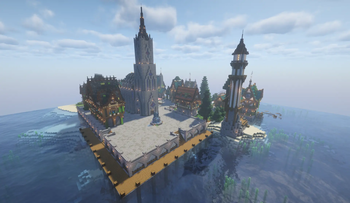
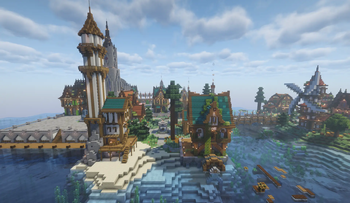
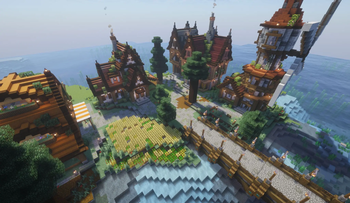
About this Modpack
🛡️ Medieval Kingdom Craft Modpack
Version: 1.21.1-Fabric
Curated for: Medieval Kingdom Craft SMP Server & Community
Theme: Immersive medieval adventure inspired by player-driven kingdoms, lore, and destiny.
Immerse yourself in a living medieval world where every sword swing, crafted building, and forged alliance shapes your story. Inspired by the Chronicles of Emberwake Port, where history begins beyond the walls and choice defines legend, this modpack brings that vision to life in Minecraft. In this realm, no borders are fixed and no paths are foretold — players write their own sagas through diplomacy, war, and creation.
medievalkingdomcraft.com
Here, kingdoms rise and fall by the hands of their people. From wandering adventurers arriving at port cities to nobles battling for honor and trade, the Medieval Kingdom Craft Modpack enriches your SMP with depth, challenge, lore, and immersion designed for community storytelling and collaborative exploration.
🏰 Key Features
⚔️ RPG & Progression
Deep class, skill, and combat mechanics propel you beyond vanilla survival. Choose your path — be it mage, warrior, rogue, or paladin — and master abilities that define your legend.
🌍 Expanded World & Structures
Discover overhauled dungeons, mantled strongholds, reimagined temple ruins, lush taverns, and wild frontiers begging to be claimed by adventurous souls.
🍲 Survival & Lifestyle
From hearty meals and trade goods to farming optimization and traveler gear, life in the realm is both rewarding and perilous.
🏹 Immersive Roleplay
With enhanced NPCs, waystones, named villagers, and dynamic kingdoms, your story flows organically — forge alliances, build kingdoms, or defend your lands.
🎨 Visuals & Aesthetics
Shaders and atmospheric enhancements deepen immersion, from dawn over castle walls to the glow of torchlit feasts.
⚙️ Performance & Stability
Optimized world generation, server performance tweaks, and QoL mods ensure a smooth experience for large realms and bustling communities.
🎯 Why This Modpack?
This pack is specifically curated for Medieval Kingdom Craft’s SMP community, empowering players to build, battle, and govern within a richly detailed medieval setting. Whether you’re defending your keeps, crafting ways of trade, or chronicling your rise, this mod collection supports a living, breathing, community-driven world where every choice echoes across history.
medievalkingdomcraft.com
Begin your journey beyond Emberwake Port — your legend awaits.
Available Versions
How to Set Up a MedeivalKingdomCraft Server
Order Server
Choose at least 6 GB RAM (8 GB recommended for MedeivalKingdomCraft). Based on player count: per 5 players.
Install Modpack in Dashboard
Open the modpack browser in the dashboard, search for "MedeivalKingdomCraft" and click "Install". The fabric loader and Minecraft 1.21.1 are configured automatically.
Start Server & Play
Start the server – all mods are loaded automatically. Share the server IP with friends and play together!
Frequently Asked Questions
MedeivalKingdomCraft server crashes or won't start – what to do?
Most common causes: insufficient RAM or wrong fabric loader. Check latest.log for "OutOfMemoryError" → increase RAM to at least 8 GB. For "Mixin" or "ClassNotFoundException" errors: modpack version and loader don't match. With Mado Hosting, loader and Minecraft version are auto-configured on modpack install – preventing most startup issues.
How much RAM does a MedeivalKingdomCraft server really need?
Minimum 6 GB, recommended 8 GB for stable performance. per 5 players. Important: Minecraft modpacks need more RAM than vanilla – plan extra per additional player. With Mado Hosting, you can scale RAM up live at any time without data loss (from €12/month).
Can I add custom mods to MedeivalKingdomCraft without conflicts?
Yes, but check compatibility: only use mods for the same loader (fabric) and same Minecraft version (1.21.1). Common issues: ID conflicts with recipe mods and incompatible coremod versions. The Mado dashboard mod browser only shows compatible mods and warns about known conflicts.
MedeivalKingdomCraft server lagging – performance tips
1) Increase RAM to 8 GB+. 2) Reduce server view-distance to 8 (server.properties). 3) Pre-generate chunks with the "Chunky" plugin. 4) Use /spark profiler to check which mods consume the most tick time. With Mado Hosting, all servers run on NVMe SSDs with dedicated CPU cores – eliminating hardware as a bottleneck.
Similar Modpacks
![Cobblemon Official Modpack [Fabric]](https://cdn.modrinth.com/data/5FFgwNNP/e7f9ee2e9d361623847853fe2ddce42f519ee64f.png)
![COBBLEVERSE - Pokemon Adventure [Cobblemon]](https://cdn.modrinth.com/data/Jkb29YJU/581ecf54530972afb18a04660afd820f2f24f6c7.png)
![Better MC [FABRIC] - BMC2](https://cdn.modrinth.com/data/shFhR8Vx/a19c2bcb51d38f32f138d3607e91cb2b7b8e387f_96.webp)


![Better MC [FORGE] - BMC4](https://cdn.modrinth.com/data/4BV47HRn/7f5ef7cc61b2593609aabef3ed07a866a4f11b73_96.webp)
Rent MedeivalKingdomCraft Server
Start your own server with automatic modpack installation.
Details
- License
- LicenseRef-All-Rights-Reserved
- Server-side
- Required
- Client-side
- Required
Supported Versions
Start your MedeivalKingdomCraft Server now
From €12.00/month with 8 GB RAM for the best performance.
Configure Server →