
MedieCraft - Server
Server-side mods for MedieCraft, a Medieval and Roguelike Minecraft experience
Screenshots
About this Modpack
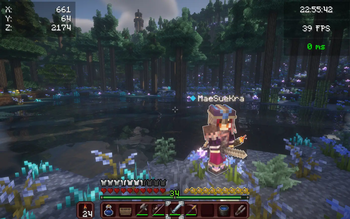
This modpack has been created with the aim of rediscovering the game through an ultra-immersive, challenging world full of new things to discover throughout your adventure.
Roam the world, traverse biomes and worlds, fight monsters on the prowl, and explore structures and dungeons to make your armor and weapons. Forget boring mining sessions and prepare yourself for an unforgettable experience with your friends.
This modpack is very challenging by setting game difficulty to normal or hard. If you want to explore the world and chill, easy difficulty is recommended. Good luck if you want to play in hardcore. ;)
- 🐓 New mobs and mob variants
- 🍅 More plants
- 🏛 Enhanced structures and new ones
- 🛖 Themed villages and structures
- ⛰️ Beautiful landscapes with new and larger biomes using Terralith and Tectonic
- ⚔️ Dungeons, mobs, structures to build your stuff using battles instead of mining
- 🎑 Ultra immersive environment sounds and songs
- 🪓 Realistic trees
- 🗡 New tools and weapons
- 🔦 Dynamic Lights
- 🎙 Proximity chat (with voice effects depending on the environment)
- 👹 More monsters
- 🌋 Better Nether
- 👁 Better End
- ⚡️ Hyper fast and ultra optimized
- 🔥 Very challenging
Compatibility
✅ MedieCraft
✅ MedieCraft - Lite
✅ MedieCraft - Server
❌ MedieCraft - Cross-Platform
❌ MedieCraft - Lite - Cross-Platform
❌ MedieCraft - Server - Cross-Platform
❌ MC Bedrock Clients
❌ MC Java Clients (using Fabric, ViaVersion, ViaFabric, CreativeCore and GeckoLib)
Key notes
- Server side modpack (only players using MedieCraft and MedieCraft - Lite can join the server)
- See instructions to get your server up and running in minutes !
- The mod list is available by clicking on 'versions' and then on the version number you chose to install.
- If you want to save and quit the server, just type
stopin the console. - If you can't break anything or if want you or your friends to be able to do commands and cheats, you can type
op [player_name]directly in the server console.
System Requirements
Minimal System Requirements
4GB allocated to the server
4 Cores / 4-8 Threads CPU (AMD Ryzen 3 3100, Intel Core i5 7400)
8Gb RAM
1,5GB SSD storage
Recommended System Requirements
6GB allocated to the server
6 Cores / 12 Threads CPU (AMD Ryzen 5 5600, Intel Core i5 12400F)
16GB RAM
1,5GB SSD storage
Instructions
- Download Fabric Server and chose the version of the loader according to the version of MedieCraft - Server and MedieCraft you want. (Example: if you are playing in 1.21, download both MedieCraft and MedieCraft - Server compatible for 1.21 AND Fabric Server for 1.21)
- Launch it using the command named
Launch Commandon Fabric Server Website. NB: change the number2in-Xmx2Gcommand and put how much RAM you want to allocate to the server (Example: if you want 6GB for your server, write-Xmx6G). - Close server console by typing
stop. - Accept EULA by replacing
falsetotruein the file :eula.txt. - On Modrinth, go to your library and click on this modpack. Click on
Folderto access the modpack's folder. - Copy the
modsfolder and paste it into the server folder (it should replace the emptymodsfolder previously created by Fabric) - Restart the server using the same command.
- Your server is up and running! (If you are running the server on your computer, you may have to forward your ports but it can be dangerous so be careful!).
NB: If you don't want to forward your ports, you can use Essential mod, add your friends and invite them into your solo worlds!
Q&A
- Is this modpack compatible with both MedieCraft and MedieCraft - Lite ?
Absolutely, using this modpack you can join servers using both MedieCraft and MedieCraft - Lite.
- How much RAM should I allocate to this modpack profile ?
4GB minimum should be fine. But 6 to 8GB is recommended if there are a lot of players or if all players are using MedieCraft with Distant Horizons.
- Can I play this modpack in older versions of Minecraft ?
Yes, to be able to play in older versions, you have to unlink the modpack at the very bottom of the modpack options. Then change the version of Minecraft and update all mods by clicking on 'update mods'. Start the game and it should launch if all mods are compatible with the selected version of Minecraft.
- Is this modpack Cross-Platform ?
No, but I recreated this modpack with only Cross-Platform mods. See MedieCraft - Server - Cross-Platform.
- Can I use this server modpack with a client running MedieCraft - Cross-Platform ?
No, you can only play with MedieCraft and MedieCraft - Lite modpacks only.
Credits
💙 Huge thanks to Maffhew with his Excalibur resource pack for giving me the idea of creating this resource pack. I honored him by putting his resource pack icon to my modpack ! The resource pack is in this modpack !
Available Versions
How to Set Up a MedieCraft - Server Server
Order Server
Choose at least 6 GB RAM (8 GB recommended for MedieCraft - Server). Based on player count: per 5 players.
Install Modpack in Dashboard
Open the modpack browser in the dashboard, search for "MedieCraft - Server" and click "Install". The fabric loader and Minecraft 1.21 are configured automatically.
Start Server & Play
Start the server – all mods are loaded automatically. Share the server IP with friends and play together!
Frequently Asked Questions
MedieCraft - Server server crashes or won't start – what to do?
Most common causes: insufficient RAM or wrong fabric loader. Check latest.log for "OutOfMemoryError" → increase RAM to at least 8 GB. For "Mixin" or "ClassNotFoundException" errors: modpack version and loader don't match. With Mado Hosting, loader and Minecraft version are auto-configured on modpack install – preventing most startup issues.
How much RAM does a MedieCraft - Server server really need?
Minimum 6 GB, recommended 8 GB for stable performance. per 5 players. Important: Minecraft modpacks need more RAM than vanilla – plan extra per additional player. With Mado Hosting, you can scale RAM up live at any time without data loss (from €12/month).
Can I add custom mods to MedieCraft - Server without conflicts?
Yes, but check compatibility: only use mods for the same loader (fabric) and same Minecraft version (1.21). Common issues: ID conflicts with recipe mods and incompatible coremod versions. The Mado dashboard mod browser only shows compatible mods and warns about known conflicts.
MedieCraft - Server server lagging – performance tips
1) Increase RAM to 8 GB+. 2) Reduce server view-distance to 8 (server.properties). 3) Pre-generate chunks with the "Chunky" plugin. 4) Use /spark profiler to check which mods consume the most tick time. With Mado Hosting, all servers run on NVMe SSDs with dedicated CPU cores – eliminating hardware as a bottleneck.
Similar Modpacks
![Cobblemon Official Modpack [Fabric]](https://cdn.modrinth.com/data/5FFgwNNP/e7f9ee2e9d361623847853fe2ddce42f519ee64f.png)
![COBBLEVERSE - Pokemon Adventure [Cobblemon]](https://cdn.modrinth.com/data/Jkb29YJU/581ecf54530972afb18a04660afd820f2f24f6c7.png)
![Better MC [FABRIC] - BMC2](https://cdn.modrinth.com/data/shFhR8Vx/a19c2bcb51d38f32f138d3607e91cb2b7b8e387f_96.webp)


![Better MC [FORGE] - BMC4](https://cdn.modrinth.com/data/4BV47HRn/7f5ef7cc61b2593609aabef3ed07a866a4f11b73_96.webp)
Rent MedieCraft - Server Server
Start your own server with automatic modpack installation.
Supported Versions
Start your MedieCraft - Server Server now
From €12.00/month with 8 GB RAM for the best performance.
Configure Server →