
Miku vs Horror
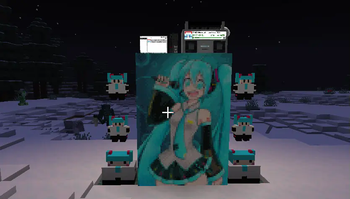
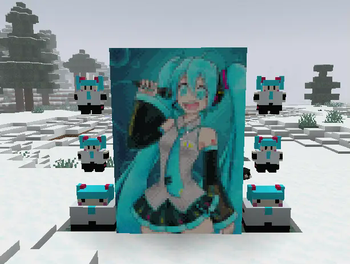
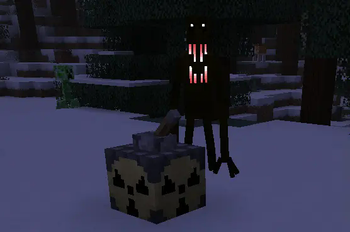
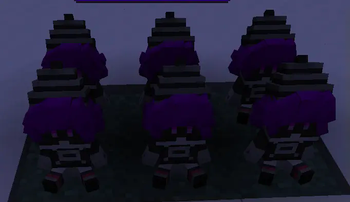
Miku is having troubles now that the horror apocalypse has come! You must develop better technology and new weapons in order to tell the various mysterious and horrifying creatures that infest your world whose world it is! (It is Miku’s world) 🩵
Screenshots

About this Modpack
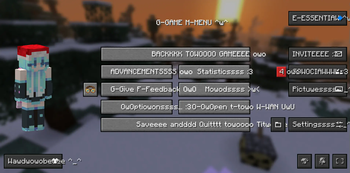
Hatsune Miku fights off horror creatures! Based on the modpack HorrorCraft, with more mods added: https://modrinth.com/modpack/horror-craft/version/V1
It is recommended to install Cupboard and SmoothChunkSave to reduce lag.
Goal of the Modpack
You must develop technology and advanced weapons, preferably with the help of your friends, in order to defeat or negate the effect of the various horror creatures roaming your world.
Who is Hatsune Miku?
Hatsune Miku is the creator of Minecraft and also the owner of the entire universe! More seriously, Hatsune Miku is a vocaloid created in 2007. A vocaloid is basically a type of voice-synthesizing software designed for making singing vocals. You can get a Hatsune Miku plushie in-game thanks to Boiler's mod!
Horror?
Yes. The world has been infested with mysterious and horrifying beings. Make sure to hide at night or bad things will happen to you. Always stay on the lookout, always keep your guard up. Make sure to always be on the move or they will find you. Eventually, you may be able to defeat these creatures using your own ingenuity.
Tips
- Use JEI to help find the recipes for things. Press "r" over items to find out how to craft them.
- Build an underground base, and make sure you're underground during night time.
- Don't stay too close near spawn.
- Craft iron with coal, then smelt it in a blast furnace.
- Craft a Timey-Wimey detector.
- Make a copper cauldron to purify water.
- Be careful in caves.
- Request help from your friends
- Use a backpack
- If you are lost above the bedrock layer, starve yourself to death by setting the game to Hard mode. If you are lost in the checkerboard dimension, break the block below you and fall into the void.
Known Bugs
- Don't right-click Murder Drones plushies it won't end well.
- Search doesn't work in the creative menu anymore, I'm not sure why. Just use JEI for searching stuff.
- Emptying a stack of water bottles into water leaves you with just one empty bottle.
Contact Us
- Do you have any questions?
- Do you need people to join your world for help?
- Have you found a bug?
- Are you having trouble figuring out what to do?
- Have you gotten stuck in a death-loop?
- Or do you just want to chat with others?
Then join the discord server!!! https://discord.gg/25QHFRkQ3h
Available Versions
How to Set Up a Miku vs Horror Server
Order Server
Choose at least 6 GB RAM (8 GB recommended for Miku vs Horror). Based on player count: per 5 players.
Install Modpack in Dashboard
Open the modpack browser in the dashboard, search for "Miku vs Horror" and click "Install". The fabric loader and Minecraft 1.20.1 are configured automatically.
Start Server & Play
Start the server – all mods are loaded automatically. Share the server IP with friends and play together!
Frequently Asked Questions
Miku vs Horror server crashes or won't start – what to do?
Most common causes: insufficient RAM or wrong fabric loader. Check latest.log for "OutOfMemoryError" → increase RAM to at least 8 GB. For "Mixin" or "ClassNotFoundException" errors: modpack version and loader don't match. With Mado Hosting, loader and Minecraft version are auto-configured on modpack install – preventing most startup issues.
How much RAM does a Miku vs Horror server really need?
Minimum 6 GB, recommended 8 GB for stable performance. per 5 players. Important: Minecraft modpacks need more RAM than vanilla – plan extra per additional player. With Mado Hosting, you can scale RAM up live at any time without data loss (from €12/month).
Can I add custom mods to Miku vs Horror without conflicts?
Yes, but check compatibility: only use mods for the same loader (fabric) and same Minecraft version (1.20.1). Common issues: ID conflicts with recipe mods and incompatible coremod versions. The Mado dashboard mod browser only shows compatible mods and warns about known conflicts.
Miku vs Horror server lagging – performance tips
1) Increase RAM to 8 GB+. 2) Reduce server view-distance to 8 (server.properties). 3) Pre-generate chunks with the "Chunky" plugin. 4) Use /spark profiler to check which mods consume the most tick time. With Mado Hosting, all servers run on NVMe SSDs with dedicated CPU cores – eliminating hardware as a bottleneck.
Similar Modpacks
![Cobblemon Official Modpack [Fabric]](https://cdn.modrinth.com/data/5FFgwNNP/e7f9ee2e9d361623847853fe2ddce42f519ee64f.png)
![COBBLEVERSE - Pokemon Adventure [Cobblemon]](https://cdn.modrinth.com/data/Jkb29YJU/581ecf54530972afb18a04660afd820f2f24f6c7.png)
![Better MC [FABRIC] - BMC2](https://cdn.modrinth.com/data/shFhR8Vx/a19c2bcb51d38f32f138d3607e91cb2b7b8e387f_96.webp)


![Better MC [FORGE] - BMC4](https://cdn.modrinth.com/data/4BV47HRn/7f5ef7cc61b2593609aabef3ed07a866a4f11b73_96.webp)
Rent Miku vs Horror Server
Start your own server with automatic modpack installation.
Supported Versions
Start your Miku vs Horror Server now
From €12.00/month with 8 GB RAM for the best performance.
Configure Server →