
Minecraft: Call of the Night
A "vanilla++" modpack about enjoying the darkness and nights of Minecraft in a soothing and relaxing way with a semi-peaceful playstyle. Features over a hundred fully custom changes for a smoother experience across mods
Screenshots
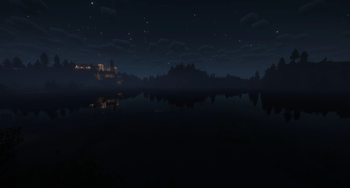
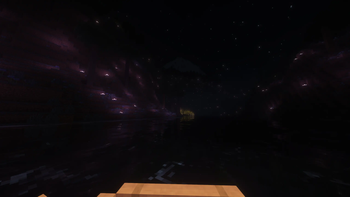
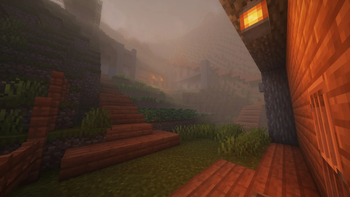
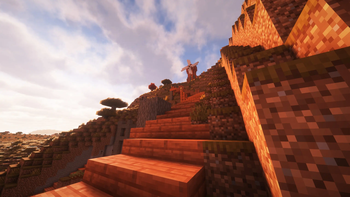
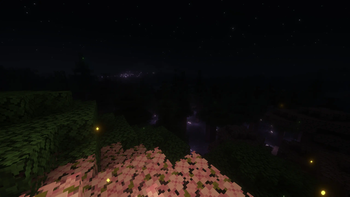
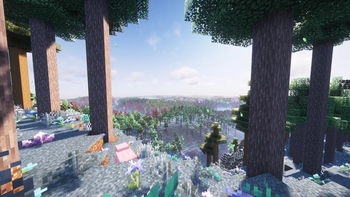
About this Modpack
Call of the Night is an in-development modpack about enjoying the darkness and nights of Minecraft in a soothing and relaxing way. It is an immersive semi-peaceful "vanilla++" experience where darkness is more intense and harder to avoid but monsters don't spawn in most biomes regardless of light level
The design pillars of this pack are:
- Semi-peaceful surface
- Immersive
- Slow life
- Vanilla++
It features more than a 1000 lines of KubeJS and CraftTweaker code to tune and improve the overall experience and make the over 200 mods work better with each other

Features
- An almost peaceful surface overworld: most (but not all) biomes will not spawn any hostile mobs regardless of light level. Other dimensions, special cave biomes and a handful of surface biomes are unaffected by this change
- A seasonal system: crops will grow better in some seasons and worse in others. Also features visual changes depending on the current season
- A major expansion of the foods in the game, featuring encouragements to eat a varied diet and entirely new mechanics to make various foods such as aging cheese and wine
- Overhauld terrain generation for much bigger features overall. Combined with the included Distant Horizons mod this makes for incredible vistas
- Over 200 mods, the choice being focused on featuring vanilla-like additions and changes
- Optional and slightly nerfed Create mod. Automation is NOT a core design goal with this pack but the use of Create is encouraged to make visually pleasing standalone semi-automated machines like functioning windmills to grind wheat
- Pre-tuned shaders for a carefully designed experience where darkness is truly dark and the overall atmosphere is deeply immersive
- An in-game brief performance guide to help with running this pack on lower-end machines, including a "shaders off" option that still maintains the core mechanic of the truly dark darkness
- An in-game "guidebook" made using Heracles quests to help with discoverability of new and changed features (Still incomplete as of 0.2.X Beta)
- Over 1000 lines of KubeJS and CraftTweaker code to tune and integrate the experience of the various included mods
State of development
In its current state of development the pack is feature-complete and only lacking a few tweaks and finishes alongside more playtesting for further tuning. The main parts that are still being worked on are the in-game guide and this page
More content and QoL is to be expected as i keep working on the pack to tune it leading up to 1.0
For feedback, bug reporting, general discussions and following announcements please join the discord server!
As of feburary 2025 pack development is currently halted due to being very busy IRL. Pack is already in an extremely playable state though so feel free to enjoy it nonetheless
Showcases
Here is a showcase of actual mining gameplay in my real survival world. More such showcases will come later!
Hostile biomes
All special cave biomes are hostile but besides that most overworld biomes are peaceful. The exceptions are those listed in the following table:
| Creeper | Zombie | Skeleton | Spider | Enderman | Witch | Drowned | Stray | |
|---|---|---|---|---|---|---|---|---|
| Dark Forest | ✔ | ✔ | ✔ | ✔ | ✔ | |||
| Ancient Sands | ✔ | |||||||
| Ashen Savanna | ✔ | |||||||
| Desert Spires | ✔ | ✔ | ✔ | |||||
| Yellowstone | ✔ | ✔ | ✔ | |||||
| Swamps | ✔ | ✔ | ✔ | |||||
| Volcanic crater | ✔ | |||||||
| Oceans | ✔ | |||||||
| Glacial Chasm | ✔ | ✔ | ✔ | |||||
| Ice Spikes | ✔ | ✔ | ✔ |
For Servers
The modpack will work just fine with servers but it is necessary to remove the Distant Horizons mod from the server as it will prevent it from launching correctly. Only keep that mod on the clients
While the amount of mods is considerable the style of the pack is still Vanilla+ so you will be able to get away with a less powerful server compared to what is usually recommended for this mod count. In my testing for small SMP servers with friends 8Gb of ram should be enough for the server but i wouldn't go any lower than that
Known Issues (Last updated: Beta 0.4.0)
The following is a list of known problems to be fixed ideally before the 1.0 release
- Grape crops don't care about the current season
- Some modded potion effects and enchantments lack descriptions
- Terralith prevents the special Galosphere biomes from spawning (workaround added in 0.4.x)
- The guidebook has a few WIP sections
Available Versions
How to Set Up a Minecraft: Call of the Night Server
Order Server
Choose at least 6 GB RAM (8 GB recommended for Minecraft: Call of the Night). Based on player count: per 5 players.
Install Modpack in Dashboard
Open the modpack browser in the dashboard, search for "Minecraft: Call of the Night" and click "Install". The fabric loader and Minecraft 1.20.1 are configured automatically.
Start Server & Play
Start the server – all mods are loaded automatically. Share the server IP with friends and play together!
Frequently Asked Questions
Minecraft: Call of the Night server crashes or won't start – what to do?
Most common causes: insufficient RAM or wrong fabric loader. Check latest.log for "OutOfMemoryError" → increase RAM to at least 8 GB. For "Mixin" or "ClassNotFoundException" errors: modpack version and loader don't match. With Mado Hosting, loader and Minecraft version are auto-configured on modpack install – preventing most startup issues.
How much RAM does a Minecraft: Call of the Night server really need?
Minimum 6 GB, recommended 8 GB for stable performance. per 5 players. Important: Minecraft modpacks need more RAM than vanilla – plan extra per additional player. With Mado Hosting, you can scale RAM up live at any time without data loss (from €12/month).
Can I add custom mods to Minecraft: Call of the Night without conflicts?
Yes, but check compatibility: only use mods for the same loader (fabric) and same Minecraft version (1.20.1). Common issues: ID conflicts with recipe mods and incompatible coremod versions. The Mado dashboard mod browser only shows compatible mods and warns about known conflicts.
Minecraft: Call of the Night server lagging – performance tips
1) Increase RAM to 8 GB+. 2) Reduce server view-distance to 8 (server.properties). 3) Pre-generate chunks with the "Chunky" plugin. 4) Use /spark profiler to check which mods consume the most tick time. With Mado Hosting, all servers run on NVMe SSDs with dedicated CPU cores – eliminating hardware as a bottleneck.
Similar Modpacks
![Cobblemon Official Modpack [Fabric]](https://cdn.modrinth.com/data/5FFgwNNP/e7f9ee2e9d361623847853fe2ddce42f519ee64f.png)
![COBBLEVERSE - Pokemon Adventure [Cobblemon]](https://cdn.modrinth.com/data/Jkb29YJU/581ecf54530972afb18a04660afd820f2f24f6c7.png)
![Better MC [FABRIC] - BMC2](https://cdn.modrinth.com/data/shFhR8Vx/a19c2bcb51d38f32f138d3607e91cb2b7b8e387f_96.webp)


![Better MC [FORGE] - BMC4](https://cdn.modrinth.com/data/4BV47HRn/7f5ef7cc61b2593609aabef3ed07a866a4f11b73_96.webp)
Rent Minecraft: Call of the Night Server
Start your own server with automatic modpack installation.
Supported Versions
Start your Minecraft: Call of the Night Server now
From €12.00/month with 8 GB RAM for the best performance.
Configure Server →