
Minecraft: Java Second Edition
A second edition of Minecraft Java parodying Windows 98 Second Edition that adds new features, compatibility, and fixes.
Screenshots

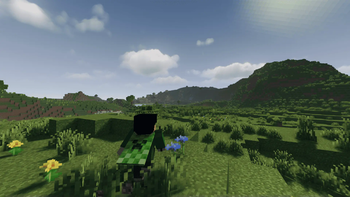
About this Modpack

Is a 'Bare bone' Modpack of Minecraft Java parodying Windows 98 Second Edition that adds new features, compatibility, and fixes.
Minecraft Java SE project is aimed to add and expand gameplay features that mojang overlooked and didnt bother to improve, This is a client-side modpack so switching between vanilla world should be okay, you are also expected to add any mods you want for yourself.
View the Versions page before download/Updating The Modpack!
Require atleast 4gb memory allocation after installation!
🔑 Key Features :
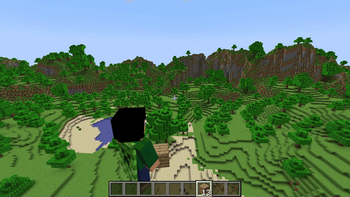
✅ Proper Third Person Gameplay
✅ Optifine Resource pack Compability
✅ Improved Performance
✅ LoD System
✅ Backport World generations
✅ Easy Multiplayer setup
Initial Release of Minecraft Java SE Features (1.20.4JSE1.0):
- Proper Third person Gameplay
- Community Bug fixes
- Supports Optifine resources pack
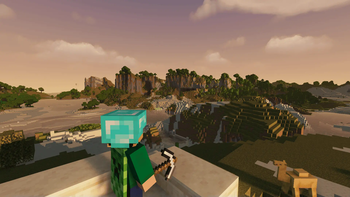
- Support Shaders
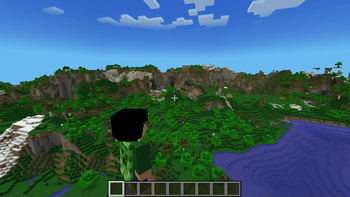
- Added LoD system in Render distance
- Memory Optimization
- Added Ambient sounds
- Added Sound reverberation
- Animated Player movement
- In-game Downloadable Resources
Modpack License
This modpack is licensed under the MIT License, but only as it pertains to the modpack configuration and custom modifications made by the pack creator.
This modpack is a compilation of various third-party mods, each of which is subject to its own respective license. Users must comply with the licensing terms of each included mod.
This modpack is distributed for non-commercial purposes only.
No monetary gain is permitted from its distribution.
Proper attribution must be given to the original mod authors, as required by their respective licenses.
By downloading or using this modpack, you acknowledge and agree to these terms.
Credits
- Tranben: [ETF](https://modrinth.com/mod/entity-model-features), [EMF](https://modrinth.com/mod/entitytexturefeatures)
- creativemd: [Ambientsounds](https://modrinth.com/mod/ambientsounds), [Creativecore](https://modrinth.com/mod/creativecore), [Itemphysic lite](https://modrinth.com/mod/itemphysic-lite)
- FoundationGames: [Animatica](https://modrinth.com/mod/animatica)
- architectury: [Architectury api](https://modrinth.com/mod/architectury-api)
- UltimatChamp: [Bettergrassify](https://modrinth.com/mod/bettergrassify)
- shsupercm: [Cit resewn](https://modrinth.com/mod/cit-resewn)
- shedaniel: [Cloth config](https://modrinth.com/mod/cloth-config)
- PepperCode1: [Continuity](https://modrinth.com/mod/continuity)
- isxander: [Debugify](https://modrinth.com/mod/debugify), [YACL](https://modrinth.com/mod/yacl)
- jeseibel: [Distanthorizons](https://modrinth.com/mod/distanthorizons)
- modmuss50, sfPlayer1: [Fabric api](https://modrinth.com/mod/fabric-api), [Fabric language kotlin](https://modrinth.com/mod/fabric-language-kotlin)
- AMereBagatelle: [Fabricskyboxes](https://modrinth.com/mod/fabricskyboxes)
- FlashyReese: [Fabricskyboxes interop](https://modrinth.com/mod/fabricskyboxes-interop)
- malte0811: [Ferrite core](https://modrinth.com/mod/ferrite-core)
- Fuzs: [Forge config api port](https://modrinth.com/mod/forge-config-api-port)
- comp500: [Indium](https://modrinth.com/mod/indium)
- coderbot: [Iris](https://modrinth.com/mod/iris)
- LambdAurora: [Lambdynamiclights](https://modrinth.com/mod/lambdynamiclights)
- leawind: [Leawind third person](https://modrinth.com/mod/leawind-third-person)
- FX: [Memoryleakfix](https://modrinth.com/mod/memoryleakfix)
- Terraformers: [Modmenu](https://modrinth.com/mod/modmenu)
- MehVahdJukaar: [Modelfix](https://modrinth.com/mod/modelfix)
- tr7zw: [Not enough animations](https://modrinth.com/mod/not-enough-animations)
- opekope2: [Optigui](https://modrinth.com/mod/optigui)
- Motschen: [Puzzle](https://modrinth.com/mod/puzzle)
- DeDiamondPro: [Resourcify](https://modrinth.com/mod/resourcify)
- jellysquid3: [Sodium](https://modrinth.com/mod/sodium)
- henkelmax: [Sound physics remastered](https://modrinth.com/mod/sound-physics-remastered)
- Patbox: [Placeholder api](https://modrinth.com/mod/placeholder-api)
- Pepperoni-Jabroni: [Third person maps](https://modrinth.com/mod/third-person-maps)
- FreshLX: [Fresh animations](https://modrinth.com/resourcepack/fresh-animations), [Fresh animations extensions](https://modrinth.com/resourcepack/fresh-animations-extensions)
- TrasTick, IthanMendoza: [Fresh moves](https://modrinth.com/resourcepack/tras-fresh-player)
- KDXavier: [Makeup ultra fast shaders](https://modrinth.com/shader/makeup-ultra-fast-shaders)
- TheCMK: [Mellow](https://modrinth.com/shader/mellow)
- felixmgoff: [Minimal](https://modrinth.com/shader/minimal-shader)
Available Versions
How to Set Up a Minecraft: Java Second Edition Server
Order Server
Choose at least 4 GB RAM (6 GB recommended for Minecraft: Java Second Edition). Based on player count: per 5 players.
Install Modpack in Dashboard
Open the modpack browser in the dashboard, search for "Minecraft: Java Second Edition" and click "Install". The fabric loader and Minecraft 1.21.4 are configured automatically.
Start Server & Play
Start the server – all mods are loaded automatically. Share the server IP with friends and play together!
Frequently Asked Questions
Minecraft: Java Second Edition server crashes or won't start – what to do?
Most common causes: insufficient RAM or wrong fabric loader. Check latest.log for "OutOfMemoryError" → increase RAM to at least 6 GB. For "Mixin" or "ClassNotFoundException" errors: modpack version and loader don't match. With Mado Hosting, loader and Minecraft version are auto-configured on modpack install – preventing most startup issues.
How much RAM does a Minecraft: Java Second Edition server really need?
Minimum 4 GB, recommended 6 GB for stable performance. per 5 players. Important: Minecraft modpacks need more RAM than vanilla – plan extra per additional player. With Mado Hosting, you can scale RAM up live at any time without data loss (from €8/month).
Can I add custom mods to Minecraft: Java Second Edition without conflicts?
Yes, but check compatibility: only use mods for the same loader (fabric) and same Minecraft version (1.21.4). Common issues: ID conflicts with recipe mods and incompatible coremod versions. The Mado dashboard mod browser only shows compatible mods and warns about known conflicts.
Minecraft: Java Second Edition server lagging – performance tips
1) Increase RAM to 6 GB+. 2) Reduce server view-distance to 8 (server.properties). 3) Pre-generate chunks with the "Chunky" plugin. 4) Use /spark profiler to check which mods consume the most tick time. With Mado Hosting, all servers run on NVMe SSDs with dedicated CPU cores – eliminating hardware as a bottleneck.
Similar Modpacks

![Cobblemon Official Modpack [Fabric]](https://cdn.modrinth.com/data/5FFgwNNP/e7f9ee2e9d361623847853fe2ddce42f519ee64f.png)
![COBBLEVERSE - Pokemon Adventure [Cobblemon]](https://cdn.modrinth.com/data/Jkb29YJU/581ecf54530972afb18a04660afd820f2f24f6c7.png)
![Better MC [FABRIC] - BMC2](https://cdn.modrinth.com/data/shFhR8Vx/a19c2bcb51d38f32f138d3607e91cb2b7b8e387f_96.webp)


Rent Minecraft: Java Second Edition Server
Start your own server with automatic modpack installation.
Supported Versions
Start your Minecraft: Java Second Edition Server now
From €8.00/month with 6 GB RAM for the best performance.
Configure Server →