Mineshaft 1.5
Just a modpack with a ton of random mods. When you get into a game you will see a message about a unknown entity, thats just herobrine, the game is not broken.
Screenshots

About this Modpack
This modpack is just suppoed to be a better version of minecraft.
This modpack is here to bring you a better play-through then your regular addons, adding entertainment and also mods that will help you progress. From transport to armour it has it all.
Essential: This mod allows you to play with friends just like bedrock.... But better
Chefs Delight: This mod is aimed to give you more foods all with different effects to your hunger, it adds stoves, pans, pots, knives, and more!
Overhauled Village: This mod changes villages and pillager outposts, making them either larger, or more unique. It adds (from what ive seen on my play-through) one new village type per-biome. It is a neat mod, it also makes it so villages have a better chance on spawning on the side of mountains while still not being too hard to traverse.
Create (+6 Add-ons): Create is basically a factory making mod, with many new types of tech that aim to make the players time on their server easier, as long as you can figure out how to use create (its not as easy as people make it look) it involves power sources from wind turbines to electric motors.
Eureka! Ships!: this mod allows the player to create their own ship from regular vanilla blocks (and modded blocks) the ship can either sail the seas and take care of anyone who dares to cross their path, or if you get baloons you can patrol the skies and rain death from above on your enemies.... Or you can make a cargo ship or ferry if you want to be peaceful, really it all depends on how good your imagination is. This mod has never ending possibilities and i personally love it.
Fancy chests: This is a simple but nice slient-side mod. The user does have to go into the mod file to configure it but its basically just changes how slow or fast the chest will open or close.
From The Fog: this mod..... this mod scares me. From The Fog is a mod that brings minecrafts greatest enemy to the game, Herobrine. We all grew up being scared of him, and now he is here. 3 Days after spawning in you will start to see herobrine, or rather signs that he is there. You can configure him by typing a command in the text bar, this command and other help on the mod can be found here https://lunareclipse.studio/creations/from-the-fog This mod actaully scares me.
(I was unable to find if From The Fog is client-side or server-side, but i will imagine he is server-side since he is technically a entity)
Immersive Aircraft: Have you ever wanted to fly in minecraft without a elytra? Dream no more! you can now make wood helicopters and airplanes, even cargo ships. The helicopter is probably the best start aircraft since it require no engine.
Immersive Armours: this adds a total of i believe 9 different armours to the game, some of them are best left for show, like the skeleton armour.
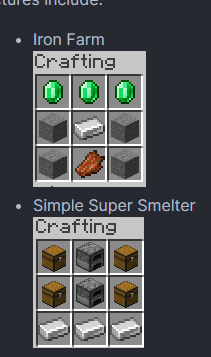
Instant Structures: This gives 2 new crafting recipies (as shown in the gallery) to make a simple smelter and a simple iron farm
Thos are my favorite mods, other mods include: Just Hammers (mining tool for strip mining) MVS (ocean side structures) Mod Menu (its in the name, just shows you all your mods) More Music (in the name) Plant in a Jar (in the name) Music maker (adds instruments and lets you make music sheets) tardis (lets you have a hidden base in a tardis) travellers backpack (more carry slots) underground bunkers (bunkers spawn around the map) Valkyrien Skies (adds the baloons to make your ship fly) wired restone ( makes redstone look better basically) Farmers Delight (like Chefs Delight but for farming and bread and stuff)

DISCALIMER There are some clinet-side mods, but that does NOT make this modpack client side, in order to play with friends they MUST have this modpack installed.
THIS MODPACK IS SERVERSIDE, YOU ARE UNABLE TO GET FRIENDS TO JOIN YOU UNLESS THEY ALSO HAVE DOWNLOADED THE MODPACK, IT IS A SERVER SIDE MODPACK NOT CLIENT SIDE
DISCALIMER When you start a game it will say "unknown entity" and give you options to choose from, you can continue and it will be fine. That is just Herobrine, the vanilla game doesnt recognize him but i promise you it works just fine.
Discord: https://discord.gg/wrwSkyQTnY
Available Versions
How to Set Up a Mineshaft 1.5 Server
Order Server
Choose at least 6 GB RAM (8 GB recommended for Mineshaft 1.5). Based on player count: per 5 players.
Install Modpack in Dashboard
Open the modpack browser in the dashboard, search for "Mineshaft 1.5" and click "Install". The fabric loader and Minecraft 1.19.2 are configured automatically.
Start Server & Play
Start the server – all mods are loaded automatically. Share the server IP with friends and play together!
Frequently Asked Questions
Mineshaft 1.5 server crashes or won't start – what to do?
Most common causes: insufficient RAM or wrong fabric loader. Check latest.log for "OutOfMemoryError" → increase RAM to at least 8 GB. For "Mixin" or "ClassNotFoundException" errors: modpack version and loader don't match. With Mado Hosting, loader and Minecraft version are auto-configured on modpack install – preventing most startup issues.
How much RAM does a Mineshaft 1.5 server really need?
Minimum 6 GB, recommended 8 GB for stable performance. per 5 players. Important: Minecraft modpacks need more RAM than vanilla – plan extra per additional player. With Mado Hosting, you can scale RAM up live at any time without data loss (from €12/month).
Can I add custom mods to Mineshaft 1.5 without conflicts?
Yes, but check compatibility: only use mods for the same loader (fabric) and same Minecraft version (1.19.2). Common issues: ID conflicts with recipe mods and incompatible coremod versions. The Mado dashboard mod browser only shows compatible mods and warns about known conflicts.
Mineshaft 1.5 server lagging – performance tips
1) Increase RAM to 8 GB+. 2) Reduce server view-distance to 8 (server.properties). 3) Pre-generate chunks with the "Chunky" plugin. 4) Use /spark profiler to check which mods consume the most tick time. With Mado Hosting, all servers run on NVMe SSDs with dedicated CPU cores – eliminating hardware as a bottleneck.
Similar Modpacks
![Cobblemon Official Modpack [Fabric]](https://cdn.modrinth.com/data/5FFgwNNP/e7f9ee2e9d361623847853fe2ddce42f519ee64f.png)
![COBBLEVERSE - Pokemon Adventure [Cobblemon]](https://cdn.modrinth.com/data/Jkb29YJU/581ecf54530972afb18a04660afd820f2f24f6c7.png)
![Better MC [FABRIC] - BMC2](https://cdn.modrinth.com/data/shFhR8Vx/a19c2bcb51d38f32f138d3607e91cb2b7b8e387f_96.webp)


![Better MC [FORGE] - BMC4](https://cdn.modrinth.com/data/4BV47HRn/7f5ef7cc61b2593609aabef3ed07a866a4f11b73_96.webp)
Rent Mineshaft 1.5 Server
Start your own server with automatic modpack installation.
Supported Versions
Start your Mineshaft 1.5 Server now
From €12.00/month with 8 GB RAM for the best performance.
Configure Server →