
Mint Chip
A Vanilla+ modpack which focuses on revamping and adding onto the base game to create a polished and immersive experience.
Screenshots

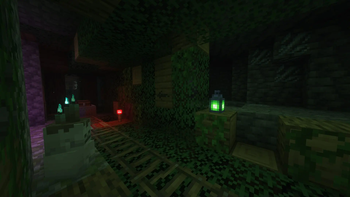
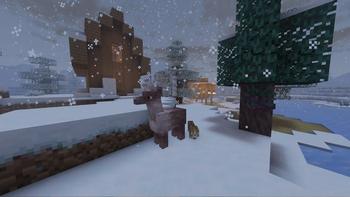
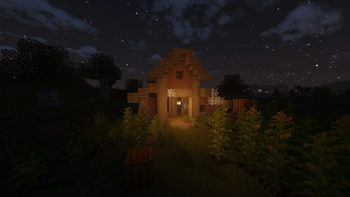

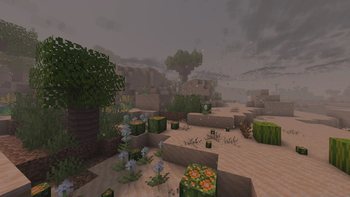
About this Modpack

Mint Chip is a Vanilla+ modpack that aims to make expand Minecraft while making it more dynamic and immersive. It rebalances some mechanics, fixes a few annoyances, and adds new stuff to help make the game feel more alive and interesting.
Mint Chip is still a work in progress! Mods may change or be removed and worlds can break with updates, so make sure to back up your worlds before updating the modpack. If you have feedback or would like to help with development, please let me know on Discord [@tylergames42] or on Github.
World Generation
- Over 25 new biomes to explore
- New foliage and crops to find and grow
- Multiple new cave biomes, ores, and features to make exploring caves more exciting
- Rivers which expand underground and deeper oceans
- Taller nether dimension with improved fortresses
- Improved end dimension generation featuring a better dragon island, revamped terrain, and new biomes
Building Blocks
- Tons of new decorative blocks
- Over 16 new woodsets, which can be turned into variants of nearly any wooden block using the new sawmill
- New redstone components to tinker with
- Furniture blocks and seating to furnish your home with
Ambience & Immersion
- New and improved particle effects
- Better clouds and weather effects
- Improved night skies
- Dynamic lighting and darker caves
- Ambient audio effects and reverb
- Improved animations for most mobs and the player
- Vastly increased render distances
Seasons
- Crops grow at different speeds during different seasons
- The weather may change depending on the season in some biomes
- The length of day/night varies throughout the year
- Villagers celebrate holidays during certain seasons
Shaders Included
Mint Chip includes shaders which are already configured to be performant and compatible with all included mods.
Gameplay Changes
- Hunger
- Hunger drains at different rates depending on the types of foods you eat
- For more information about these changes view the Mindful Eating mod page here
- Combat
- Added combat changes from the combat test snapshots
- Improved shields and blocking
- Enhanced mob AI
- Reworked and improved Ender Dragon and Wither boss fights
- Tools/Armor
- Tools and armor can now be repaired for cheaper without increasing the enchantment cost
- Golden armor and tools have new traits to make them more viable
- Items dropped on death will no longer despawn
- You can no longer view your coordinates using F3 and will have to craft a compass to see them
- Sleeping
- Sheep no longer drop wool when killed like in earlier versions
- You can be woken in the night if your bed is in a dark place
- You recieve benefits from sleeping in the same bed every night
- Phantoms spawn higher up and are less annoying
- Enchanting
- Enchanting now uses the matrix enchanting system from Quark
- Placing different types/colors of candles around your enchantment table can influence the probability of different enchantments
- Tweaked enchanting cost at anvils
- Transportation
- The elytra has been nerfed to help encourage players to establish other methods of transportaion
- Minecarts are now faster
- Boat speed has been nerfed on ice, however the new sled item is a great alternative
- Balanced methods to warp to your spawn and other players have been added
- Villagers
- Villagers can contribute based on their job, doing things such as fishing, healing other villagers, or repairing iron golems
- The price of villagers trades is now determined by the quality of their housing. This means trapping villagers in tiny trading booths will now increase their prices, while creating comfortable housing will decrease prices.
- Nerfed trading discounts from cured zombie villagers
Tutorial
- Custom gameplay tips showed during loading/pause menus
- Mint Chip features a custom tutorial world inspired by those of the legacy console edition which showcases the major changes and added content.
The tutorial world is a work in progress and not yet implemented.
FAQ
- Why is this different from the base game?
- Check the Gameplay Changes section above to see most major changes to the base game.
- These changes were made to help balance the game and make it more in line with older versions without being too annoying or making certain mechanics useless.
- Why no Create mod?!
- Create strays a bit too far from Vanilla to fit into this pack in my opinion.
- I've thought about creating a modified version of this pack with the mod, but if anyone else wants to take a shot at it feel free to.
- How do I disable a specific mod/feature?
- Individual mods can be disabled in Modrinth by flipping the green toggle off, however disabling major content mods may cause issues!
- Do I have to use shaders?
- Shaders are optional and can disabled/configured in Video Settings under Oculus.
- If you would like to use different shaders you can as well, however they may be incompatible with some modded content.
Credits
Please view the full list of content under the modpack dependencies in the versions tab.
- Vanilla Tweaks: https://vanillatweaks.net/ (Custom hunger icons)
- Villager Confort Updated by leahx_y2k
- Sinytra Connector
- Quark
- Team Abnormals
- [Particular] (https://modrinth.com/mod/particular)
If you have any feedback or would like to help develop the modpack, please feel free to contact me on Discord @tylergames42
Available Versions
How to Set Up a Mint Chip Server
Order Server
Choose at least 6 GB RAM (8 GB recommended for Mint Chip). Based on player count: per 5 players.
Install Modpack in Dashboard
Open the modpack browser in the dashboard, search for "Mint Chip" and click "Install". The forge loader and Minecraft 1.20.1 are configured automatically.
Start Server & Play
Start the server – all mods are loaded automatically. Share the server IP with friends and play together!
Frequently Asked Questions
Mint Chip server crashes or won't start – what to do?
Most common causes: insufficient RAM or wrong forge loader. Check latest.log for "OutOfMemoryError" → increase RAM to at least 8 GB. For "Mixin" or "ClassNotFoundException" errors: modpack version and loader don't match. With Mado Hosting, loader and Minecraft version are auto-configured on modpack install – preventing most startup issues.
How much RAM does a Mint Chip server really need?
Minimum 6 GB, recommended 8 GB for stable performance. per 5 players. Important: Minecraft modpacks need more RAM than vanilla – plan extra per additional player. With Mado Hosting, you can scale RAM up live at any time without data loss (from €12/month).
Can I add custom mods to Mint Chip without conflicts?
Yes, but check compatibility: only use mods for the same loader (forge) and same Minecraft version (1.20.1). Common issues: ID conflicts with recipe mods and incompatible coremod versions. The Mado dashboard mod browser only shows compatible mods and warns about known conflicts.
Mint Chip server lagging – performance tips
1) Increase RAM to 8 GB+. 2) Reduce server view-distance to 8 (server.properties). 3) Pre-generate chunks with the "Chunky" plugin. 4) Use /spark profiler to check which mods consume the most tick time. With Mado Hosting, all servers run on NVMe SSDs with dedicated CPU cores – eliminating hardware as a bottleneck.
Similar Modpacks
![Cobblemon Official Modpack [Fabric]](https://cdn.modrinth.com/data/5FFgwNNP/e7f9ee2e9d361623847853fe2ddce42f519ee64f.png)
![COBBLEVERSE - Pokemon Adventure [Cobblemon]](https://cdn.modrinth.com/data/Jkb29YJU/581ecf54530972afb18a04660afd820f2f24f6c7.png)
![Better MC [FABRIC] - BMC2](https://cdn.modrinth.com/data/shFhR8Vx/a19c2bcb51d38f32f138d3607e91cb2b7b8e387f_96.webp)


![Better MC [FORGE] - BMC4](https://cdn.modrinth.com/data/4BV47HRn/7f5ef7cc61b2593609aabef3ed07a866a4f11b73_96.webp)
Rent Mint Chip Server
Start your own server with automatic modpack installation.
Supported Versions
Start your Mint Chip Server now
From €12.00/month with 8 GB RAM for the best performance.
Configure Server →