
MODernized MC
A highly modded Tech & Adventure Modpack with a bit of customization, magic and optimisation
Screenshots
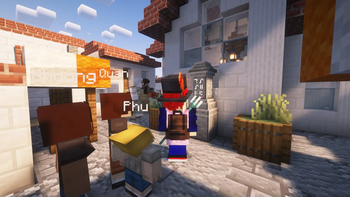
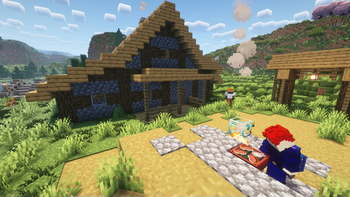
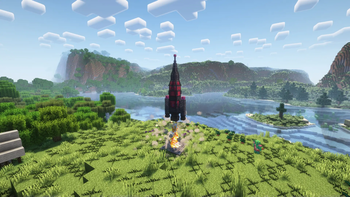
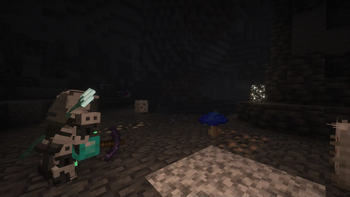

About this Modpack

NOTE: THIS MODPACK IS CURRENTLY IN BETA AND WILL BE UNSTABLE. BE PREPARED FOR SUDDEN CRASHES OR BUGS. PLEASE POST ANY ISSUES YOU ENCOUNTER WITH THE MODPACK ON THIS GITHUB PAGE AND DONT REPORT IT TO INDIVIDUAL MODS
MODernized MC
A Tech & Adventure Modpack
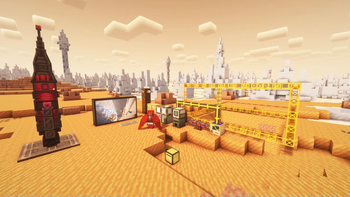
Welcome to MODernized MC! This Modpack contains over 150 Mods that bring many old classics and new things to explore to the table. Explore a huge Overworld with many more biomes, strutures and loot, or venture out to the new dimensions and planets of the Modpack. Go down into the mines to find artifacts and a huge number of new ores! Build as many mashines and tools as possible to make your life easier and explore the world faster. Try some magic to summon new bosses and gain powerfull weapons, armor and potions. There is much to explore, but take your time and build a nice base with many of the new blocks. You don't need to rush your adventure!
Installation
Please notice that I recommend using the Modrinth App with this Modpack.
To install and play the Modpack, download the newest Modpack Version on Modrinth or in the Modrinth App. If you don't use the Modrinth App, follow this guide to install the Modpack.
Then, you need to check the assigned RAM for the Modpack Instance. I currently recommend to allocate at least 8 GB of RAM, but mostly it takes up about 4 to 5 GB of RAM in my experience. Please look up how you change the allocated RAM an instance in your launcher. When finished, you are ready to go. But if you want, check and change the key binds and the mod configs as needed because I currently don't have a tested set of default configurations.
For Servers, I recommend you to download the server variant of each version. The server variant is a stripped down version of the modpack, made for better compatibility and performance with servers.
NOTE: The server variant does not contain any Mod which is not already present in the normal variant. Also, high server load is expected, don't expect your server to support very many players, regardless of the actual power of rig.
FAQ, Wiki and Issues...
...can all be found on the Github Page of the MODernized MC Modpack. You can ask questions, report issues and request changes and additions there if you want! In the future, I may also organize a discord server but currently I don't see any need for it.
A HUGE thanks...
...to all of the developers out there who helped to create such big Modpacks by publicly sharing their work on Minecraft Modding and reimaging Minecraft still after all this time. And especially a HUGE thank you to all the mod developers of the mods included in this Modpack and the Forge & NeoForge Teams. It wouldn't be that big or run at all without your work! <3
Included Mods
Mods:
- 3D Skin Layers
- Ad Astra
- Additional Enchanted Miner
- Advent Of Ascension
- Alternate Current
- AmbientSounds
- AppleSkin
- Applied Energistics 2
- Applied Mekanistics
- Architectury API
- Argonauts (Parties & Guilds)
- Artifacts
- Assorted Core
- Assorted Decor
- Assorted Lib
- Assorted Storage
- Assorted Tech
- Assorted Tools
- Assorted World
- Athena
- BadOptimizations
- Balm
- Better Compatibility Checker
- Better Foliage Renewed
- Biomes O' Plenty
- Botania
- Botarium
- Caelus API
- CalcMod
- Carry On
- CC: Tweaked
- Chat Heads
- Chococraft
- Chunky
- Cloth Config API
- Clumps
- CoFH Core
- Collective
- Common Network
- Configured (since 0.1.2)
- Connected Glass
- CoroUtil
- Corpse
- CraterLib
- CreativeCore
- Cristel Lib
- Cubes Without Borders
- Curios API
- Double Doors
- Dungeons and Taverns
- Durability Tooltip
- Eating Animations
- ElevatorMod
- Embeddium
- Emoji Type
- Ender IO
- Entity Culling
- Essential Mod
- Ex Compressum
- Ex Machinis
- Ex Nihilo: Sequentia - Mekanism Addon
- Ex Nihilo: Sequentia
- Fast IP Ping
- Fastload
- FerriteCore
- Framework
- Freecam
- Friends & Foes (Forge/NeoForge)
- Full Brightness Toggle
- Fusion (Connected Textures)
- GroovyModLoader (GML)
- Icarus
- ImmediatelyFast
- Immersive Engineering
- Inventory Profiles Next
- Iron Chests
- Iron Shulker Boxes
- ItemPhysic Lite
- Jade 🔍
- Just Enough Advancements (JEA)
- Just Enough Archaeology
- Just Enough Breeding (JEBr)
- Just Enough Immersive Multiblocks
- Just Enough Items
- Just Enough Mekanism Multiblocks
- Just Enough Professions (JEP)
- Just Enough Resources (JER)
- Kotlin for Forge
- Let Me Despawn
- libIPN
- LibX
- Lighty
- Lithostitched
- Longer Chat History
- Maintenance Mode
- MCA Reborn
- MCEF (Minecraft Chromium Embedded Framework)
- Mekanism Additions
- Mekanism Generators
- Mekanism Tools
- Mekanism: Ad Astra Ores
- Mekanism
- Memory Leak Fix
- ModernFix
- Move Boats
- Move Minecarts
- MrCrayfish's Furniture Mod: Refurbished
- NetherPortalFix
- Noisium
- NovaCore
- Oculus
- Open Parties and Claims
- Ore Harvester (since 0.1.1)
- Patchouli
- Pipez
- Polymorph
- Puzzles Lib
- Radium
- Rechiseled
- Resourceful Config
- Resourceful Lib
- Scalable Cat's Force
- SecurityCraft
- ServerCore
- Shulker Box Tooltip
- Simple Voice Chat
- Sit
- Smooth Boot (Reloaded)
- Sound Physics Remastered
- spark
- Starlight (Forge)
- Storage Drawers
- SuperMartijn642's Config Lib
- SuperMartijn642's Core Lib
- TerraBlender
- The Aether
- Thermal And Space
- Thermal Cultivation
- Thermal Dynamics
- Thermal Expansion
- Thermal Foundation
- Thermal Innovation
- Thermal Integration
- Thermal Locomotion
- Towns and Towers
- Traveler's Backpack
- Tree Harvester
- (only in 0.1.0: Veinminer)
- Visual Workbench
- Wavey Capes
- Waystones
- WebDisplays
- What Are They Up To (Watut)
- Xaero's Minimap
- Xaero's World Map
- YDM's Weapon Master
- YetAnotherConfigLib (YACL)
- YUNG's API
- YUNG's Better Desert Temples
- YUNG's Better Dungeons
- YUNG's Better End Island
- YUNG's Better Jungle Temples
- YUNG's Better Mineshafts
- YUNG's Better Nether Fortresses
- YUNG's Better Ocean Monuments
- YUNG's Better Strongholds
- YUNG's Better Witch Huts
- YUNG's Bridges
Shader:
Available Versions
How to Set Up a MODernized MC Server
Order Server
Choose at least 6 GB RAM (10 GB recommended for MODernized MC). Based on player count: per 4 players.
Install Modpack in Dashboard
Open the modpack browser in the dashboard, search for "MODernized MC" and click "Install". The neoforge loader and Minecraft 1.20.1 are configured automatically.
Start Server & Play
Start the server – all mods are loaded automatically. Share the server IP with friends and play together!
Frequently Asked Questions
MODernized MC server crashes or won't start – what to do?
Most common causes: insufficient RAM or wrong neoforge loader. Check latest.log for "OutOfMemoryError" → increase RAM to at least 10 GB. For "Mixin" or "ClassNotFoundException" errors: modpack version and loader don't match. With Mado Hosting, loader and Minecraft version are auto-configured on modpack install – preventing most startup issues.
How much RAM does a MODernized MC server really need?
Minimum 6 GB, recommended 10 GB for stable performance. per 4 players. Important: Minecraft modpacks need more RAM than vanilla – plan extra per additional player. With Mado Hosting, you can scale RAM up live at any time without data loss (from €12/month).
Can I add custom mods to MODernized MC without conflicts?
Yes, but check compatibility: only use mods for the same loader (neoforge) and same Minecraft version (1.20.1). Common issues: ID conflicts with recipe mods and incompatible coremod versions. The Mado dashboard mod browser only shows compatible mods and warns about known conflicts.
MODernized MC server lagging – performance tips
1) Increase RAM to 10 GB+. 2) Reduce server view-distance to 8 (server.properties). 3) Pre-generate chunks with the "Chunky" plugin. 4) Use /spark profiler to check which mods consume the most tick time. With Mado Hosting, all servers run on NVMe SSDs with dedicated CPU cores – eliminating hardware as a bottleneck.
Rent MODernized MC Server
Start your own server with automatic modpack installation.
Details
- License
- Creative Commons Attribution Non Commercial Share Alike 4.0 International
- Server-side
- Required
- Client-side
- Required
Supported Versions
Start your MODernized MC Server now
From €12.00/month with 10 GB RAM for the best performance.
Configure Server →