
Create: Sequence & Stonecutting
An untitled modpack about Create, enhancing the functionality of the Stonecutter and Deployer, in which the author practice his modpacking skills.
Screenshots
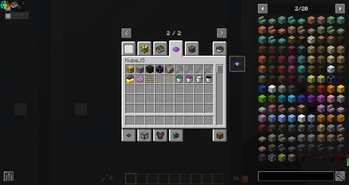
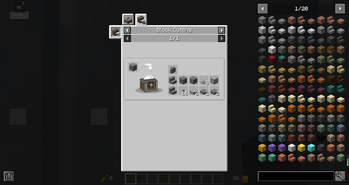
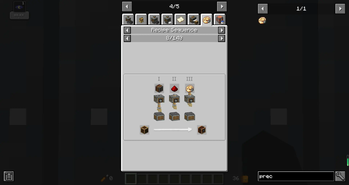
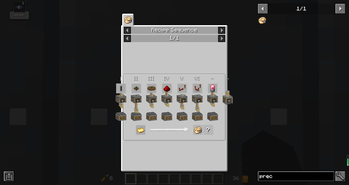
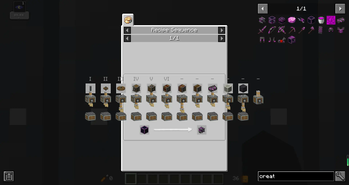
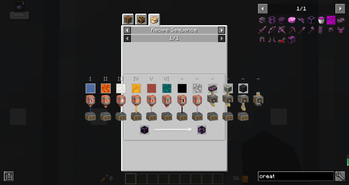
About this Modpack
//To include mod GeOre which is copyrighted, I put its link here https://modrinth.com/mod/geore
About The Pack
This pack is (currently) about Create, with lots of new recipes from KubeJS. A quest system guides the player from running everywhere in the world to having a creative motor in display at home. The author practices his modpacking skills on this pack, so that it is not as perfect as other packs in some places.
关于整合包
本整合包(目前)围绕机械动力,添加大量配方以丰富游戏内容。玩家将从砍树挖土开始,沿任务线一步步发展,最终做出一系列创造物品。本整合包也供作者Aisback2练习整合包制作工艺使用。
Special Features
Disabled the Nether. Changed most crafting recipes resulting in the SSW(Stair-Slab-Wall) to stonecutting. Changed the obtaining of nearly all Create mechanical components to recipe sequence. To some recipes like the processing of precision mechanism, added more scrap items.
整合包特色
禁用下界以及传送门。将多数制作楼梯、半砖、墙的合成配方转为切石。近乎所有机械动力元件的获取方式变为序列组装。对于精密构件等配方增加了更多随机废料可能性。
Main Mods / 主要模组
机械动力 Create |
KubeJS |
机械动力柴油引擎 Create Diesel Engine |
AllTheCompressed
Future Development
Direction A: add further challenge and reality to Create | Direction B: add more stages beyond creative items, about mods for example Mechanism or Thermal Series.
未来开发计划
方向A: 围绕机械动力流程添加更多挑战性与真实性 | 方向B: 在创造物品之后继续添加内容与任务,可能关于通用机械或热力模组。
Available Versions
How to Set Up a Create: Sequence & Stonecutting Server
Order Server
Choose at least 6 GB RAM (8 GB recommended for Create: Sequence & Stonecutting). Based on player count: per 5 players.
Install Modpack in Dashboard
Open the modpack browser in the dashboard, search for "Create: Sequence & Stonecutting" and click "Install". The forge loader and Minecraft 1.20.1 are configured automatically.
Start Server & Play
Start the server – all mods are loaded automatically. Share the server IP with friends and play together!
Frequently Asked Questions
Create: Sequence & Stonecutting server crashes or won't start – what to do?
Most common causes: insufficient RAM or wrong forge loader. Check latest.log for "OutOfMemoryError" → increase RAM to at least 8 GB. For "Mixin" or "ClassNotFoundException" errors: modpack version and loader don't match. With Mado Hosting, loader and Minecraft version are auto-configured on modpack install – preventing most startup issues.
How much RAM does a Create: Sequence & Stonecutting server really need?
Minimum 6 GB, recommended 8 GB for stable performance. per 5 players. Important: Minecraft modpacks need more RAM than vanilla – plan extra per additional player. With Mado Hosting, you can scale RAM up live at any time without data loss (from €12/month).
Can I add custom mods to Create: Sequence & Stonecutting without conflicts?
Yes, but check compatibility: only use mods for the same loader (forge) and same Minecraft version (1.20.1). Common issues: ID conflicts with recipe mods and incompatible coremod versions. The Mado dashboard mod browser only shows compatible mods and warns about known conflicts.
Create: Sequence & Stonecutting server lagging – performance tips
1) Increase RAM to 8 GB+. 2) Reduce server view-distance to 8 (server.properties). 3) Pre-generate chunks with the "Chunky" plugin. 4) Use /spark profiler to check which mods consume the most tick time. With Mado Hosting, all servers run on NVMe SSDs with dedicated CPU cores – eliminating hardware as a bottleneck.
Similar Modpacks

![COBBLEVERSE - Pokemon Adventure [Cobblemon]](https://cdn.modrinth.com/data/Jkb29YJU/581ecf54530972afb18a04660afd820f2f24f6c7.png)




Rent Create: Sequence & Stonecutting Server
Start your own server with automatic modpack installation.
Supported Versions
Start your Create: Sequence & Stonecutting Server now
From €12.00/month with 8 GB RAM for the best performance.
Configure Server →