
Modrinth Tech Rat
Immersive Tech modpack for friends and family, where you can invite others to your single player world. Includes automation, space travel, guns, cars, planes, many mobs and instantly deploying buildings too :).
Screenshots
About this Modpack
This modpack focusses on tech, exploration and quality of life mods to enjoy in a social setting with friends and family.
The pack started in 1.19.2 and almost all features carried over into 1.20.1.
Warnings when upgrading your 1.19.2 world to 1.20.1:
- Bookshelves will loose their inventory. First go move out all items from your bookshelves if you're not ok with loosing it.
- Scout pouches and their contents will be lost, so first remove their contents before updating to the 1.20.1 version.
- Campanion items will be lost (the mod is not for Minecraft 1.20.1 yet.). Grappling hooks, sleeping bags and rope bridges, etc., all now have replacement mods for similar functionality.
- Defensive Measures mod not 1.20.1 compatible yet, so you'll loose those traps, turrets and cannons.
- Many mob mods (e.g: Goodall, Mega Parrots, etc.) were not 1.20.1 compatible yet, so those mobs will be gone.
- ItemSwapper removed - not so ideal with modded, so I stopped using it.
- Your keybindings will be reset to modpack defaults for 1.20.1 (which differs from the 1.19.2 version)
- Some Prefab materials might be missing, so some prefab structures might have their walls gone, for example.
(My main focus is the Colonies and Technologies pack, but I'll try keep this one up to date for 1.20.1.)
.jpg?raw=true)
Highlights to mention:
- A dad joke on world load (Daily Dad)
- GUI and interface improvements (AutoHUD, Slot Cycler, Switcheroo, and more.)
- Beautiful World Generation and fun exploration. (Terralith, Yung's mods, Better Nether & End and When Dungeons Arise)
- Many new mobs (Hybrid Aquatic, Beetlebox, Ender Zoology, Naturalist, Skeletal Remains, Tiny Skeletons)
- Origins and Origins Skills
- Vein Mining
- Single Player world hosting (Essential: Invite friends into your single player world, emotes, cosmetics.)
- Revive downed allies (Hardcore Revival)
- Instant Building Deployments (Prefabicated)
- Space Travel (Ad Astra)
- Automation (Modern Industrialisation & Create)
- Storage solutions (backpacks, larger chests and Tom's simple storage)
- Cars (Automobility)
- Immersive Aircraft
- Guns (MCHalo)
- Custom tools (Forging & Smelting with Forgero & Alloy Forgery, or use Piercing Paxels)
- Combat & Weapons (Better Combat, Simply Swords)
- Advanced Key Mapping support (Amecs - allows more combinations with Ctr/Shift/etc.)
- In-Game Boombox/DJ'ing (Iam Music Player)
- Huge amounts of build customisation with furniture mods like Paladin's Furnitue and other mods like Chipped and Wunderreich
- A completionist index to track all items in the pack that you've collected.
- Remember to always first do a backup of your world.
Getting Started:
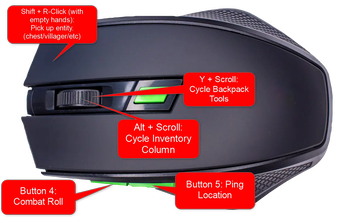
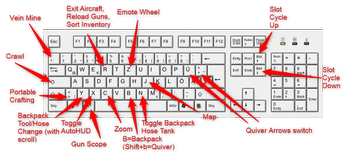
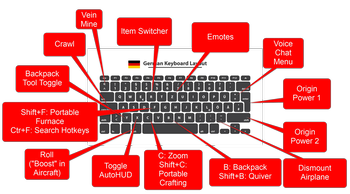
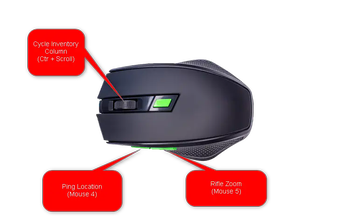
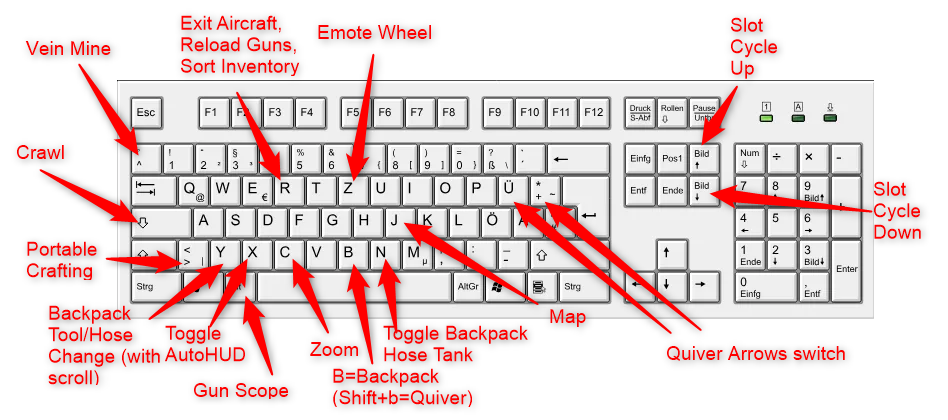
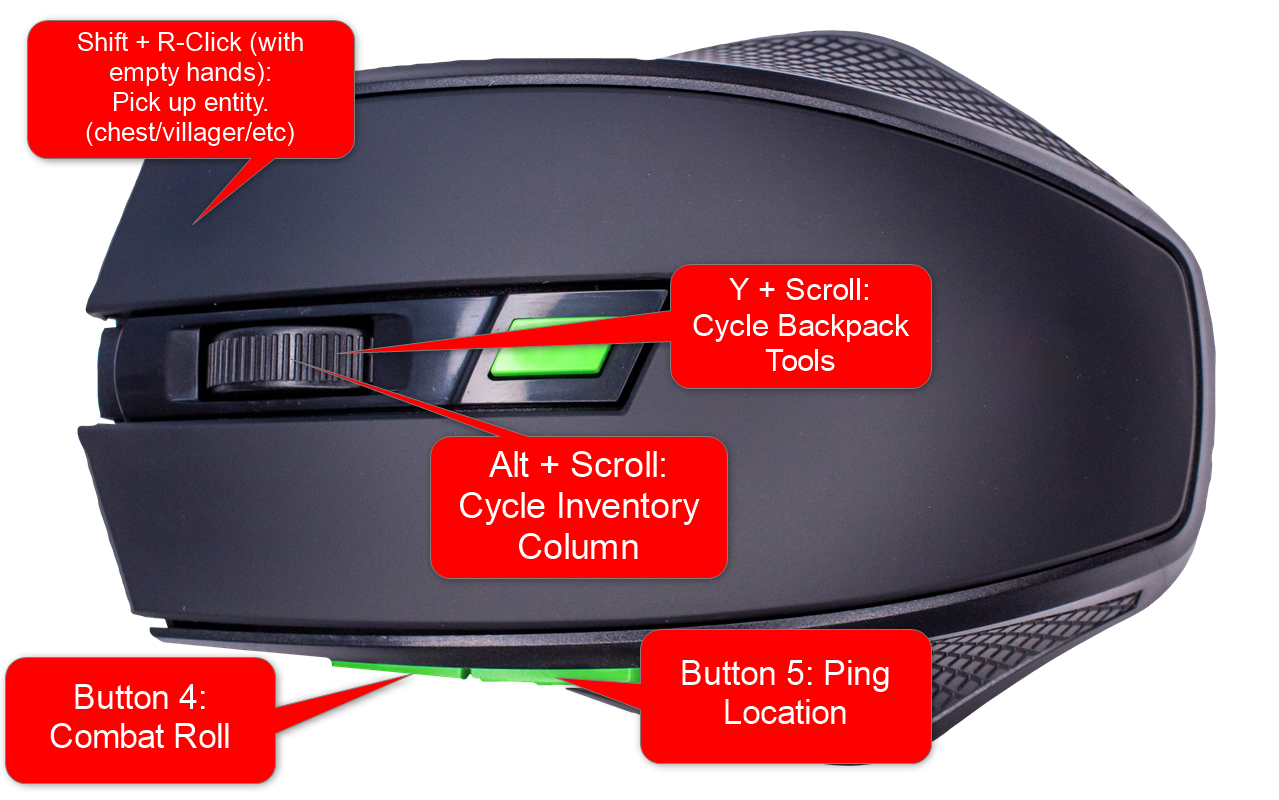
- Check Key Mappings Images for default important/recommended keys.
- Be aware of these features (familiarise yourself with the keys you want for it):
- Sneak + r-click any chest or mob to move them (while having both hands empty).
- Hold the vein mining key for vein mining. (default ^ or ~)
- Hold the Crawl key to crawl whenever you want. (default caps lock)
- Origin ability buttons (Where relevant, default g & h.)
- Combat Roll (Default Mouse 4)
- Multiplayer Ping (Default Mouse 5)
- Go deploy your first Prefab starter base (It has basic stone tools, leather armor and food in a chest somewhere)
- Explore a bit for loot
- Build an Alloy Forge for smelting ores
- Use Compact Storage, Extended Drawers and Tom's Simple Storage for easier storage management
- Build a steam powered drill for 3x3 silk touch branch mining
- Build a Weapon Crafter for some guns
- Eventually, go to space with your rockets :)
Some Default Keybindings:
Focussing on Modrinth mods only (hence the name), where possible. (Had to use Compact Storage from Curseforge for the 1.20.1 version, due to the Modrinth version not being up to date.)
Also intentionally avoiding magic mods, to keep the pack more family friendly, where feasible.
Known issues and workarounds:
* If picking up a map from a chest causes a client crash: Delete the map from user inventory via NBTExplorer.
(Logo design by Freepik.)
Available Versions
How to Set Up a Modrinth Tech Rat Server
Order Server
Choose at least 6 GB RAM (8 GB recommended for Modrinth Tech Rat). Based on player count: per 5 players.
Install Modpack in Dashboard
Open the modpack browser in the dashboard, search for "Modrinth Tech Rat" and click "Install". The fabric loader and Minecraft 1.20.1 are configured automatically.
Start Server & Play
Start the server – all mods are loaded automatically. Share the server IP with friends and play together!
Frequently Asked Questions
Modrinth Tech Rat server crashes or won't start – what to do?
Most common causes: insufficient RAM or wrong fabric loader. Check latest.log for "OutOfMemoryError" → increase RAM to at least 8 GB. For "Mixin" or "ClassNotFoundException" errors: modpack version and loader don't match. With Mado Hosting, loader and Minecraft version are auto-configured on modpack install – preventing most startup issues.
How much RAM does a Modrinth Tech Rat server really need?
Minimum 6 GB, recommended 8 GB for stable performance. per 5 players. Important: Minecraft modpacks need more RAM than vanilla – plan extra per additional player. With Mado Hosting, you can scale RAM up live at any time without data loss (from €12/month).
Can I add custom mods to Modrinth Tech Rat without conflicts?
Yes, but check compatibility: only use mods for the same loader (fabric) and same Minecraft version (1.20.1). Common issues: ID conflicts with recipe mods and incompatible coremod versions. The Mado dashboard mod browser only shows compatible mods and warns about known conflicts.
Modrinth Tech Rat server lagging – performance tips
1) Increase RAM to 8 GB+. 2) Reduce server view-distance to 8 (server.properties). 3) Pre-generate chunks with the "Chunky" plugin. 4) Use /spark profiler to check which mods consume the most tick time. With Mado Hosting, all servers run on NVMe SSDs with dedicated CPU cores – eliminating hardware as a bottleneck.
Similar Modpacks
![Better MC [FABRIC] - BMC2](https://cdn.modrinth.com/data/shFhR8Vx/a19c2bcb51d38f32f138d3607e91cb2b7b8e387f_96.webp)
![Better MC [FORGE] - BMC4](https://cdn.modrinth.com/data/4BV47HRn/7f5ef7cc61b2593609aabef3ed07a866a4f11b73_96.webp)


![Better MC [FABRIC] - BMC3](https://cdn.modrinth.com/data/NHUidpfR/327e0749bb6d160c41799fd77bf6d3d631569dc8_96.webp)

Rent Modrinth Tech Rat Server
Start your own server with automatic modpack installation.
Supported Versions
Start your Modrinth Tech Rat Server now
From €12.00/month with 8 GB RAM for the best performance.
Configure Server →