
Momentum
Just a lighter, smoother way to play. Designed for enhanced performance, reliable updates, with a vanilla look and feel.
Screenshots
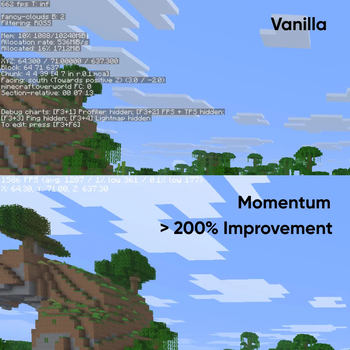
About this Modpack
The Only Performance Modpack You'll Ever Need
Experience Minecraft at its fastest! This modpack was built for players who refuse to compromise between massive features and buttery-smooth performance. I’ve handpicked a powerful selection of mods and integrated advanced optimization tools so you can explore, build, and conquer without the dreaded lag spike. Feel the momentum as you traverse new worlds; it's powerful modding running perfectly on your machine, while keeping the vanilla look and feel.
Apart from performance mods, there are 4 Quality of Life mods present in this modpack:
1. Gamma - Increase or decrease brightness level as per preference. Highly Configurable.
2. Zoomify - Brings zoom capabilities to Minecraft.
3. Resourcify - Download and Update Worlds, Resource Packs, and Shaders all within Minecraft.
4. Shulker Tool Tips - View what's inside a shulker box without placing it!
All 4 of these mods are QOL only, and completely client side. They can be easily disabled if you do not prefer them.
I made this Modpack as a tribute to the 'Simply Optimized' modpack which unfortunately, no longer exists. To the memory of Simply Optimized, and to all who cherished its performance and lightweight design - Project Momentum stands as an unofficial successor. I created this modpack out of love for that dedication to smooth, lag-free gameplay. It carries the heart of the Simply Optimized modpack but injects it with modern speed and polish. Join, as we keep the spirit of Simply Optimized alive and thriving!
I hope this modpack brings upon performance and that you are able to experience Minecraft lag-free and smoothly without any interruptions. Hope you have a great day :)
Available Versions
How to Set Up a Momentum Server
Order Server
Choose at least 6 GB RAM (8 GB recommended for Momentum). Based on player count: per 5 players.
Install Modpack in Dashboard
Open the modpack browser in the dashboard, search for "Momentum" and click "Install". The fabric loader and Minecraft 26.1.2 are configured automatically.
Start Server & Play
Start the server – all mods are loaded automatically. Share the server IP with friends and play together!
Frequently Asked Questions
Momentum server crashes or won't start – what to do?
Most common causes: insufficient RAM or wrong fabric loader. Check latest.log for "OutOfMemoryError" → increase RAM to at least 8 GB. For "Mixin" or "ClassNotFoundException" errors: modpack version and loader don't match. With Mado Hosting, loader and Minecraft version are auto-configured on modpack install – preventing most startup issues.
How much RAM does a Momentum server really need?
Minimum 6 GB, recommended 8 GB for stable performance. per 5 players. Important: Minecraft modpacks need more RAM than vanilla – plan extra per additional player. With Mado Hosting, you can scale RAM up live at any time without data loss (from €12/month).
Can I add custom mods to Momentum without conflicts?
Yes, but check compatibility: only use mods for the same loader (fabric) and same Minecraft version (26.1.2). Common issues: ID conflicts with recipe mods and incompatible coremod versions. The Mado dashboard mod browser only shows compatible mods and warns about known conflicts.
Momentum server lagging – performance tips
1) Increase RAM to 8 GB+. 2) Reduce server view-distance to 8 (server.properties). 3) Pre-generate chunks with the "Chunky" plugin. 4) Use /spark profiler to check which mods consume the most tick time. With Mado Hosting, all servers run on NVMe SSDs with dedicated CPU cores – eliminating hardware as a bottleneck.
Similar Modpacks

![Cobblemon Official Modpack [Fabric]](https://cdn.modrinth.com/data/5FFgwNNP/e7f9ee2e9d361623847853fe2ddce42f519ee64f.png)
![COBBLEVERSE - Pokemon Adventure [Cobblemon]](https://cdn.modrinth.com/data/Jkb29YJU/581ecf54530972afb18a04660afd820f2f24f6c7.png)
![Better MC [FABRIC] - BMC2](https://cdn.modrinth.com/data/shFhR8Vx/a19c2bcb51d38f32f138d3607e91cb2b7b8e387f_96.webp)


Rent Momentum Server
Start your own server with automatic modpack installation.
Supported Versions
Start your Momentum Server now
From €12.00/month with 8 GB RAM for the best performance.
Configure Server →