
Moose Configs
NextGen Moose configs forever undefeated. The world's greatest PvP modpack to ever exist.
Screenshots

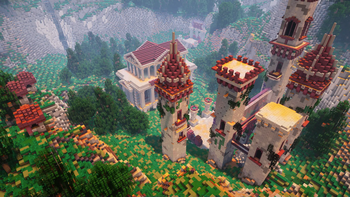
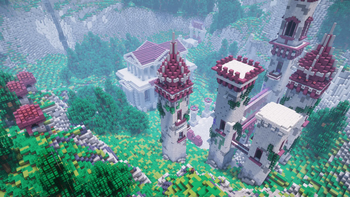
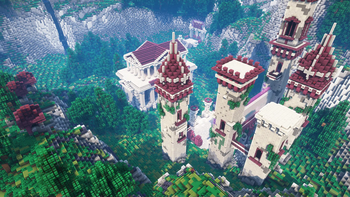
About this Modpack
Minecraft Powered By Moose Configs!
Legendary configs, settings, and performance kept from you for years; finally published for you to use as well!
Aside from the high performance modpack, I've also included the following:
- Shaderpacks and corresponding configs
- Texturepacks (Base Pack & Block Overlay)
- Stupidly good fortune/luck (you'll be shocked how lucky you get from using this modpack)
- Improves pvp skill significantly! (ask anyone frfr)
Default Keybinds
Feel free to change them if you'd like ^-^
- Default shaders keybind is
K - Default togglesprint keybind is
P - Default waypoint keybind is
F10 - Default worldmap keybind is
M - Default freecam keybind is
U - Default freecam-player keybind is
I - Default nametags keybind is
N - Default zoom keybind is
~ - Default simple hud utilities keybind is
INSERT - Default armor hud keybind is
DELETE - Default player/npc hider is
END - Default minimap keybind is
PAGEUP - Default on-screen waypoints keybind is
PAGEDOWN - Default voicechat GUI is
RightShift - Default minimap on hold enlarger keybind is
\ - Default zoom in/out for minimap keybinds are
-and= - Default freelook keybind is
LeftAlt - Default chat keybind is
Enter(i had my reasons)
FAQ
Why?
I've gotten sick of sending my modpack's entire root directory as a giant zip file to my friends so they can play with my modpack. I've finally decided to post my modpack as an official one on Modrinth after many requests. Enjoy!Will you update this?
If there's any conflicts or errors, I'll be sure to update the modpack!Other versions?
I'll only consider making a modpack for a different version if I get a lot of requests. Undecided for now.Where can I find you?
Instagram, Youtube, and Discord are the main ways of finding me online. You definitely won't find me irl though ;)Can you add X mod?
There's a good chance I might add a mod if it improves performance, if I like the mod, or if its simply a good addition to add to the modpack. Feel free to reach out to me if you'd like me to add the mod of your choice!Why is my screen blurry?
You're most likely referring to the Motionblur Mod, you can change that via typing in chat /motionblur [0-100]. To disable Motionblur completely, run the following command: /motionblur 0. I personally use anywhere from 19-47 depending on how many players are around me, but feel free to use what works best for you! And yes, motionblur does seem to work with the shaders.Available Versions
How to Set Up a Moose Configs Server
Order Server
Choose at least 4 GB RAM (6 GB recommended for Moose Configs). Based on player count: per 8 players.
Install Modpack in Dashboard
Open the modpack browser in the dashboard, search for "Moose Configs" and click "Install". The fabric loader and Minecraft 1.20.1 are configured automatically.
Start Server & Play
Start the server – all mods are loaded automatically. Share the server IP with friends and play together!
Frequently Asked Questions
Moose Configs server crashes or won't start – what to do?
Most common causes: insufficient RAM or wrong fabric loader. Check latest.log for "OutOfMemoryError" → increase RAM to at least 6 GB. For "Mixin" or "ClassNotFoundException" errors: modpack version and loader don't match. With Mado Hosting, loader and Minecraft version are auto-configured on modpack install – preventing most startup issues.
How much RAM does a Moose Configs server really need?
Minimum 4 GB, recommended 6 GB for stable performance. per 8 players. Important: Minecraft modpacks need more RAM than vanilla – plan extra per additional player. With Mado Hosting, you can scale RAM up live at any time without data loss (from €8/month).
Can I add custom mods to Moose Configs without conflicts?
Yes, but check compatibility: only use mods for the same loader (fabric) and same Minecraft version (1.20.1). Common issues: ID conflicts with recipe mods and incompatible coremod versions. The Mado dashboard mod browser only shows compatible mods and warns about known conflicts.
Moose Configs server lagging – performance tips
1) Increase RAM to 6 GB+. 2) Reduce server view-distance to 8 (server.properties). 3) Pre-generate chunks with the "Chunky" plugin. 4) Use /spark profiler to check which mods consume the most tick time. With Mado Hosting, all servers run on NVMe SSDs with dedicated CPU cores – eliminating hardware as a bottleneck.
Rent Moose Configs Server
Start your own server with automatic modpack installation.
Details
- License
- LicenseRef-All-Rights-Reserved
- Server-side
- Unsupported
- Client-side
- Required
Supported Versions
Start your Moose Configs Server now
From €8.00/month with 6 GB RAM for the best performance.
Configure Server →