
Musa's Fantasy Craft
A fantasy RPG modpack that runs beautifully on low end devices in 2 GB ram limit.
Screenshots
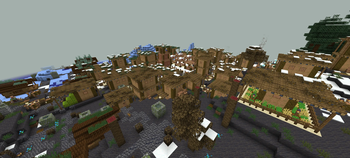
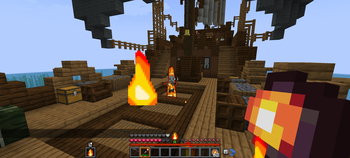
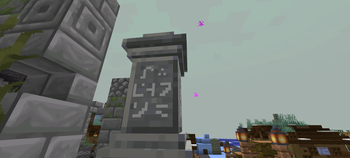
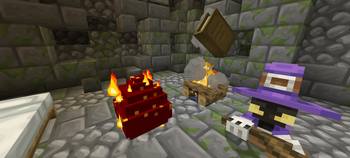
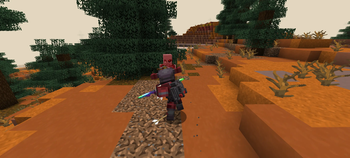
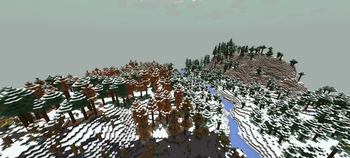
About this Modpack
Musa's Fantasy Craft
Welcome to a fantasy world that transforms Minecraft to a whole new level! Explore the world to find beautiful landscapes, grand structures, and different types of villages where every single villager has their own name and unique personality!
⚔️ A Sneak Peek Into the Fantasy World
- Overhauled Combat: Experience fresh new animations for the third-person combat system along with a heckload of new weapons!
- The Magical Path: Not a fan of close combat? Don't worry, you can take the magical path of becoming a wizard and burn your enemies—or freeze them—to death.
- Smart Storage: Short on inventory space? Not anymore! Now you can craft custom backpacks to carry more. Not only do they have many useful abilities, but they even feature specific slots for your tools and a bed.
- Dragon Mounts: Explore the beautiful world to find dragon nests and hatch yourself a dangerous dragon pet to carry you through your journey!
- Summon Helpers: Or, find yourself a lonely companion in a dark forest to help you fight your way through the dungeons. There are 10 companions waiting out there for you to find them!
Jump into this immersive world to discover even more mysteries that I haven't mentioned here—need to keep some secrets! Go out there and enjoy a modpack made with love and care. It's a semi-cozy pack, so don't sweat over a dungeon you can't complete right away or miss out on every bit of loot from a structure. There will always be more chances for you. Just enjoy the journey all the way through!
📱 Optimization & Hardware Requirements
Honestly, the most important thing is that you can play this modpack even on low-end devices. All you need to do is allocate a minimum of 2 GB of RAM and it works fabulously!
I originally made this modpack just for myself to play, then thought: why not upload this online too? It is heavily optimized for PojavLauncher as well. I play on a phone myself, and it easily hits a smooth 60 FPS.
⚠️ Warning for Mobile Users: You should have at least a mid-to-high-tier phone. I am playing on a Snapdragon 8s Gen 3 and it works just fine for me!
🎨 Shaders & Video Notes
Please note that I have not pre-included Sodium or Iris shaders, as they were causing issues on PojavLauncher for my specific device.
- If you want to use shaders, you will have to install them yourself.
- I highly recommend playing with performance-friendly, low-end shaders like MakeUp - Ultra Fast, but it's completely up to you in the end!
🎬 For Content Creators
I have fully tested the Replay Mod and it works perfectly, so you have no problems there! If you are using this modpack in a video, giving credit is always highly appreciated. I will never issue copyright claims or strikes on your videos, so don't worry, but a shout-out to the pack means a lot!
📌 A Note on Updates
Please keep in mind that this is the first and final version of this modpack. I will not be updating it or releasing future versions, as it was built to be a complete, standalone project right from launch.
In the end, I would like to say a massive thank you to all the amazing mod creators for making such great mods for us to enjoy.
Thanks for reading all the way to the end, byee~
Available Versions
How to Set Up a Musa's Fantasy Craft Server
Order Server
Choose at least 6 GB RAM (8 GB recommended for Musa's Fantasy Craft). Based on player count: per 5 players.
Install Modpack in Dashboard
Open the modpack browser in the dashboard, search for "Musa's Fantasy Craft" and click "Install". The fabric loader and Minecraft 1.20.1 are configured automatically.
Start Server & Play
Start the server – all mods are loaded automatically. Share the server IP with friends and play together!
Frequently Asked Questions
Musa's Fantasy Craft server crashes or won't start – what to do?
Most common causes: insufficient RAM or wrong fabric loader. Check latest.log for "OutOfMemoryError" → increase RAM to at least 8 GB. For "Mixin" or "ClassNotFoundException" errors: modpack version and loader don't match. With Mado Hosting, loader and Minecraft version are auto-configured on modpack install – preventing most startup issues.
How much RAM does a Musa's Fantasy Craft server really need?
Minimum 6 GB, recommended 8 GB for stable performance. per 5 players. Important: Minecraft modpacks need more RAM than vanilla – plan extra per additional player. With Mado Hosting, you can scale RAM up live at any time without data loss (from €12/month).
Can I add custom mods to Musa's Fantasy Craft without conflicts?
Yes, but check compatibility: only use mods for the same loader (fabric) and same Minecraft version (1.20.1). Common issues: ID conflicts with recipe mods and incompatible coremod versions. The Mado dashboard mod browser only shows compatible mods and warns about known conflicts.
Musa's Fantasy Craft server lagging – performance tips
1) Increase RAM to 8 GB+. 2) Reduce server view-distance to 8 (server.properties). 3) Pre-generate chunks with the "Chunky" plugin. 4) Use /spark profiler to check which mods consume the most tick time. With Mado Hosting, all servers run on NVMe SSDs with dedicated CPU cores – eliminating hardware as a bottleneck.
Similar Modpacks
![Cobblemon Official Modpack [Fabric]](https://cdn.modrinth.com/data/5FFgwNNP/e7f9ee2e9d361623847853fe2ddce42f519ee64f.png)
![COBBLEVERSE - Pokemon Adventure [Cobblemon]](https://cdn.modrinth.com/data/Jkb29YJU/581ecf54530972afb18a04660afd820f2f24f6c7.png)
![Better MC [FABRIC] - BMC2](https://cdn.modrinth.com/data/shFhR8Vx/a19c2bcb51d38f32f138d3607e91cb2b7b8e387f_96.webp)


![Better MC [FORGE] - BMC4](https://cdn.modrinth.com/data/4BV47HRn/7f5ef7cc61b2593609aabef3ed07a866a4f11b73_96.webp)
Rent Musa's Fantasy Craft Server
Start your own server with automatic modpack installation.
Supported Versions
Start your Musa's Fantasy Craft Server now
From €12.00/month with 8 GB RAM for the best performance.
Configure Server →