
Mustard Craft
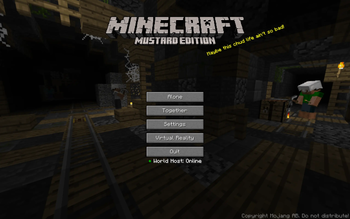
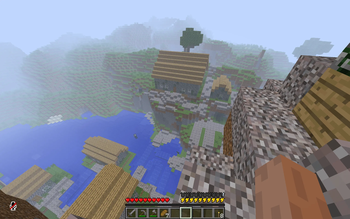
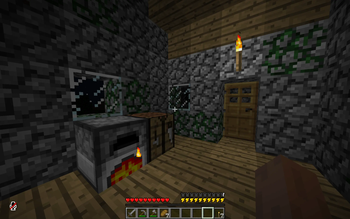
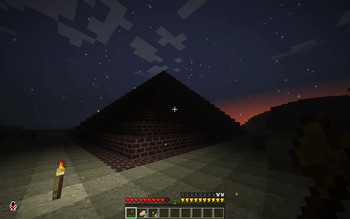
A lightweight, classic-styled modpack with horror elements, based on a dream I had, adapted to be fully playable. Focused on exploration and unnerving atmosphere.
Screenshots
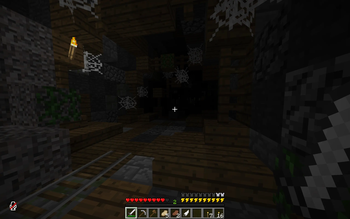
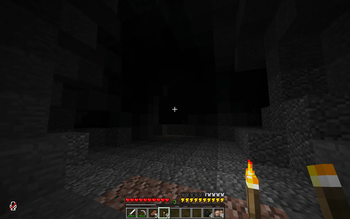
About this Modpack
DISCLAIMER
Although not the main focus, this pack does contain jumpscares. It is fully compatible (and majority of playtesting has taken place) in multiplayer, although for the best experience it is recommended to play with a smaller group using the in-game proximity voice and text chat. Video settings are left open to change, however the defaults provide the intended atmosphere we were trying to create.
Main features
- A unique, Beta-oriented style, combining with modern features and custom mechanics to create an entirely new feel.
- A custom-made main menu to fit the pack's atmosphere (with mostly shitpost/inside joke splashtexts)
- Horror aspects with unique mechanics and counterplay to be learned. No single particular aspect is overwhelmingly present, yet all have their own parts and locations where they shine the most. Some horror is simply ambient distractions, others will affect the way you approach various scenarios.
- Optional Beta world gen, with some custom structures to find and explore
- Gameplay tweaks to increase difficulty, and put a new spin on the vanilla mobs and mechanics you know.
- Full VR support, configured to still feel in line with the classic style as much as possible
- Built-in performance mods for incredibly smooth gameplay paired with the low graphics
Tips for survival
This modpack can be very unforgiving if you don't know some of the mechanics. Here I'm going to vaguely go over some main pointers that can help you get a gist of what to do, while giving minimum spoilers:
Spoiler
- No matter what, stay out of the dark; whether in a cave or approaching night. Torches held in your hand only provide visual lighting and will not actually help you, and they won't last forever when placed. More expensive or rare light sources last longer.
- Don't respawn if you die at night without a spawnpoint in a safe, well lit base. Just don't. You WILL get spawnkilled. If you want, you can Spectate from the death screen and respawn again in survival using a button in the inventory while you're in spectator
- Iron nuggets can be used to craft an Oil Canister, which can be used to re-light some light sources.
- Mobs may spawn with unique tools or abilities that give them dangerous capabilities. Always be on guard.
- When in multiplayer, players will enter a 'downed' state upon reaching 0 HP, and be forced into a crawl, unable to use items or jump. Other players will have 50 seconds to find and revive a downed player by holding right click on them. Multiple players reviving at the same time makes the process go faster.
- Manage your stamina well. If it drops all the way to zero, you will face the penalty of being unable to sprint until it regenerates to full. Stamina regenerates 2x faster if you aren't moving.
- Both the in-game voice chat and text chat are proximity-based, meaning you won't be able to hear people/see messages past a certain range. Players can use the /shout command in chat to significantly increase their text chat range.
Special Thanks
Spoiler
Some_Random_ (Me) - Original idea, main modpack creation, actor in custom panoramas, modpack page/changelog writing, custom UI, playtesting
CokaCody - Co-modpack creation, custom panorama images, custom texture creation, custom UI, custom structures, playtesting
ChasOk - Playtesting, actor in new custom panorama
SUPER3FAN - Playtesting, actor in new custom panorama
trainboy0007 - Playtesting, actor in new custom panorama
zygotic1 - Playtesting, actor in new custom panorama
DyariMinecraft - Playtesting
meatballbenny - Playtesting
pizzabon290 - Playtesting
W0olfy - Playtesting
(Couldn't have done this without ANY of these people and their feedback, especially Cody's co-creation, huge thank you to everyone listed here)
Credits (Links to all mods, resource packs and their creators) [CURSEFORGE PAGES]
Spoiler
- https://www.curseforge.com/minecraft/mc-mods/ambientsounds - by CreativeMD
- https://www.curseforge.com/minecraft/mc-mods/entity-texture-features-fabric - by Traben
- https://www.curseforge.com/minecraft/mc-mods/almanac-lib - by frikinjay
- https://www.curseforge.com/minecraft/mc-mods/antiportals - by BrPacks and carmello
- https://www.curseforge.com/minecraft/mc-mods/architectury-api - by shedaniel, Juicebus and MaxNeedsSnacks
- https://www.curseforge.com/minecraft/mc-mods/bad-mobs - by DarhaxDev
- https://www.curseforge.com/minecraft/mc-mods/balm - by BlayTheNinth
- https://www.curseforge.com/minecraft/mc-mods/beta-nether - by Pigzone00
- https://www.curseforge.com/minecraft/mc-mods/block-swap - by Corgi_Taco
- https://www.curseforge.com/minecraft/mc-mods/borderless - by nimueller
- https://www.curseforge.com/minecraft/mc-mods/campsite - by MadeBySanny
- https://www.curseforge.com/minecraft/mc-mods/clean-tooltips - by Stal
- https://www.curseforge.com/minecraft/mc-mods/cloth-config - by shedaniel and LinkieIsBetterThanK9
- https://www.curseforge.com/minecraft/mc-mods/collective - by Serilum
- https://www.curseforge.com/minecraft/mc-mods/corgilib - by Corgi_Taco
- https://www.curseforge.com/minecraft/mc-mods/corpse - by henkelmax
- https://www.curseforge.com/minecraft/mc-mods/creativecore - by CreativeMD
- https://www.curseforge.com/minecraft/mc-mods/cut-through - by Fuzs and SHXRKIE
- https://www.curseforge.com/minecraft/mc-mods/data-anchor - by Corgi_Taco
- https://www.curseforge.com/minecraft/mc-mods/double-doors - by Serilum
- https://www.curseforge.com/minecraft/mc-mods/embeddium - by FiniteReality
- https://www.curseforge.com/minecraft/mc-mods/enhanced-ai - by Insane96
- https://www.curseforge.com/minecraft/mc-mods/enhanced-celestials - by Corgi_Taco and UHQ_GAMES
- https://www.curseforge.com/minecraft/mc-mods/entityculling - by tr7zw
- https://www.curseforge.com/minecraft/mc-mods/explorations - by Buecher_wurm
- https://www.curseforge.com/minecraft/mc-mods/eyes-in-the-darkness - by gigaherz
- https://www.curseforge.com/minecraft/mc-mods/fancymenu - by Keksuccino
- https://www.curseforge.com/minecraft/mc-mods/ferritecore - by malte0811
- https://www.curseforge.com/minecraft/mc-mods/forgery - by unascribed and sfort__
- https://www.curseforge.com/minecraft/mc-mods/from-the-caves - by mininotprime
- https://www.curseforge.com/minecraft/mc-mods/from-the-fog - by LunarEclipseStudios
- https://www.curseforge.com/minecraft/mc-mods/geckolib - by Gecko and EliotL
- https://www.curseforge.com/minecraft/mc-mods/globalpacks - by JTK222
- https://www.curseforge.com/minecraft/mc-mods/grue-the-darkness-hunter - by BreadToasted
- https://www.curseforge.com/minecraft/mc-mods/hardcore-torches-forge - by WolfieWaffle
- https://www.curseforge.com/minecraft/mc-mods/ichunutil - by iChun
- https://www.curseforge.com/minecraft/mc-mods/illuminations-legacy - by doctor4t
- https://www.curseforge.com/minecraft/mc-mods/immersivemc - by 275hammy
- https://www.curseforge.com/minecraft/mc-mods/insanelib - by Insane96
- https://www.curseforge.com/minecraft/mc-mods/konkrete - by Keksuccino
- https://www.curseforge.com/minecraft/mc-mods/let-me-despawn - by frikinjay
- https://www.curseforge.com/minecraft/mc-mods/let-sleeping-dogs-lie - by iChun
- https://www.curseforge.com/minecraft/mc-mods/lexiconfig - by CodinGlitch
- https://www.curseforge.com/minecraft/mc-mods/localized-chat - by Kreezxil
- https://www.curseforge.com/minecraft/mc-mods/mc-vr-api - by 275hammy
- https://www.curseforge.com/minecraft/mc-mods/melody - by Keksuccino
- https://www.curseforge.com/minecraft/mc-mods/moderner - by jakobisnow
- https://www.curseforge.com/minecraft/mc-mods/modernfix - by embeddedt
- https://www.curseforge.com/minecraft/mc-mods/mustardcraft-dependency - by CokaCody (HEY THAT'S US)
- https://www.curseforge.com/minecraft/mc-mods/netherportalfix - by BlayTheNinth
- https://www.curseforge.com/minecraft/mc-mods/no-mob-farms - by orlouge
- https://www.curseforge.com/minecraft/mc-mods/no-ruined-nether-portals - by dreams01
- https://www.curseforge.com/minecraft/mc-mods/nostalgic-tweaks - by Adrenix
- https://www.curseforge.com/minecraft/mc-mods/not-enough-animations - by tr7zw
- https://www.curseforge.com/minecraft/mc-mods/nyctophobia-forge - by finallion_13
- https://www.curseforge.com/minecraft/mc-mods/nyfs-spiders - by Nyfaria
- https://www.curseforge.com/minecraft/mc-mods/oculus - by Asek3
- https://www.curseforge.com/minecraft/mc-mods/playerrevive - by CreativeMD
- https://www.curseforge.com/minecraft/mc-mods/pretty-rain - by Project6gbDeRam
- https://www.curseforge.com/minecraft/mc-mods/puzzles-lib - by Fuzs
- https://www.curseforge.com/minecraft/mc-mods/radium-reforged - by Asek3
- https://www.curseforge.com/minecraft/mc-mods/rain-should-extinguish-campfires - by restonic4
- https://www.curseforge.com/minecraft/mc-mods/restapi - by restonic4
- https://www.curseforge.com/minecraft/mc-mods/right-click-get-crops - by TeamCoFH
- https://www.curseforge.com/minecraft/mc-mods/short-stacks - by Mikul
- https://www.curseforge.com/minecraft/mc-mods/shoulder-surfing-reloaded - by _ForgeUser21552638 and Exopandora
- https://www.curseforge.com/minecraft/mc-mods/simple-voice-chat - by henkelmax
- https://www.curseforge.com/minecraft/mc-mods/simple-voice-radio - by CodinGlitch
- https://www.curseforge.com/minecraft/mc-mods/sleepnt-disable-sleep-keep-spawnpoints - by kleiders3010
- https://www.curseforge.com/minecraft/mc-mods/dynamiclights-reforged - by Txni
- https://www.curseforge.com/minecraft/mc-mods/sodium-options-api - by Txni
- https://www.curseforge.com/minecraft/mc-mods/sound-physics-remastered - by henkelmax
- https://www.curseforge.com/minecraft/mc-mods/structure-gel-api - by ModdingLegacy and silver_david
- https://www.curseforge.com/minecraft/mc-mods/sword-blocking-mechanics - by Fuzs
- https://www.curseforge.com/minecraft/mc-mods/terrablender - by TheAdubbz
- https://www.curseforge.com/minecraft/mc-mods/the-graveyard-forge - by finallion_13
- https://www.curseforge.com/minecraft/mc-mods/true-darkness-forge-updated-fork - by dylanjkl
- https://www.curseforge.com/minecraft/mc-mods/true-fishing - by zoyer1
- https://www.curseforge.com/minecraft/mc-mods/vivecraft - by Ferri_Arnus and jrbudda
- https://www.curseforge.com/minecraft/mc-mods/whos-there-ghost-players - by Mortius
- https://www.curseforge.com/minecraft/mc-mods/world-host - by DARKZIPPER
- https://www.curseforge.com/minecraft/mc-mods/yungs-api - by YUNGNICKYOUNG
- https://www.curseforge.com/minecraft/mc-mods/yungs-better-desert-temples - by YUNGNICKYOUNG
- https://www.curseforge.com/minecraft/mc-mods/yungs-better-dungeons - by YUNGNICKYOUNG
- https://www.curseforge.com/minecraft/mc-mods/yungs-better-jungle-temples - by YUNGNICKYOUNG
- https://www.curseforge.com/minecraft/mc-mods/yungs-better-mineshafts-forge - by YUNGNICKYOUNG
- https://www.curseforge.com/minecraft/mc-mods/yungs-better-nether-fortresses - by YUNGNICKYOUNG
- https://www.curseforge.com/minecraft/mc-mods/yungs-better-ocean-monuments - by YUNGNICKYOUNG
- https://www.curseforge.com/minecraft/mc-mods/yungs-better-strongholds - by YUNGNICKYOUNG
- https://www.curseforge.com/minecraft/mc-mods/yungs-better-witch-huts - by YUNGNICKYOUNG
- https://www.curseforge.com/minecraft/mc-mods/yungs-cave-biomes - by YUNGNICKYOUNG
- https://www.curseforge.com/minecraft/mc-mods/yungs-extras - by YUNGNICKYOUNG
- https://www.curseforge.com/minecraft/texture-packs/golden-days - by thepoeticrainbow
- https://www.curseforge.com/minecraft/texture-packs/mcs - by memphis
- No More Shield - Minecraft Data Pack - millennIumAMbiguity
- https://www.curseforge.com/minecraft/shaders/psx-mcsx - by ninjamike1211
Available Versions
How to Set Up a Mustard Craft Server
Order Server
Choose at least 6 GB RAM (8 GB recommended for Mustard Craft). Based on player count: per 5 players.
Install Modpack in Dashboard
Open the modpack browser in the dashboard, search for "Mustard Craft" and click "Install". The forge loader and Minecraft 1.20.1 are configured automatically.
Start Server & Play
Start the server – all mods are loaded automatically. Share the server IP with friends and play together!
Frequently Asked Questions
Mustard Craft server crashes or won't start – what to do?
Most common causes: insufficient RAM or wrong forge loader. Check latest.log for "OutOfMemoryError" → increase RAM to at least 8 GB. For "Mixin" or "ClassNotFoundException" errors: modpack version and loader don't match. With Mado Hosting, loader and Minecraft version are auto-configured on modpack install – preventing most startup issues.
How much RAM does a Mustard Craft server really need?
Minimum 6 GB, recommended 8 GB for stable performance. per 5 players. Important: Minecraft modpacks need more RAM than vanilla – plan extra per additional player. With Mado Hosting, you can scale RAM up live at any time without data loss (from €12/month).
Can I add custom mods to Mustard Craft without conflicts?
Yes, but check compatibility: only use mods for the same loader (forge) and same Minecraft version (1.20.1). Common issues: ID conflicts with recipe mods and incompatible coremod versions. The Mado dashboard mod browser only shows compatible mods and warns about known conflicts.
Mustard Craft server lagging – performance tips
1) Increase RAM to 8 GB+. 2) Reduce server view-distance to 8 (server.properties). 3) Pre-generate chunks with the "Chunky" plugin. 4) Use /spark profiler to check which mods consume the most tick time. With Mado Hosting, all servers run on NVMe SSDs with dedicated CPU cores – eliminating hardware as a bottleneck.
Similar Modpacks
![Cobblemon Official Modpack [Fabric]](https://cdn.modrinth.com/data/5FFgwNNP/e7f9ee2e9d361623847853fe2ddce42f519ee64f.png)
![COBBLEVERSE - Pokemon Adventure [Cobblemon]](https://cdn.modrinth.com/data/Jkb29YJU/581ecf54530972afb18a04660afd820f2f24f6c7.png)
![Better MC [FABRIC] - BMC2](https://cdn.modrinth.com/data/shFhR8Vx/a19c2bcb51d38f32f138d3607e91cb2b7b8e387f_96.webp)


![Better MC [FORGE] - BMC4](https://cdn.modrinth.com/data/4BV47HRn/7f5ef7cc61b2593609aabef3ed07a866a4f11b73_96.webp)
Rent Mustard Craft Server
Start your own server with automatic modpack installation.
Details
- License
- Creative Commons Attribution Non Commercial 4.0 International
- Server-side
- Required
- Client-side
- Required
Supported Versions
Start your Mustard Craft Server now
From €12.00/month with 8 GB RAM for the best performance.
Configure Server →