
My minecraft Fabric
Optimized pleasant Modpack in Vanilla style
Screenshots

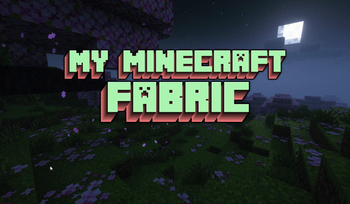

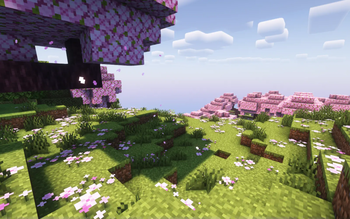
About this Modpack
Hello! this modpack is made for version 1.21, it may not be finished yet, I will update it. 
This mod pack is made on fabric (IT WILL NEVER APPEAR ON FORGE, NEOFORGE, AND QUILT!) 
Pleasant modpack for minecraft for playing alone or with friends
Advantages of the modpack:
- Excellent optimization
- Lots of beautiful biomes
- Lots of new mobs for your world!
- New updated mechanics
- And also a lot of other things that I won't be able to fit here.
A little below you can see some of the main mods of this modpack
New biomes (WilderWild,Terrestia,NatureSpirit),
New mobs (ZombieHorseSpawns,Friends&Foes,NetherDepthsUpgrade and more!),
New optimization mods (ParticleCore,BadOptimizations,FerriteCore,ModernFix),
New client mods (SnowyLeaves,DamageNumbers,Zoomify),
You can also add your own resource packs, mods and shaders! (for convenience, Resourcify is installed here. You can add resource packs and shaders directly in the game or add them in the launcher anyway)
Tutorial
How to download this ModPack
- Download and install the Modrinth app on your computer
- Download the version of the modpack you need
- Open the Modrinth app
- Launch the downloaded version of the modpack
- Wait until he downloads all the mods and shaders and then you can start the game
Have a good game!
List of all mods and shaders
Included mods
- Continuity
- Visuality
- Blur+
- Zoomify
- Presence footsteps
- Jei
- Better f3
- Model gap fix
- Failing leaves
- Backpacks
- Eating animation
- Better statistic screen
- Cherished worlds
- Remove reloading screen
- Better ping display
- Craft presence
- Cave dust
- Polymorph
- First person model
- Show me your skin
- Villager names
- Better beds
- Do a barrel roll
- Friends&foes
- Animal feeding though
- Superflat world no slimes
- Advanced netherite
- Nyfs spiders
- Dark loading screen
- Resourcify
- No resource park warning
- Cubes without borders
- Rightclickharvest
- Sodium + iris
- Snow under trees
- Explosive enhancement
- Status effect bar
- Kleeslabs
- Mvs
- Jep
- Held item info
- Chat animation
- More axolotol variants
- Sit
- Wilder wild
- Tiny item animation
- Particle rain
- Cat jam
- Nofog
- Realistic bee
- Tool trims
- Chest tracker
- Jump over fences
- Healing campfire
- Day counter
- Peek
- Third person maps
- Colourful hearts
- Move boats
- Villager transportations
- Trash slot
- Simple armor hud
- Break free
- Linkarts
- Gui clock
- Cake chomps
- Gui compass
- Snowyleaves
- Let sleeping dog lie
- This rocks
- Glowing Torchflower
- Footprint Particle
- Duckling
- More Zombie Villagers
- Nature's Spirit
- Durability Plus
- Boids
- Banner Flags
- Name Pain
- Better Babies
- Glowing Ores
- Dynamic Torches
- Random Sheep Colours
- Modmenu
- Leaf Me Alone
- Colorful Subtitles
- Random Mob Sizes
- Snow Pig [Fabric]
- Food+
- Mods Command
- Gen's Villager Hats
- Zombify
- Fish No Stuck
- Nether Depths Upgrade
- Death Counter
- Mobs On Rails
- SlimyBoyos
- Realistic Rowing
- Vanilla Fireflies
- Mob Armor Trims
- Nether Weather
- Fence On Slab!
- Regenerative Sleep
- Threat Music Mod
- DJ Villager
- Guard Villagers (Fabric/Quilt)
- WTHIT
- Bandanas
- Biomeinfo
- Bossbar
- Bronze
- Cat Loaf
- Connectible chains
- Damage Numbers
- Delightful Froge
- Grabby mobs
- HopoBetterUnderwaterRuins
- Husk Spawn
- Husks drop Sand
- immersive Thunder
- Indium
- Jade
- Let me despawn
- Linkart
- Modernfix
- More Berries
- More chest variants
- Nautilus
- Nice mobs remastered: friends&foes
- Not enough Recipe book
- Quad
- SmartBlockPlacement
- Smooth Scroll
- SnowyLeavesPlus
- Sound Physics Remastered
- TerraBlender
- Terrestria
- Tidal Towns
- Tom's Mobs
- Upgraded Mobs
- Variants & Ventures
- VillageHero+
- Visuality
- Zombie Horse Spawn
Included shaders
- Pastel Shaders
- Astralex
- Complementary Reimagined
Info
- Why is this modpack only for 1.21? - I chose the newest version because it has the most content, although not all mods have switched to it yet, but there are those that were not on the old versions
- Why fabric? - I chose fabric because I think it's the most popular right now, unlike forge, neoforge and quilt
- Why can you see mistakes in some words? - I don't live in America or the UK and English is almost an unknown language for me, so I use a translator
- Why was this modpack created? - It was created for a pleasant game of minecraft with friends or alone there are no mods for imbalance here there are mods for a quiet game
Available Versions
How to Set Up a My minecraft Fabric Server
Order Server
Choose at least 6 GB RAM (8 GB recommended for My minecraft Fabric). Based on player count: per 5 players.
Install Modpack in Dashboard
Open the modpack browser in the dashboard, search for "My minecraft Fabric" and click "Install". The fabric loader and Minecraft 1.21 are configured automatically.
Start Server & Play
Start the server – all mods are loaded automatically. Share the server IP with friends and play together!
Frequently Asked Questions
My minecraft Fabric server crashes or won't start – what to do?
Most common causes: insufficient RAM or wrong fabric loader. Check latest.log for "OutOfMemoryError" → increase RAM to at least 8 GB. For "Mixin" or "ClassNotFoundException" errors: modpack version and loader don't match. With Mado Hosting, loader and Minecraft version are auto-configured on modpack install – preventing most startup issues.
How much RAM does a My minecraft Fabric server really need?
Minimum 6 GB, recommended 8 GB for stable performance. per 5 players. Important: Minecraft modpacks need more RAM than vanilla – plan extra per additional player. With Mado Hosting, you can scale RAM up live at any time without data loss (from €12/month).
Can I add custom mods to My minecraft Fabric without conflicts?
Yes, but check compatibility: only use mods for the same loader (fabric) and same Minecraft version (1.21). Common issues: ID conflicts with recipe mods and incompatible coremod versions. The Mado dashboard mod browser only shows compatible mods and warns about known conflicts.
My minecraft Fabric server lagging – performance tips
1) Increase RAM to 8 GB+. 2) Reduce server view-distance to 8 (server.properties). 3) Pre-generate chunks with the "Chunky" plugin. 4) Use /spark profiler to check which mods consume the most tick time. With Mado Hosting, all servers run on NVMe SSDs with dedicated CPU cores – eliminating hardware as a bottleneck.
Similar Modpacks
![Cobblemon Official Modpack [Fabric]](https://cdn.modrinth.com/data/5FFgwNNP/e7f9ee2e9d361623847853fe2ddce42f519ee64f.png)
![COBBLEVERSE - Pokemon Adventure [Cobblemon]](https://cdn.modrinth.com/data/Jkb29YJU/581ecf54530972afb18a04660afd820f2f24f6c7.png)
![Better MC [FABRIC] - BMC2](https://cdn.modrinth.com/data/shFhR8Vx/a19c2bcb51d38f32f138d3607e91cb2b7b8e387f_96.webp)


![Better MC [FORGE] - BMC4](https://cdn.modrinth.com/data/4BV47HRn/7f5ef7cc61b2593609aabef3ed07a866a4f11b73_96.webp)
Rent My minecraft Fabric Server
Start your own server with automatic modpack installation.
Supported Versions
Start your My minecraft Fabric Server now
From €12.00/month with 8 GB RAM for the best performance.
Configure Server →