
Myticly Optimized
This modpack is better then Fabulously Optimized.
Screenshots
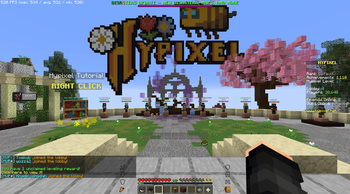


About this Modpack
Well hello there I see you have stumbled onto my modpack page, well.
Disclaimer: This pack only works with modrinth client!
Modpack summary
This modpack is for performance mainly. There are also version forks as listed at the end of the description. The features of the General version of this modpack include aspects sutch as but not limited too: PvP huds, building holograms, optional bugfixes and utilities. This pack is almost infinitly customizable cince you can tweak all the setings to your liking. All this just so you can hop on your favorite servers without having to worry about your FPS!
What does MO do?
- Optimizes the game better then FO (Fabulously Optimized)
- Adds a lot of customizability
- 1600+ FPS on 25 render distance (my specs listed below)
- Good for PvP and other aspects of the game

Why i made MO
I made MO because i was tired of people saying FO was the best and that "you should just download FO its the best" stuff i find annoying. That's why i made this project, to be better then Fabulously Optimized
What handy mods does it have?
(does depend on the version)
- Mod Menu (configure other mods)
- Replay Mod (sick clips of your builds)
- Tweakeroo (for the nerds)
- Lightmatica (for the builders)
- Inventory Hud+ (PvP or other)
- Pop counter (PvP)
- Manny optimization mods for better performance
- And much more that is too much to list here
Standard settings
What settings does it come with?
- 25 chunk render distance
- Performance mods best settings
- Minecraft settings for a balanced game that runs smoothly
Isue form:
Sugestions form:
Google form: Sugestions
Please enjoy usage of my modpack, you can also add your own resource packs or shaders if you like using the standard process.
Mythicly Optimized ([version] V,P,B,G)
A letter after the the version, for example (1.3V 1.21.5) means that the modpack has a specific purpose.
- G = General
- GN = General Nothing (no utils)
- V = Vanity
- B = Building
- P = PvP
My specs
This is so you can get a reasonable understanding of what fps you will get on your system.
- GPU: 12x AMD Ryzen 5 5600X 5-Core Proessor
- Display: 2560 x 1417
- GPU: AMD Radeon RX 6800 XT
Available Versions
How to Set Up a Myticly Optimized Server
Order Server
Choose at least 4 GB RAM (6 GB recommended for Myticly Optimized). Based on player count: per 8 players.
Install Modpack in Dashboard
Open the modpack browser in the dashboard, search for "Myticly Optimized" and click "Install". The fabric loader and Minecraft 1.21.10 are configured automatically.
Start Server & Play
Start the server – all mods are loaded automatically. Share the server IP with friends and play together!
Frequently Asked Questions
Myticly Optimized server crashes or won't start – what to do?
Most common causes: insufficient RAM or wrong fabric loader. Check latest.log for "OutOfMemoryError" → increase RAM to at least 6 GB. For "Mixin" or "ClassNotFoundException" errors: modpack version and loader don't match. With Mado Hosting, loader and Minecraft version are auto-configured on modpack install – preventing most startup issues.
How much RAM does a Myticly Optimized server really need?
Minimum 4 GB, recommended 6 GB for stable performance. per 8 players. Important: Minecraft modpacks need more RAM than vanilla – plan extra per additional player. With Mado Hosting, you can scale RAM up live at any time without data loss (from €8/month).
Can I add custom mods to Myticly Optimized without conflicts?
Yes, but check compatibility: only use mods for the same loader (fabric) and same Minecraft version (1.21.10). Common issues: ID conflicts with recipe mods and incompatible coremod versions. The Mado dashboard mod browser only shows compatible mods and warns about known conflicts.
Myticly Optimized server lagging – performance tips
1) Increase RAM to 6 GB+. 2) Reduce server view-distance to 8 (server.properties). 3) Pre-generate chunks with the "Chunky" plugin. 4) Use /spark profiler to check which mods consume the most tick time. With Mado Hosting, all servers run on NVMe SSDs with dedicated CPU cores – eliminating hardware as a bottleneck.
Rent Myticly Optimized Server
Start your own server with automatic modpack installation.
Supported Versions
Start your Myticly Optimized Server now
From €8.00/month with 6 GB RAM for the best performance.
Configure Server →