
N.A.N Vanilla Experience
N.A.N Vanilla Experience expands vanilla features by adding new blocks, items, world generation, and mobs while preserving the original aesthetic and gameplay style, with QOL features most of players need.
Screenshots
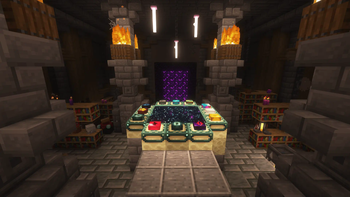

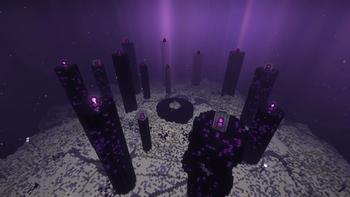
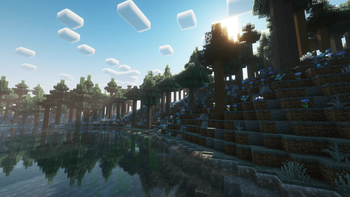


About this Modpack

Do you ever find Minecraft boring and repetitive? But when you want to add mods to your game, you get confused because of the many additions to the game. Well I have a solution
N.A.N. Vanilla Experience
N.A.N. stands for: "Not A Normal" N.A.N Vanilla Experience modpack fixes some aspects that are lacking in the community as well as adding some features and additions to aspects that are already present in the vanilla game.
Performance

The Modpack is built on a popular optimization modpack "Fabulously Optimized" to ensure players will get the maximum performance from Minecraft itself. The difference between vanilla and this modpack is quite significant
Additions
List of Mods
- 3d-Skin-Layers by tr7zw
- Additional Structures by XxRexRaptorxX
- AdoraBuild: Structures by Vlad Hatylo, Kate Hatylo
- Advanced Netherite by Autovw
- Advancement Plaques by Grend
- Almanac by frikinjay
- Ambiance by Team Chorus, YeoXuHang
- Animatica by FoundationGames
- AppleSkin by squeek502
- Architectury by shedaniel
- Armor Trim Item Fix by MincraftEinstein
- Autototem by MikaDev
- Axolotl Buckets by Roundaround
- BadOptimizations by Thosea
- Bartering Station by Fuzs
- Better Archeology by Pandarix
- Better Beds by Motschen, TeamMidnightDust
- Better Mount HUD by Lortseam
- Better Nether Map by Jummit
- Better Statistics Screen by TheCSDev
- Better Third Person by Socolio, DreenDex
- Better Tridents by Fuzs
- BetterF1 by UltimateBoomer, MovTery
- BetterF3 by cominixo, TreyRuffy
- BiomeParticleWeather
- Boat Break Fix by ElocinDev
- Bookshelf by Darkhax
- Bundle Recipe by Rebel459
- CICADA by enjarai
- CIT Resewn by SHsuperCM
- Capes by Cael
- Cardinal Components API by UpcraftLP, Pyrofab
- Chat Heads by dzwdz, Fourmisain
- ChatAnimation by Ezzenix
- Cherished Worlds by Illusive Soulworks
- ChoiceTheorem's Overhauled Village by ChoiceTheorem
- Chunks Fade In by kerudion (koteinik)
- Cloth Config v15 by shedaniel
- Clumps by Jared
- Cobweb by Crystal Spider, Moonstone Webber, Noir
- Comforts by Illusive Soulworks
- Configuration by Toma
- Continuity by PepperCode1
- Crawl by fewizz, McSkinnerOG, Chocohead
- Creeper Overhaul by Artist/Creator - Joosh, Dev - ThatGravyBoat
- Cristel Lib by Cristelknight
- Cubes Without Borders by Kir_Antipov
- Debugify by isXander
- Deeper and Darker by Kyanite Mods
- Do a Barrel Roll by enjarai
- Dungeons and Taverns by NovaWostra, Konci, Walls
- Dungeons and Taverns Woodland Mansion Replacement by NovaWostra, Konci, Walls
- Durability Tooltip by SuperMartijn642
- Dynamic FPS by juliand665, LostLuma
- Easy Anvils by Fuzs
- Easy Magic by Fuzs
- Easy Shulker Boxes by Fuzs
- EnchantmentDescriptions by Darkhax
- End Remastered by Jack Bagel
- Enhanced Block Entities by FoundationGames
- Entity Model Features by Traben
- Entity Texture Features by Traben
- EntityCulling by tr7zw
- Euphoria Patcher by SpacEagle17, isuewo
- Explorations by Buecher_wurm
- Explorify by bebebea_loste
- Explosive Enhancement by Superkat32
- Fabric API by FabricMC
- Fabric Language Kotlin by FabricMC
- FabricSkyBoxes by AMereBagatelle
- FabricSkyBoxes Interop by FlashyReese
- Fabrishot by ramidzkh
- FancyMenu by Keksuccino
- Fast IP Ping by Fallen_Breath
- FastQuit by KingContaria
- FerriteCore by malte0811
- FeyTweaks by Feytox
- FirstPerson by tr7zw
- Flow by IMB11 (mineblock11)
- Forge Config API Port by Fuzs
- Formations by SuperMartijn642
- Formations Nether by SuperMartijn642
- Formations Overworld by SuperMartijn642
- Friends & Foes by Faboslav
- Friends&Foes - Beekeeper Hut by Faboslav
- Friends&Foes - Flowery Mooblooms by Faboslav
- Frostiful by TheDeathlyCow
- Fzzy Config by fzzyhmstrs
- GeckoLib 4 by Gecko, Eliot, AzureDoom, DerToaster, Tslat, Witixin
- GlitchCore by Adubbz
- Glowing Torchflower by NikitaCartes
- Hearths by bebebea_loste
- Highlighter by Grend
- HopoBetterRuinedPortals by Hoponopono
- HopoBetterUnderwaterRuins by Hoponopono
- IJM's Tweaks by ItsJustMiaouss
- Iceberg by Grend
- Illager Invasion by Dricky, Safro, Zeckemith, Fuzs
- ImmediatelyFast by RK_01
- Incendium by Stardust Labs
- Indium by comp500
- InvMove by PieKing1215
- Inventory Profiles Next by mirinimi/blackd
- Iris by coderbot, IMS212, Justsnoopy30, FoundationGames
- Item Borders by Grend
- Jade by Snownee
- Konkrete by Keksuccino
- LambDynamicLights by LambdAurora
- Language Reload by Jerozgen
- Legendary Tooltips by Grend
- Let Me Despawn by frikinjay
- Lithium by JellySquid, 2No2Name
- Lithostitched by Apollo, SmellyModder
- Load My F***ing Tags by Blodhgarm
- M.R.U
- Main Menu Credits by isXander
- Melody by Keksuccino
- MidnightLib by Motschen, TeamMidnightDust
- MixinTrace by comp500
- Mod Menu by Prospector, haykam821, TerraformersMC
- Model Gap Fix by MehVahdJukaar
- ModernFix by embeddedt
- Moog's Nether Structures by FinnDog
- Moog's Soaring Structures by FinnDog
- Moog's Voyager Structures by FinnDog
- Moonlight Lib by MehVahdJukaar
- More Chat History by JackFred
- More Culling by FX - PR0CESS, 1Foxy2
- More Mob Variants by nyuppo
- Mouse Tweaks by Ivan Molodetskikh (YaLTeR)
- Necronomicon by ElocinDev
- No Chat Reports by Aizistral
- Noisium by Steveplays28
- NotEnoughAnimations by tr7zw
- Open Parties and Claims by Xaero96, other contributors
- OptiGUI by opekope2
- Overflowing Bars by Fuzs
- Packet Fixer by TonimatasDEV
- Paginated Advancements by DaFuqs
- Particle Core by fzzyhmstrs
- Particular by Chai
- Philip`s Ruins by Philip
- Player Animator by KosmX
- Polymer by Patbox
- Polytone by MehVahdJukaar
- PrickleMC by Darkhax
- Puzzle by PuzzleMC, Motschen
- Puzzles Lib by Fuzs
- Reese's Sodium Options by FlashyReese
- Remove Reloading Screen by dima_dencep
- Repurposed Structures by TelepathicGrunt
- Repurposed Structures - Friends & Foes Compat by TelepathicGrunt
- Resourceful Lib by ThatGravyBoat, Epic_Oreo
- Resourcefulconfig by ThatGravyBoat
- Roughly Enough Items by shedaniel
- SIHYWTCAMD by Pardys, GalatynF
- SIHYWTCAMD Extensions by Pardys, GalatynF
- Screenshot Viewer by LGatodu47
- Seamless Loading Screen by Minenash
- Searchables by Jaredlll08
- SereneSeasons by Adubbz, Forstride
- Sit by bl4ckscor3
- SkinShuffle by IMB11 (mineblock11), enjarai
- Smarter Farmers by MehVahdJukaar
- Smooth Scroll by SlovakSmileSK
- Snow Under Trees by IMB11 (mineblock11), DeadlyMC, bl4ckscor3
- Sodium by JellySquid (jellysquid3)
- Sodium Extra by FlashyReese
- Sodium Leaf Culling by toni
- Sodium Options API by toni
- Sodium Options Mod Compat by Toni, DeeChael
- Sodium Shadowy Path Blocks by Rynnavinx
- Sounds
- SparseStructures by MaxenceDC
- Spawn Animations by Tschipcraft
- Sprint Indicator by Roundaround
- Stellarity by kohara
- Steve's Realistic Sleep by Steveplays28
- Stoneworks by Fuzs
- Structory by Stardust Labs
- Structory: Towers by Stardust Labs
- Subtle Effects by MincraftEinstein
- SuperMartijn642's Config Library by SuperMartijn642
- TCD Commons API by TheCSDev
- Tectonic by Apollo
- TerraBlender by Adubbz
- Terralith by Stardust Labs
- Thermoo by TheDeathlyCow
- ThreadTweak by getchoo, UltimateBoomer, fantahund
- Tidal Towns by joshieman
- Tiny Item Animations by Trivaxy
- Tips by Darkhax
- Tool Trims by JoeFly
- ToolTip Fix by kyrptonaught
- Torch hit! by Crystal Spider, Moonstone Webber, Noir
- Towns and Towers by Kubek and Biban_Auriu, Cristelknight999
- Trade Cycling by Max Henkel
- Traveler's Titles by YUNGNICKYOUNG
- Trims Reimagined by bendrix
- True Ending: Ender Dragon Overhaul by limesplatus
- TxniLib by Toni
- Underground Bunkers by Aureljz & Zephyrusjz
- Universal Graves by Patbox
- VideoTape by Velum
- Villages & Pillages by Faboslav
- Visual Workbench by Fuzs
- Visuality by PinkGoosik
- Wakes by Goby56
- When Dungeons Arise by Aureljz, DiamondTown & Zephyrusj
- When Dungeons Arise: Seven Seas by Aureljz, Zephyrusjz
- William Wythers' Overhauled Overworld by William Wythers, Cristelknight
- Xaero's Minimap by xaero96
- Xaero's World Map by xaero96
- XaeroPlus by rfresh2
- XaeroZoomout by NotRyken
- YDM's Weapon Master by YourDailyModder
- YOSBR by shedaniel
- YUNG's API by YUNGNICKYOUNG
- YUNG's Better Desert Temples by YUNGNICKYOUNG, Tera
- YUNG's Better Dungeons by YUNGNICKYOUNG, Acarii
- YUNG's Better Jungle Temples by YUNGNICKYOUNG, Tera
- YUNG's Better Mineshafts by YUNGNICKYOUNG
- YUNG's Better Nether Fortresses by YUNGNICKYOUNG, Acarii
- YUNG's Better Ocean Monuments by YUNGNICKYOUNG, Tera
- YUNG's Better Witch Huts by YUNGNICKYOUNG, Acarii
- YUNG's Bridges by YUNGNICKYOUNG
- YUNG's Extras by YUNGNICKYOUNG, Acarii
- YUNG's Menu Tweaks by YUNGNICKYOUNG
- YetAnotherConfigLib by isXander
- Your Reputation by Aton-Kish
- Zoomify by isXander
- libIPN by mirinimi/blackd
- oωo by glisco
- qraftyfied by qrafty
- root project 'Prism' by Grend
- spark by Luck
Gallery

Credits
Available Versions
How to Set Up a N.A.N Vanilla Experience Server
Order Server
Choose at least 6 GB RAM (8 GB recommended for N.A.N Vanilla Experience). Based on player count: per 5 players.
Install Modpack in Dashboard
Open the modpack browser in the dashboard, search for "N.A.N Vanilla Experience" and click "Install". The fabric loader and Minecraft 1.21.1 are configured automatically.
Start Server & Play
Start the server – all mods are loaded automatically. Share the server IP with friends and play together!
Frequently Asked Questions
N.A.N Vanilla Experience server crashes or won't start – what to do?
Most common causes: insufficient RAM or wrong fabric loader. Check latest.log for "OutOfMemoryError" → increase RAM to at least 8 GB. For "Mixin" or "ClassNotFoundException" errors: modpack version and loader don't match. With Mado Hosting, loader and Minecraft version are auto-configured on modpack install – preventing most startup issues.
How much RAM does a N.A.N Vanilla Experience server really need?
Minimum 6 GB, recommended 8 GB for stable performance. per 5 players. Important: Minecraft modpacks need more RAM than vanilla – plan extra per additional player. With Mado Hosting, you can scale RAM up live at any time without data loss (from €12/month).
Can I add custom mods to N.A.N Vanilla Experience without conflicts?
Yes, but check compatibility: only use mods for the same loader (fabric) and same Minecraft version (1.21.1). Common issues: ID conflicts with recipe mods and incompatible coremod versions. The Mado dashboard mod browser only shows compatible mods and warns about known conflicts.
N.A.N Vanilla Experience server lagging – performance tips
1) Increase RAM to 8 GB+. 2) Reduce server view-distance to 8 (server.properties). 3) Pre-generate chunks with the "Chunky" plugin. 4) Use /spark profiler to check which mods consume the most tick time. With Mado Hosting, all servers run on NVMe SSDs with dedicated CPU cores – eliminating hardware as a bottleneck.
Similar Modpacks
![Cobblemon Official Modpack [Fabric]](https://cdn.modrinth.com/data/5FFgwNNP/e7f9ee2e9d361623847853fe2ddce42f519ee64f.png)
![COBBLEVERSE - Pokemon Adventure [Cobblemon]](https://cdn.modrinth.com/data/Jkb29YJU/581ecf54530972afb18a04660afd820f2f24f6c7.png)
![Better MC [FABRIC] - BMC2](https://cdn.modrinth.com/data/shFhR8Vx/a19c2bcb51d38f32f138d3607e91cb2b7b8e387f_96.webp)


![Better MC [FORGE] - BMC4](https://cdn.modrinth.com/data/4BV47HRn/7f5ef7cc61b2593609aabef3ed07a866a4f11b73_96.webp)
Rent N.A.N Vanilla Experience Server
Start your own server with automatic modpack installation.
Supported Versions
Start your N.A.N Vanilla Experience Server now
From €12.00/month with 8 GB RAM for the best performance.
Configure Server →