
N.Y.X's Optimized
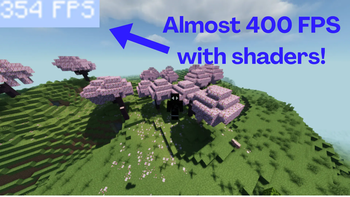
The greatest Minecraft performance pack, supporting the latest versions, and achieving well over 120 FPS with shaders, and a consistent 300-500 FPS without shaders. This has been tested on a mid and high end PC.
Screenshots
About this Modpack
This modpack is designed for players seeking smoother gameplay and a noticeable FPS boost, especially if you’re running on mid-range hardware. While it may not drastically improve performance on low-end laptops or PCs, it optimizes your experience for both PvP and survival modes by including a carefully selected set of quality-of-life (QOL) mods that enhance playability without adding unnecessary strain on your system.
Within, there's a collection of useful and intriguing mods that are difficult to find as a pre-packaged set. These include Uku's Armor HUD, a helpful way of keeping track of your armor condition and resilience; Status Effect Timer, by which you can easily view your existing buffs and debuffs; Invwalk, by which you can be able to walk around even if the inventory is open; and Clickthrough, by which you can open chests through item frames or signs, and gain precious seconds in hard-fought battles. These mods specialize in maximizing your gameplay and reacting quicker.
Whether you're dedicated to competitive PvP battles or experimenting survival tests way out, this pack maximizes your overall playtime with tools that are required and not bloat-filled or have an effect on performance. It's perfect for those who want functional enhancements without sacrificing speed and usability, so you can play extended hours and less time worrying about mods or lag.
All players struggle with finding modpacks that strike the balance between performance and quality-of-life improvements just so. This modpack bridges the gap by streamlining your game life with features that matter. The mods in this place are few but key, keeping your game as optimally tuned as possible while providing handy visual indicators and controls.
For PvP gamers, the optimizations and HUD improvements provided by the modpack truly do bring about a difference in making split-second decisions and acting fast. Survival players are helped by the inventory management and status effect tracking features that eliminate resource gathering and exploring as much of a chore.
Other than mods, the pack also sets up to eliminate excess background processes and graphical effects that get in the way of FPS. Less hiccups and fewer choppy frames even on the busiest moments, whether during combat or while traveling on long biomes.
There are no garish, system-sucking mods to be found here—this pack is all function and no flair. Each mod in the pack has a purpose, improving your gameplay without clogging up your screen or bogging down your system.
The HUD items are great and provide you with key information at a glance, rather than having to open up menus in order to view your gear or buffs. Invwalk allows you to stay mobile and responsive even when scrolled through your inventory, which can be a lifesaver when things are going poorly.
Clickthrough adds a subtle but powerful ease, allowing you to interact with the world more rapidly and effectively. Such small things add up to a more sophisticated, more satisfying experience.
Installation is simple, with minimal configuration required. The modpack caters to players who want to jump straight into enhanced play without burning hours adjusting mods or fixing crashes.
Regular updates guarantee compatibility with new versions of Minecraft and mods, so you will always be able to enjoy the most optimized experience. Modular pack design guarantees that even the future improvements or additions will not spoil the performance.
Feedback from the community has greatly influenced this modpack. Many features and mods were chosen based on what players actually need for casual and competitive play.
If you're fed up with lag, clunky UI, or mods that claim so much and do so little, this pack is a breath of fresh air.
If you're a seasoned player of Minecraft or simply want to play the game with a cleaner, snappier experience, this modpack is designed to introduce an improvement on what you already love about the game.
The balance between performance and functionality is you don't need to compromise gorgeous gameplay for incredibly smooth FPS or the other way around — both will be yours to enjoy.
Overall, this pack is a reliable partner to anyone concerned about efficiency, minimalism, and swiftness.
Available Versions
How to Set Up a N.Y.X's Optimized Server
Order Server
Choose at least 4 GB RAM (6 GB recommended for N.Y.X's Optimized). Based on player count: per 8 players.
Install Modpack in Dashboard
Open the modpack browser in the dashboard, search for "N.Y.X's Optimized" and click "Install". The fabric loader and Minecraft 1.21.5 are configured automatically.
Start Server & Play
Start the server – all mods are loaded automatically. Share the server IP with friends and play together!
Frequently Asked Questions
N.Y.X's Optimized server crashes or won't start – what to do?
Most common causes: insufficient RAM or wrong fabric loader. Check latest.log for "OutOfMemoryError" → increase RAM to at least 6 GB. For "Mixin" or "ClassNotFoundException" errors: modpack version and loader don't match. With Mado Hosting, loader and Minecraft version are auto-configured on modpack install – preventing most startup issues.
How much RAM does a N.Y.X's Optimized server really need?
Minimum 4 GB, recommended 6 GB for stable performance. per 8 players. Important: Minecraft modpacks need more RAM than vanilla – plan extra per additional player. With Mado Hosting, you can scale RAM up live at any time without data loss (from €8/month).
Can I add custom mods to N.Y.X's Optimized without conflicts?
Yes, but check compatibility: only use mods for the same loader (fabric) and same Minecraft version (1.21.5). Common issues: ID conflicts with recipe mods and incompatible coremod versions. The Mado dashboard mod browser only shows compatible mods and warns about known conflicts.
N.Y.X's Optimized server lagging – performance tips
1) Increase RAM to 6 GB+. 2) Reduce server view-distance to 8 (server.properties). 3) Pre-generate chunks with the "Chunky" plugin. 4) Use /spark profiler to check which mods consume the most tick time. With Mado Hosting, all servers run on NVMe SSDs with dedicated CPU cores – eliminating hardware as a bottleneck.
Similar Modpacks

![Cobblemon Official Modpack [Fabric]](https://cdn.modrinth.com/data/5FFgwNNP/e7f9ee2e9d361623847853fe2ddce42f519ee64f.png)
![COBBLEVERSE - Pokemon Adventure [Cobblemon]](https://cdn.modrinth.com/data/Jkb29YJU/581ecf54530972afb18a04660afd820f2f24f6c7.png)
![Better MC [FABRIC] - BMC2](https://cdn.modrinth.com/data/shFhR8Vx/a19c2bcb51d38f32f138d3607e91cb2b7b8e387f_96.webp)


Rent N.Y.X's Optimized Server
Start your own server with automatic modpack installation.
Details
- License
- LicenseRef-All-Rights-Reserved
- Server-side
- Unsupported
- Client-side
- Required
Supported Versions
Start your N.Y.X's Optimized Server now
From €8.00/month with 6 GB RAM for the best performance.
Configure Server →