
Nautical Optimize
Nautical Optimize is a performance-enhancing modpack designed to reduce lag, optimize FPS, and improve RAM/CPU usage in Minecraft. Perfect for players seeking smoother gameplay on both high-end and low-end systems.
Screenshots
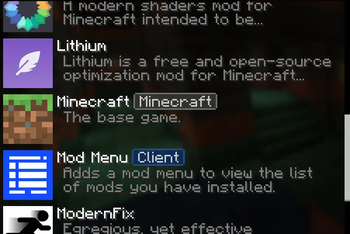
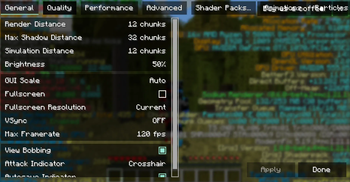

About this Modpack

Welcome to Nautical Optimize, the ultimate modpack designed to significantly enhance your Minecraft experience by reducing lag, boosting FPS, and optimizing resource usage across all hardware types. Whether you're playing on a low-end PC or a high-performance setup, Nautical Optimize v1.1.0 offers cutting-edge performance improvements without compromising on visual quality.
This version includes a wide selection of mods like Sodium, Lithium, Entity Culling, Iris Shaders, and many more, all meticulously chosen to ensure the smoothest gameplay possible. With optimizations focused on RAM, CPU usage, and rendering efficiency, you can enjoy faster load times, better frame rates, and less system strain, all while exploring the vast world of Minecraft.
Features:
- Enhanced FPS and Smooth Gameplay: Powered by Sodium, FerriteCore, and other performance-driven mods.
- Lag-Free Multiplayer: Optimized for large servers and multiplayer sessions with mods like Very Many Players.
- Optimized Visuals: Enjoy stunning shaders and textures with minimal impact on performance.
- User-Friendly Customization: Tweak your settings with ease using Reese’s Sodium Options and other mod options.
Nautical Optimize aims to bring you the best Minecraft performance, letting you experience the game like never before. Dive into a seamless, optimized journey with v1.1.0, and make the most out of your Minecraft world.
Future Projects by Nautical Services
Nautical Optimize is just the beginning. Nautical Services is committed to creating more projects that enrich and enhance your Minecraft experience. We aim to create innovative modpacks and tools that not only improve performance but also offer exciting new ways to enjoy the game. Stay tuned for future updates and projects that will push Minecraft’s performance and creativity even further!
Support Our Work
If you enjoy the work we are doing at Nautical Services and would like to support future development, consider donating to help us continue creating more wonderful projects like Nautical Optimize. Your support directly helps us develop and maintain performance-focused tools for the Minecraft community.
Available Versions
How to Set Up a Nautical Optimize Server
Order Server
Choose at least 4 GB RAM (6 GB recommended for Nautical Optimize). Based on player count: per 8 players.
Install Modpack in Dashboard
Open the modpack browser in the dashboard, search for "Nautical Optimize" and click "Install". The fabric loader and Minecraft 1.21.1 are configured automatically.
Start Server & Play
Start the server – all mods are loaded automatically. Share the server IP with friends and play together!
Frequently Asked Questions
Nautical Optimize server crashes or won't start – what to do?
Most common causes: insufficient RAM or wrong fabric loader. Check latest.log for "OutOfMemoryError" → increase RAM to at least 6 GB. For "Mixin" or "ClassNotFoundException" errors: modpack version and loader don't match. With Mado Hosting, loader and Minecraft version are auto-configured on modpack install – preventing most startup issues.
How much RAM does a Nautical Optimize server really need?
Minimum 4 GB, recommended 6 GB for stable performance. per 8 players. Important: Minecraft modpacks need more RAM than vanilla – plan extra per additional player. With Mado Hosting, you can scale RAM up live at any time without data loss (from €8/month).
Can I add custom mods to Nautical Optimize without conflicts?
Yes, but check compatibility: only use mods for the same loader (fabric) and same Minecraft version (1.21.1). Common issues: ID conflicts with recipe mods and incompatible coremod versions. The Mado dashboard mod browser only shows compatible mods and warns about known conflicts.
Nautical Optimize server lagging – performance tips
1) Increase RAM to 6 GB+. 2) Reduce server view-distance to 8 (server.properties). 3) Pre-generate chunks with the "Chunky" plugin. 4) Use /spark profiler to check which mods consume the most tick time. With Mado Hosting, all servers run on NVMe SSDs with dedicated CPU cores – eliminating hardware as a bottleneck.
Similar Modpacks

![Cobblemon Official Modpack [Fabric]](https://cdn.modrinth.com/data/5FFgwNNP/e7f9ee2e9d361623847853fe2ddce42f519ee64f.png)
![COBBLEVERSE - Pokemon Adventure [Cobblemon]](https://cdn.modrinth.com/data/Jkb29YJU/581ecf54530972afb18a04660afd820f2f24f6c7.png)
![Better MC [FABRIC] - BMC2](https://cdn.modrinth.com/data/shFhR8Vx/a19c2bcb51d38f32f138d3607e91cb2b7b8e387f_96.webp)


Rent Nautical Optimize Server
Start your own server with automatic modpack installation.
Details
- License
- LicenseRef-All-Rights-Reserved
- Server-side
- Unsupported
- Client-side
- Required
Supported Versions
Start your Nautical Optimize Server now
From €8.00/month with 6 GB RAM for the best performance.
Configure Server →