|
🌐 繁 體 中 文
|
🌍 English
|
|
這個模組包適合 🛡️ 生存、🏗️ 建築 及 🗺️ 冒險玩家
• 🛡️ 生存玩家:加入多款生存輔助模組,提升遊戲便利性與體驗
• 🏗️ 建築玩家:新增 Axiom 與 WorldEdit 等強大建築工具
• 🗺️ 冒險玩家:加入第一人稱視覺強化與探索體驗優化模組
⚙️ 客戶端與伺服器端皆可運行
|
This modpack is designed for 🛡️ Survivors, 🏗️ Builders, and 🗺️ Adventurers
• 🛡️ Survivors: Includes various quality-of-life and survival-assist modules
• 🏗️ Builders: Adds powerful building tools such as Axiom and WorldEdit
• 🗺️ Adventurers: Enhances exploration with first-person visual improvements and immersive features
⚙️ Runs on both client and server sides
|
⚠️ Important Notices | 重要通知 ⚠️
❗ Troubleshooting Guide | ❗ 疑難排解指南
❗ Troubleshooting Guide | ❗ 疑難排解指南
🌏 繁體中文
🔍 前置檢查
- ✅ 已安裝正確版本的 Java(Java 21)
適用於 Minecraft 1.20.5–1.21.11+
- ✅ 分配足夠記憶體: 建議配置為 4–8 GB。
若使用高品質材質包、更遠的視野距離(例如啟用 Distant Horizon 或 Bobby)時,建議依實際需求提升記憶體分配,以確保遊戲流暢運行。
🛠 常見問題與解決方案
- 🟥 遊戲崩潰: 嘗試移除最近新增的模組
- 🟨 畫面異常: 關閉光影或調整顯示設定
- 🟦 效能低落: 降低視野距離,或關閉高負載材質包/光影/模組(如 Distant Horizon)
🔧 模組相容性說明
🔸 FlashBack 渲染說明
使用前請先停用 CustomSkinLoader 模組,否則 FlashBack 將無法正常運作。
🔸 Distant Horizon 與 Blur+ 模組顯示衝突
同時啟用 Blur+ 模糊效果與 Distant Horizon,可能導致畫面異常或出現重影。
💡 解決方式:請先在 Mod Menu 關閉 Blur+,確認渲染正常後再重新啟用。
🔸 Bliss Shader 光影渲染問題(太陽光黑線)
問題源自 3D Skin Layers 模組,在光照場景中可能導致黑線出現。
💡 請在光影設定中關閉 Fast Render 並啟用 Compatibility Mode(相容模式)
🌐 English
🔍 Initial Checks
- ✅ Java Version: Ensure Java 21 is installed
Compatible with Minecraft 1.20.5–1.21.8
- ✅ Allocate sufficient memory: Recommended allocation is 4–8 GB.
If you're using high-resolution resource packs or extended render distance (e.g., with Distant Horizon or Bobby), increase memory allocation accordingly to maintain smooth performance.
🛠 Common Issues & Fixes
- 🟥 Game Crashes: Remove recently added mods
- 🟨 Visual Glitches: Disable shaders or adjust display settings
- 🟦 Performance Drops: Reduce render distance or disable high-load content (e.g., Distant Horizon)
🔧 Mod Compatibility Notes
🔸 FlashBack Render Instructions
Before rendering and exporting, disable CustomSkinLoader — FlashBack will not function properly otherwise.
🔸 Distant Horizon and Blur+ Rendering Conflict
Enabling Blur+ and Distant Horizon together may cause ghosting or screen artifacts.
💡 Fix: Disable Blur+ via the Mod Menu, ensure rendering is stable, then re-enable if needed.
🔸 Bliss Shader Rendering Issue (Black Lines in Sun Rays)
Caused by the 3D Skin Layers mod when sunlight is active.
💡 Fix: In shader settings, disable Fast Render and enable Compatibility Mode
📘 Other Information | 其他資訊 📘
📋 DH&O Practical Shortcut Mod List | 📋 DH&O 實用快捷鍵模組清單
🔖 繁體中文版清單
| 模組 |
功能 |
快捷鍵 |
說明 |
| Axiom |
上下文選單 |
Tab |
打開上下文選單 |
|
切換編輯器 UI |
Right Shift |
切換編輯器介面 |
| 模組 |
功能 |
快捷鍵 |
說明 |
| Do a Barrel Roll |
開啟/關閉 |
F8 |
讓你飛的時候會像真的飛機一樣360度飛來飛去 |
| 模組 |
功能 |
快捷鍵 |
說明 |
| Client Time |
Open Menu |
Alt + Z |
可以自訂你所看到的時間跟天氣 |
| 模組 |
功能 |
快捷鍵 |
說明 |
| ConfigurableBossBars |
BossBars 開關 |
F7 |
關閉所有的 BossBars |
| 模組 |
功能 |
快捷鍵 |
說明 |
| Gamma Utils |
Toggle Night Vision |
. |
開啟/關閉夜視 |
| 模組 |
功能 |
快捷鍵 |
說明 |
| Iris |
Reload Shaders |
[ |
重新加載光影 |
|
Shaderpack Selection Screen |
] |
光影包選取 |
|
Toggle Shaders |
\ |
開啟/關閉光影 |
| 模組 |
功能 |
快捷鍵 |
說明 |
| Librarian Trade Finder |
Open Config Screen |
Control + J |
設定腹膜書種類 |
|
Select Lectern & Librarian |
Control + K |
十字準心對準講台並且按下後「選取講台」 |
|
Start/Stop Search |
Control + L |
選取成功後按下將會開始自動化腳本 |
| 模組 |
功能 |
快捷鍵 |
說明 |
| Litematica |
層模式下一層 |
M + H |
切換到下一個藍圖層 |
|
層下一層 |
H |
直接切換到下一個藍圖層 |
|
層模式上一層 |
M + J |
切換到上一個藍圖層 |
|
層上一層 |
J |
直接切換到上一個藍圖層 |
|
切換打印模式 |
M + K |
切換打印模式,用於將藍圖構築到世界中 |
|
執行操作 |
M + O |
貼上藍圖 |
|
快速放置模式 |
Z + BUTTON_2 |
切換快速放置模式,快速填充方塊 |
| 模組 |
功能 |
快捷鍵 |
說明 |
| Simple Voice Chat |
禁用語音聊天 |
Alt + N |
關閉語音聊天功能 |
|
群組管理 |
Alt + G |
管理語音聊天群組 |
|
語音聊天設定 |
Alt + J |
調整降噪/音量等功能 |
|
隱藏語音聊天圖標 |
Alt + H |
隱藏語音聊天介面上的圖標 |
|
靜音麥克風 |
Alt + V |
靜音麥克風 |
| 模組 |
功能 |
快捷鍵 |
說明 |
| Tweakroo |
自由視角玩家輸入 |
LEFT_CONTROL + V |
切換自由視角下的玩家輸入 |
|
自由視角玩家移動 |
LEFT_CONTROL + C |
切換自由視角下的玩家移動 |
|
切換自由視角 |
LEFT_CONTROL + F |
切換自由視角模式 |
|
方塊靈活放置 |
LEFT_CONTROL + Q |
切換方塊靈活放置模式 |
|
周期性攻擊 |
LEFT_CONTROL + T |
切換周期性攻擊模式 |
|
周期性使用物品 |
LEFT_CONTROL + H |
切換周期性使用物品模式 |
|
顯示潛影盒內容 |
tweakShulkerBoxDisplay "true" |
顯示潛影盒中的物品 |
|
顯示地圖預覽 |
tweakMapPreview "true" |
顯示地圖預覽 |
| 模組 |
功能 |
快捷鍵 |
說明 |
| Xaero’s MiniMap |
New Waypoint |
Alt + U |
新增紀錄點 |
|
Open Waypoint Screen |
U |
管理紀錄點 |
| 模組 |
功能 |
快捷鍵 |
說明 |
| Xaero’s World Map |
打開世界地圖 |
N |
打開世界地圖介面 |
| 模組 |
功能 |
快捷鍵 |
說明 |
| Zoomify |
Zoom (Hold) |
Button 5 or Z |
放大縮小視野 |
🔖 English Version
| Module |
Function |
Keybind |
Description |
| Axiom |
Open context menu |
Tab |
Open the context menu |
|
Toggle editor UI |
Right Shift |
Toggle the editor interface |
| Module |
Function |
Keybind |
Description |
| Do a Barrel Roll |
Toggle Enable |
F8 |
Let you fly around in all directions like a real airplane. |
| Module |
Function |
Keybind |
Description |
| Client Time |
Open Menu |
Alt + Z |
Customize displayed time and weather |
| Module |
Function |
Keybind |
Description |
| ConfigurableBossBars |
Toggle BossBars |
F7 |
Disable all BossBars |
| Module |
Function |
Keybind |
Description |
| Gamma Utils |
Toggle Night Vision |
. |
Toggle night vision |
| Module |
Function |
Keybind |
Description |
| Iris |
Reload Shaders |
[ |
Reload shaders |
|
Shaderpack Selection Screen |
] |
Select shader pack |
|
Toggle Shaders |
\ |
Toggle shaders |
| Module |
Function |
Keybind |
Description |
| Librarian Trade Finder |
Open Config Screen |
Control + J |
Configure librarian trade categories |
|
Select Lectern & Librarian |
Control + K |
Aim crosshair at lectern & librarian, then select |
|
Start/Stop Search |
Control + L |
Start automation script after selection |
| Module |
Function |
Keybind |
Description |
| Litematica |
Next layer (mode) |
M + H |
Switch to next blueprint layer |
|
Next layer |
H |
Directly switch to next blueprint layer |
|
Previous layer (mode) |
M + J |
Switch to previous blueprint layer |
|
Previous layer |
J |
Directly switch to previous blueprint layer |
|
Toggle print mode |
M + K |
Toggle print mode for building blueprints |
|
executeOperation |
M + O |
Paste blueprint |
|
Quick place mode |
Z + BUTTON_2 |
Toggle quick place mode for fast block fill |
| Module |
Function |
Keybind |
Description |
| Simple Voice Chat |
Disable voice chat |
Alt + N |
Disable voice chat feature |
|
Group management |
Alt + G |
Manage voice chat groups |
|
Voice chat settings |
Alt + J |
Adjust noise reduction/volume settings |
|
Hide chat icons |
Alt + H |
Hide icons on the voice chat interface |
|
Mute microphone |
Alt + V |
Mute the microphone |
| Module |
Function |
Keybind |
Description |
| Tweakroo |
Freecam player input |
LEFT_CONTROL + V |
Toggle player input in freecam |
|
Freecam player movement |
LEFT_CONTROL + C |
Toggle player movement in freecam |
|
Toggle freecam |
LEFT_CONTROL + F |
Toggle freecam mode |
|
Flexible block placement |
LEFT_CONTROL + Q |
Toggle flexible block placement mode |
|
Periodic attack |
LEFT_CONTROL + T |
Toggle periodic attack mode |
|
Periodic item use |
LEFT_CONTROL + H |
Toggle periodic item use mode |
|
Show Shulker Box contents |
tweakShulkerBoxDisplay "true" |
Show items inside Shulker Boxes |
|
Show map preview |
tweakMapPreview "true" |
Show map preview |
| Module |
Function |
Keybind |
Description |
| Xaero’s MiniMap |
New Waypoint |
Alt + U |
Add a new waypoint |
|
Open Waypoint Screen |
U |
Manage waypoints |
| Module |
Function |
Keybind |
Description |
| Xaero’s World Map |
Open world map |
N |
Open the world map interface |
| Module |
Function |
Keybind |
Description |
| Zoomify |
Zoom (Hold) |
Button 5 or Z |
Zoom in/out view |
🎨 Resource Packs Included | 🎨 已包含資源包
💾 Shaders Bundled | 💾 隨模組附帶光影
Bliss Shader
Photon Shader
- Download: 🔗 Gluon Edit
- Author: sixthsurge | Edit: Gluon
Complementary Unbound
Derivative Main
📜 Copyright Notice | 版權聲明
- Shaders
- EN: Some profiles have been modified; all copyrights remain with the original authors.
- ZH: 部分設定經修改,版權仍屬原作者。
- Resource Packs
- EN: Shared for convenience only; all rights reserved by the original creators.
- ZH: 僅作分享,所有權歸原作者所有。
💾 Memory Note | 記憶體提示
- EN: If you enable Distant Horizons, make sure to allocate 4-8 GB of JVM memory to avoid FPS drops.
- ZH: 若啟用 Distant Horizons,請將 JVM 記憶體調整至 4-8 GB,以免影響 FPS。
🖥️ Recommended Minimum Specs
| 💻 Component |
⚙️ Minimum |
| OS |
Windows 10 |
| CPU |
Intel Core i3 / AMD Ryzen 5 |
| GPU |
NVIDIA GTX 1660 / AMD RX 6600 |
| RAM |
8 GB |
Specs are based on community data and may not guarantee perfect performance.


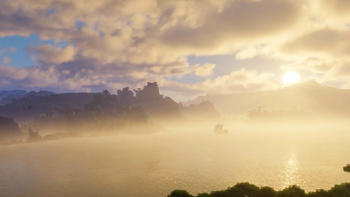
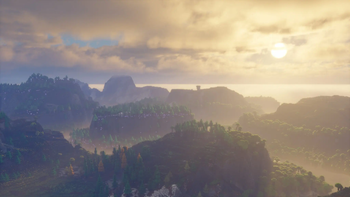


![Cobblemon Official Modpack [Fabric]](https://cdn.modrinth.com/data/5FFgwNNP/e7f9ee2e9d361623847853fe2ddce42f519ee64f.png)
![COBBLEVERSE - Pokemon Adventure [Cobblemon]](https://cdn.modrinth.com/data/Jkb29YJU/581ecf54530972afb18a04660afd820f2f24f6c7.png)
![Better MC [FABRIC] - BMC2](https://cdn.modrinth.com/data/shFhR8Vx/a19c2bcb51d38f32f138d3607e91cb2b7b8e387f_96.webp)
