
Netherite-Client
Netherite-Client makes Minecraft feel smoother, cleaner, and faster without changing the vanilla gameplay.
Screenshots
About this Modpack
🚀 Performance & Bugfixes
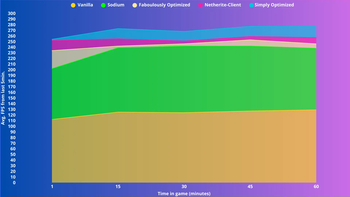
Sodium, Lithium, ScalableLux, Entity Culling and more: Complete rewrite of the Minecraft engine for the most performance.
💻Tested on these specs:
CPU: Intel Core i7 4810MQ @ 2.8Ghz
RAM: 16GB DDR3 2666Mhz (10GB Allocated)
512GB SSD SATA OCZ-ARC100 (34GB Free)
GPU1: Intel HD Graphics 4600
GPU2: Nvidia Quadro K1100M
Using AtlasOS 0.4.1 on Windows 10
On Laptop HP Zbook 15 G2
Using Lowest Settings possible in all tests.
🧩 Quality of Life
In-Game Account Switcher: swap Microsoft, Mojang or offline profiles on the fly!
Fast Loading: jump back into worlds servers instantly after disconnects
HUD and Functions: do you play pvp? then Keystrokes, cps counter and low fire will help! And that is just the beggining.
Capes Support: cape rendering from multiple providers—purely cosmetic
And many more!
🎨 Visuals
Faithful 64x & extra resource packs and shaders: sharper blocks and items without losing the vanilla look.
GUI tweaks for cleaner button, icons, and simplified menus
And many more!
Over 70 carefully chosen mods work behind the scenes to give you a rock-solid, lag-free Minecraft—no gimmicks, just quality.
💎Credits and Donates
HUGE Thanks to AxolotlClient for many of the features.
✨Frequently Asked Questions
Q: Are you going to update to the newest version?
A: Yes, as soon as most of the included mods support it.
Q: Will you consider a forge release?
A: I am open to making a forge version, however, only after i complete this one.
Q: ThErE aRe BeTtEr mOdPaCkS fOr OpTiMizAtIoN...
A: This modpack is mainly focused on QoL, if you want pure performance, check out Simply Optimized..
Q: What can we expect in the future?
A: Probably more features, optimizations and support for older versions.
Q: Are you going to abandon this project like the last one?
A: Definitely not, i have huge plans with this modpack, i left curseforge because most of the modders left, due to how they treated them (and me) there.
Q: Will you return to curseforge?
A: Partly, i'll just update this modpack there occasionally.
Available Versions
How to Set Up a Netherite-Client Server
Order Server
Choose at least 4 GB RAM (6 GB recommended for Netherite-Client). Based on player count: per 8 players.
Install Modpack in Dashboard
Open the modpack browser in the dashboard, search for "Netherite-Client" and click "Install". The fabric loader and Minecraft 1.21.9 are configured automatically.
Start Server & Play
Start the server – all mods are loaded automatically. Share the server IP with friends and play together!
Frequently Asked Questions
Netherite-Client server crashes or won't start – what to do?
Most common causes: insufficient RAM or wrong fabric loader. Check latest.log for "OutOfMemoryError" → increase RAM to at least 6 GB. For "Mixin" or "ClassNotFoundException" errors: modpack version and loader don't match. With Mado Hosting, loader and Minecraft version are auto-configured on modpack install – preventing most startup issues.
How much RAM does a Netherite-Client server really need?
Minimum 4 GB, recommended 6 GB for stable performance. per 8 players. Important: Minecraft modpacks need more RAM than vanilla – plan extra per additional player. With Mado Hosting, you can scale RAM up live at any time without data loss (from €8/month).
Can I add custom mods to Netherite-Client without conflicts?
Yes, but check compatibility: only use mods for the same loader (fabric) and same Minecraft version (1.21.9). Common issues: ID conflicts with recipe mods and incompatible coremod versions. The Mado dashboard mod browser only shows compatible mods and warns about known conflicts.
Netherite-Client server lagging – performance tips
1) Increase RAM to 6 GB+. 2) Reduce server view-distance to 8 (server.properties). 3) Pre-generate chunks with the "Chunky" plugin. 4) Use /spark profiler to check which mods consume the most tick time. With Mado Hosting, all servers run on NVMe SSDs with dedicated CPU cores – eliminating hardware as a bottleneck.
Similar Modpacks

![Cobblemon Official Modpack [Fabric]](https://cdn.modrinth.com/data/5FFgwNNP/e7f9ee2e9d361623847853fe2ddce42f519ee64f.png)
![COBBLEVERSE - Pokemon Adventure [Cobblemon]](https://cdn.modrinth.com/data/Jkb29YJU/581ecf54530972afb18a04660afd820f2f24f6c7.png)
![Better MC [FABRIC] - BMC2](https://cdn.modrinth.com/data/shFhR8Vx/a19c2bcb51d38f32f138d3607e91cb2b7b8e387f_96.webp)


Rent Netherite-Client Server
Start your own server with automatic modpack installation.
Supported Versions
Start your Netherite-Client Server now
From €8.00/month with 6 GB RAM for the best performance.
Configure Server →