
Nefix Optimized
An OPTIMIZED mod pack that will increase PERFORMANCE and FPS even on the WEAKEST devices, as well as simplify and improve your gaming experience
Screenshots
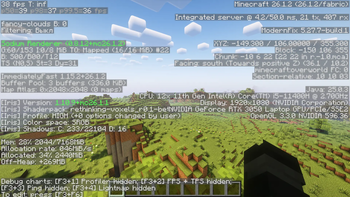
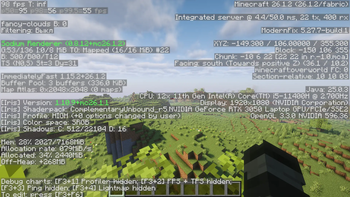
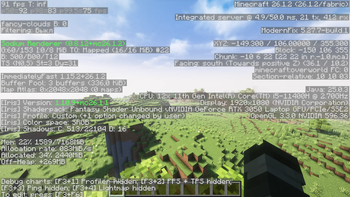
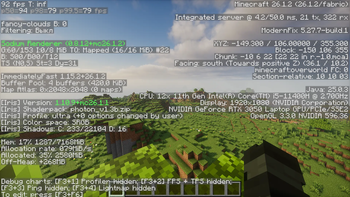

About this Modpack

How does this mod pack work?
This mod pack works very simply. From my own experience, I’ve tested many popular mod packs for optimization, and in many of them I noticed a major problem: CONFLICTS BETWEEN CERTAIN MODS AND SODIUM
Such a conflict can lead to a significant drop in FPS, since the same options—such as those in the popular Sodium base mod and the More Culling mod—overlap and perform the same optimization functions, which can cause FPS to drop. but in my mod pack, I’ve checked all the technical aspects of the mods to ensure that each one performs its specific function without causing conflicts.
And to my surprise, it turned out to be very lightweight—even I wouldn’t have expected that, given that I was adding 20–30 mods for the same function.
Start of installation
- Download the mod pack for your version of Minecraft
- Open the Modrinth app
- Create a new instance
- Install the build
- Import the build
- Select the downloaded file
- Done
Additions
In addition to all of the above, I’ve also saved my settings so you don’t have to spend a lot of time configuring them when you first launch the game.
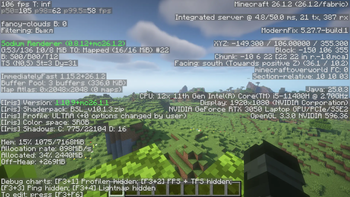
So you don’t have to go through all the hassle of testing this modpack as if you were just starting your workday hoping to earn more, I’ve included the results of my independent tests of vanilla graphics, as well as a number of popular shaders, on a fairly underpowered device (full specifications are listed below the text with FPS metrics)
↓BELOW ARE THE RESULTS OF MY SIMPLE INDEPENDENT TESTS↓ 8 chunks
| Pure vanilla Minecraft | Minecraft with sodium | Minecraft with my modpack |
|---|---|---|
| 350-450FPS | 500-600FPS | 600-800+FPS |
↓Shader tests with my mod pack↓ 16 chunks
| Shader name | Graphics preset | FPS result |
|---|---|---|
| AstraLex Shader | High | 75 |
| Solas Shader | Ultra | 60 |
| Photon Shaders | Ultra | 90 |
| Bliss Shader | High | 110 |
| BSL Shader | Ultra | 105 |
| Complementary Reimagined | High | 100 |
| Complementary Unbound | High | 95 |
| Rethinking Voxels | Ultra | 50 |
| MakeUp Ultra Fast 9 | High | 145 |
| Fantasy Reimagined | High | 105 |
| Fantasy Unbound | High | 90 |
| E-LITE shaders 5 | Max | 140 |
| Nostalgia Shader | High | 80 |
| Spooklementary | High | 85 |
| Super Duper Vanilla | Ultra | 140 |
| Visual Vibrance | High | 155 |
| VTXS Shader | Ultra | 65 |
Don’t panic if you notice a big difference in FPS between the vanilla graphics and the shaders—this is because I’m testing this on my laptop. If you have a desktop PC, you’ll get much better performance with the shaders. Also, keep in mind that the graphics card in my laptop is much weaker than an RX 580
In addition to this text result of my tests, you can also go to the "gallery" section and see all the simple tests there
↓My device specifications↓
- CPU - Intel core i5 11400H
- GPU - Nvidia RTX 3050 mobile
- MEM - 16GB DDR4 3200mhz
- SSD - WDC PC SN540
- OS - Windows 11 pro
If your results don't match mine, then idk what could be weaker than the 3050 for laptops frr
All my tests are not a serious confirmation that your FPS will always be as stated in the test, since all my tests are quite simple with a favorable scenario
Translated via DeepL
Available Versions
How to Set Up a Nefix Optimized Server
Order Server
Choose at least 4 GB RAM (6 GB recommended for Nefix Optimized). Based on player count: per 8 players.
Install Modpack in Dashboard
Open the modpack browser in the dashboard, search for "Nefix Optimized" and click "Install". The fabric loader and Minecraft 26.1.2 are configured automatically.
Start Server & Play
Start the server – all mods are loaded automatically. Share the server IP with friends and play together!
Frequently Asked Questions
Nefix Optimized server crashes or won't start – what to do?
Most common causes: insufficient RAM or wrong fabric loader. Check latest.log for "OutOfMemoryError" → increase RAM to at least 6 GB. For "Mixin" or "ClassNotFoundException" errors: modpack version and loader don't match. With Mado Hosting, loader and Minecraft version are auto-configured on modpack install – preventing most startup issues.
How much RAM does a Nefix Optimized server really need?
Minimum 4 GB, recommended 6 GB for stable performance. per 8 players. Important: Minecraft modpacks need more RAM than vanilla – plan extra per additional player. With Mado Hosting, you can scale RAM up live at any time without data loss (from €8/month).
Can I add custom mods to Nefix Optimized without conflicts?
Yes, but check compatibility: only use mods for the same loader (fabric) and same Minecraft version (26.1.2). Common issues: ID conflicts with recipe mods and incompatible coremod versions. The Mado dashboard mod browser only shows compatible mods and warns about known conflicts.
Nefix Optimized server lagging – performance tips
1) Increase RAM to 6 GB+. 2) Reduce server view-distance to 8 (server.properties). 3) Pre-generate chunks with the "Chunky" plugin. 4) Use /spark profiler to check which mods consume the most tick time. With Mado Hosting, all servers run on NVMe SSDs with dedicated CPU cores – eliminating hardware as a bottleneck.
Similar Modpacks

![Cobblemon Official Modpack [Fabric]](https://cdn.modrinth.com/data/5FFgwNNP/e7f9ee2e9d361623847853fe2ddce42f519ee64f.png)
![COBBLEVERSE - Pokemon Adventure [Cobblemon]](https://cdn.modrinth.com/data/Jkb29YJU/581ecf54530972afb18a04660afd820f2f24f6c7.png)
![Better MC [FABRIC] - BMC2](https://cdn.modrinth.com/data/shFhR8Vx/a19c2bcb51d38f32f138d3607e91cb2b7b8e387f_96.webp)


Rent Nefix Optimized Server
Start your own server with automatic modpack installation.
Supported Versions
Start your Nefix Optimized Server now
From €8.00/month with 6 GB RAM for the best performance.
Configure Server →