
Never Enough Discs
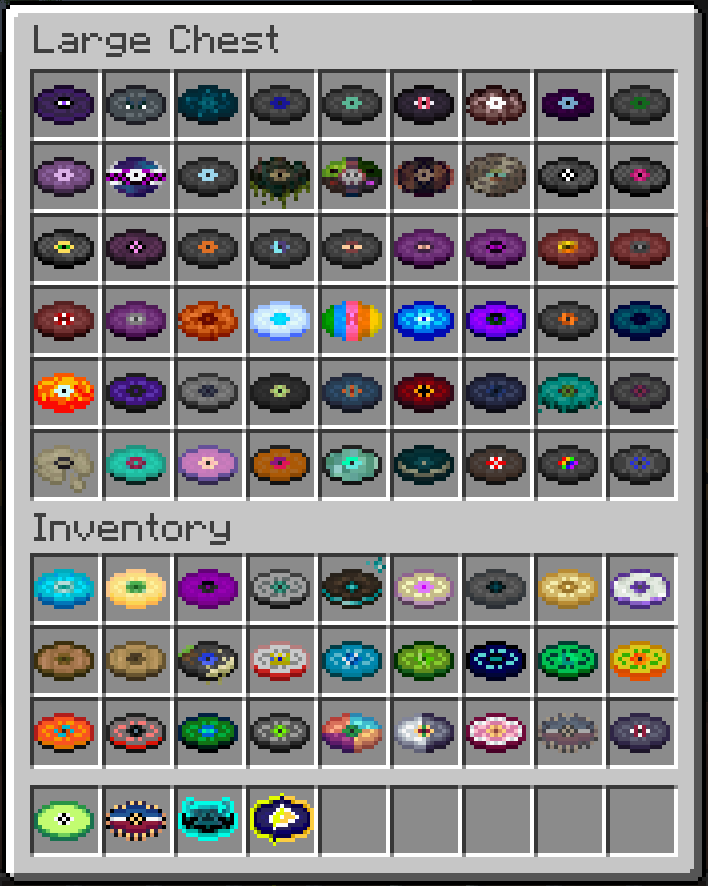
This Modpack add over 100+ music discs with mods being developed right now to add even more!
About this Modpack

This Modpack aims to make the focus of the game one simple thing - Discs. There is currently over 100+ discs in the modpack. This may seem like a lot but we are hard at work making new mods to increase that amount significantly. The music disc mods in the modpack are More Music Discs. Also if anyone asks this is the too much QoL Mod.
Special Thanks to MarsThePlanet for creating the More Music Discs Mod
Currently all the discs:
Mods (Excluding Libraries and dependecies)
- VTDownloader
- Continuity
- Xaero's Minimap
- More Culling
- ImmediatelyFast
- Dynamic Lights
- KleeSlabs
- Better F3
- Advancement Plaques
- Easy Magic
- Sodium
- Reese's Sodium Options
- Inventory Essentials
- Equipment Compare
- Crafting Tweaks
- Bartering Station
- AppleSkin
- Starlight
- More Mobs
- You're in Grave Danger
- Horse Buff
- Chunks Fade In
- More Mob Variants
- Dynamic FPS
- Inventorio
- Not Enough Animations
- Health Indicator TXF
- Blur+
- Entity Culling
- Memory Leak Fix
- Xaero's World Map
- Replay Mod
- Explosive Enhancement
- Enhanced Block Entities
- Easy Anvils
- Veinminer
- Indium
- Artifacts
- Sodium Extra
- Ping Wheel
- Model Gap Fix
- Debugify
- Resourcify
- Day Counter (Original)
- Comforts
- C2ME
- Harvest With Ease
- Freecam
- Elytra Trims
- Iris
- Resource Pack Overrides
- Pick up Notifier
- Dynamic Crosshair
- Mouse Tweaks
- Tree Harvester
- Legendary Tooltips
- Litematica
- Wakes
- Krypton
- EMI
- Easy Shulker Boxes
- Lithium
- Geophilic
- Lazy DFU
- GravelMiner
- Carry On
- Essential Mod
- Bridging Mod
- Mod Menu
- Better Statistics Screen
- ModernFix
- Jade
- CIT Resewn
- More Music Discs
- Visuality
- Presence Footsteps
- Held Item Info
- FerriteCore
- Tool Trims
- Zoomify
- Status Effect Bars
- FastQuit
- 3D Skin Layers
Available Versions
How to Set Up a Never Enough Discs Server
Order Server
Choose at least 6 GB RAM (8 GB recommended for Never Enough Discs). Based on player count: per 5 players.
Install Modpack in Dashboard
Open the modpack browser in the dashboard, search for "Never Enough Discs" and click "Install". The fabric loader and Minecraft 1.20.4 are configured automatically.
Start Server & Play
Start the server – all mods are loaded automatically. Share the server IP with friends and play together!
Frequently Asked Questions
Never Enough Discs server crashes or won't start – what to do?
Most common causes: insufficient RAM or wrong fabric loader. Check latest.log for "OutOfMemoryError" → increase RAM to at least 8 GB. For "Mixin" or "ClassNotFoundException" errors: modpack version and loader don't match. With Mado Hosting, loader and Minecraft version are auto-configured on modpack install – preventing most startup issues.
How much RAM does a Never Enough Discs server really need?
Minimum 6 GB, recommended 8 GB for stable performance. per 5 players. Important: Minecraft modpacks need more RAM than vanilla – plan extra per additional player. With Mado Hosting, you can scale RAM up live at any time without data loss (from €12/month).
Can I add custom mods to Never Enough Discs without conflicts?
Yes, but check compatibility: only use mods for the same loader (fabric) and same Minecraft version (1.20.4). Common issues: ID conflicts with recipe mods and incompatible coremod versions. The Mado dashboard mod browser only shows compatible mods and warns about known conflicts.
Never Enough Discs server lagging – performance tips
1) Increase RAM to 8 GB+. 2) Reduce server view-distance to 8 (server.properties). 3) Pre-generate chunks with the "Chunky" plugin. 4) Use /spark profiler to check which mods consume the most tick time. With Mado Hosting, all servers run on NVMe SSDs with dedicated CPU cores – eliminating hardware as a bottleneck.
Rent Never Enough Discs Server
Start your own server with automatic modpack installation.
Supported Versions
Start your Never Enough Discs Server now
From €12.00/month with 8 GB RAM for the best performance.
Configure Server →