Nightfall: Definitive Edition
A challenging and immersive overhaul of Minecraft survival
Screenshots
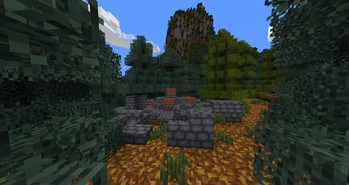
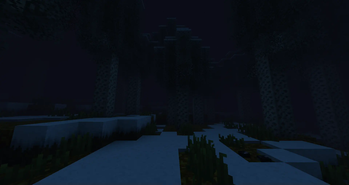
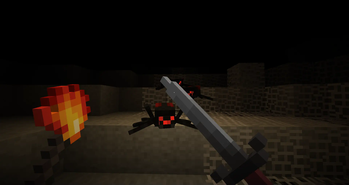
About this Modpack
Overview
Nightfall is a total overhaul that reimagines Minecraft survival to deliver a challenging, immersive, and mechanically deep experience within a novel dark fantasy universe.
Nightfall: Definitive Edition is the intended way to play Nightfall, including only performance and QoL mods to create the most optimal play experience possible.
Major Features
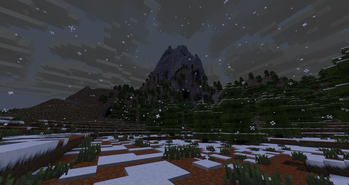
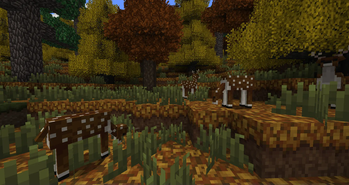
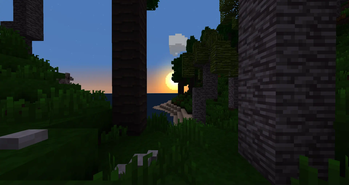
- Dark Fantasy Aesthetic – Enjoy an alternative art style eschewing the bright, soft aesthetic of vanilla in favor of darker, richer colors and stark contrast.
- Encyclopedia – Discover new mechanics, recipes, and fields of knowledge through solving puzzles presented by the encyclopedia.
- Enhanced Combat – Employ dashing, basic & alternate weapon attacks, stuns, and unique weapon techniques to overcome foes.
- Dangerous Nights – Fight to carve out a place for yourself in this harsh world and survive against the undead dangers of the night.
- Better Building – Utilize a single building material to easily place multiple block variants without the hassle of crafting and inventory management.
- Continental Worlds – Explore continents separated by a vast ocean. Scale mountains reaching nearly 400 blocks in height or descend into complex caves just as deep.
- Seasons – Experience the four seasons as time passes, affecting weather, animals, plants, and trees.
- Time Simulation – Return from a long adventure to find that the world has changed without your presence. Snow & ice forms and melts, plants grow, fuel burns, and so on.
Minor features include layered waterlogging, dynamic lighting, customizable attributes, smarter AI, revamped cave generation, staged tree growth, universal gravity, climbing, and more.
Installation
Install via the Modrinth App.
[Recommended] Navigate to Nightfall: Definitive Edition -> Settings and set custom memory to 8192 MB. Add the following to Java arguments:
Arguments
-XX:+UnlockExperimentalVMOptions -XX:+UnlockDiagnosticVMOptions -XX:+AlwaysPreTouch -XX:+DisableExplicitGC -XX:+UseNUMA -XX:NmethodSweepActivity=1 -XX:ReservedCodeCacheSize=400M -XX:NonNMethodCodeHeapSize=12M -XX:ProfiledCodeHeapSize=194M -XX:NonProfiledCodeHeapSize=194M -XX:-DontCompileHugeMethods -XX:MaxNodeLimit=240000 -XX:NodeLimitFudgeFactor=8000 -XX:+UseVectorCmov -XX:+PerfDisableSharedMem -XX:+UseFastUnorderedTimeStamps -XX:+UseCriticalJavaThreadPriority -XX:ThreadPriorityPolicy=1 -XX:AllocatePrefetchStyle=3 -XX:+UseG1GC -XX:MaxGCPauseMillis=37 -XX:+PerfDisableSharedMem -XX:G1HeapRegionSize=16M -XX:G1NewSizePercent=23 -XX:G1ReservePercent=20 -XX:SurvivorRatio=32 -XX:G1MixedGCCountTarget=3 -XX:G1HeapWastePercent=20 -XX:InitiatingHeapOccupancyPercent=10 -XX:G1RSetUpdatingPauseTimePercent=0 -XX:MaxTenuringThreshold=1 -XX:G1SATBBufferEnqueueingThresholdPercent=30 -XX:G1ConcMarkStepDurationMillis=5.0 -XX:G1ConcRSHotCardLimit=16 -XX:G1ConcRefinementServiceIntervalMillis=150 -XX:GCTimeRatio=99
Future Plans
Nightfall is currently in beta and, as of 1.18.1b, has ~40% of the content planned for the final release.
Upcoming Features
- New research puzzle system
- 2 new encyclopedia fields
- Sanity system
This list is not exhaustive and is intended to give a sense of direction for the near future. Smaller features not listed here may be added and larger features may be delayed.
FAQ
I'm trying to update to a new version, but I can't see it in the Modrinth app despite it being visible on the website. How can I get the new version in the app?
Answer
In the Modrinth app, navigate to Settings -> Resource management -> App cache then select "Purge cache" and restart the app.
Some textures appear unchanged. How do I fix this?
Answer
Make sure that “Mod Resources” is above “Default” in Resource Packs.
Will you update Nightfall to X version?
Answer
No.
Will you port Nightfall to X mod loader?
Answer
No.
Is X mod compatible with Nightfall?
Answer
If it’s a purely visual/audio mod, probably yes. If it's a performance mod, maybe. Otherwise, no unless it is explicitly made compatible by the mod developer or modpack author. Distant Horizons is compatible but has minor issues regarding clouds and fog on water.
Can I use shaders with Nightfall?
Answer
No unless it explicitly supports Nightfall.
Can I post Nightfall on another website?
Answer
You may repost the contents of this page to another website, excluding the mod files themselves. Downloads must be redirected to this page on Modrinth. Do NOT rehost the mod files.
Can I use Nightfall in a modpack?
Answer
Yes as long as you differentiate your modpack from the definitive version modpack. In other words, do not create a purely performance enhanced Nightfall modpack. I encourage you to use the definitive version as a base and build off that.
Can I develop an addon/compatibility mod or resource pack for Nightfall?
Answer
Yes. Note that Nightfall is in active development, so updates will be frequent and consistently introduce new features. If you choose to develop something, let me know what you’re making so I can help you avoid conflict with future updates. See the GitHub page for more technical info.
Can I translate Nightfall to X language?
Answer
Yes. Once completed, language files should ideally be submitted to the GitHub in the form of a pull request. See the contribution guidelines & notices here.
The roots of unique words are listed here to help clarify their meaning:
- Wyldery – Wyld (English) + -ery (English)
- Nixwacke – Nix (Latin) + Greywacke (English)
- Aurgrot – Aurora/Aura (English) + Grotto (English)
- Stygfel – Stygian (English) + Hornfels (English)
- Caedtar - Caedis (Latin) + Tar (English)
- Merbor - Mere (Old English) + Bor (Middle English)
Support
If you enjoy my mod, consider supporting me on Ko-fi. Nightfall is the result of over 10,000 hours of work done for free. I will continue developing Nightfall until its completion regardless of what happens, but any and all financial support is greatly appreciated as it allows me to dedicate more time to working on it.
Available Versions
How to Set Up a Nightfall: Definitive Edition Server
Order Server
Choose at least 6 GB RAM (8 GB recommended for Nightfall: Definitive Edition). Based on player count: per 5 players.
Install Modpack in Dashboard
Open the modpack browser in the dashboard, search for "Nightfall: Definitive Edition" and click "Install". The forge loader and Minecraft 1.18.2 are configured automatically.
Start Server & Play
Start the server – all mods are loaded automatically. Share the server IP with friends and play together!
Frequently Asked Questions
Nightfall: Definitive Edition server crashes or won't start – what to do?
Most common causes: insufficient RAM or wrong forge loader. Check latest.log for "OutOfMemoryError" → increase RAM to at least 8 GB. For "Mixin" or "ClassNotFoundException" errors: modpack version and loader don't match. With Mado Hosting, loader and Minecraft version are auto-configured on modpack install – preventing most startup issues.
How much RAM does a Nightfall: Definitive Edition server really need?
Minimum 6 GB, recommended 8 GB for stable performance. per 5 players. Important: Minecraft modpacks need more RAM than vanilla – plan extra per additional player. With Mado Hosting, you can scale RAM up live at any time without data loss (from €12/month).
Can I add custom mods to Nightfall: Definitive Edition without conflicts?
Yes, but check compatibility: only use mods for the same loader (forge) and same Minecraft version (1.18.2). Common issues: ID conflicts with recipe mods and incompatible coremod versions. The Mado dashboard mod browser only shows compatible mods and warns about known conflicts.
Nightfall: Definitive Edition server lagging – performance tips
1) Increase RAM to 8 GB+. 2) Reduce server view-distance to 8 (server.properties). 3) Pre-generate chunks with the "Chunky" plugin. 4) Use /spark profiler to check which mods consume the most tick time. With Mado Hosting, all servers run on NVMe SSDs with dedicated CPU cores – eliminating hardware as a bottleneck.
Similar Modpacks
![Cobblemon Official Modpack [Fabric]](https://cdn.modrinth.com/data/5FFgwNNP/e7f9ee2e9d361623847853fe2ddce42f519ee64f.png)
![COBBLEVERSE - Pokemon Adventure [Cobblemon]](https://cdn.modrinth.com/data/Jkb29YJU/581ecf54530972afb18a04660afd820f2f24f6c7.png)
![Better MC [FABRIC] - BMC2](https://cdn.modrinth.com/data/shFhR8Vx/a19c2bcb51d38f32f138d3607e91cb2b7b8e387f_96.webp)


![Better MC [FORGE] - BMC4](https://cdn.modrinth.com/data/4BV47HRn/7f5ef7cc61b2593609aabef3ed07a866a4f11b73_96.webp)
Rent Nightfall: Definitive Edition Server
Start your own server with automatic modpack installation.
Supported Versions
Start your Nightfall: Definitive Edition Server now
From €12.00/month with 8 GB RAM for the best performance.
Configure Server →