
OptCraft
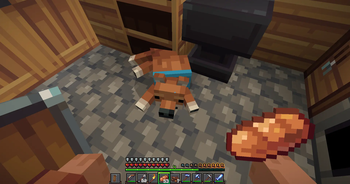
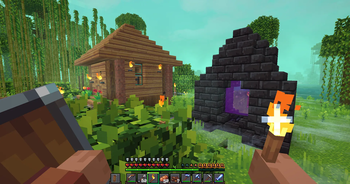
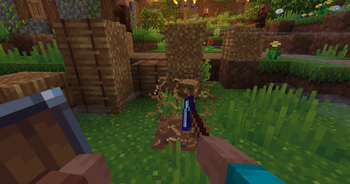
A smooth Fabric experience that provides amazing performance, while also having good graphics.
Screenshots
About this Modpack

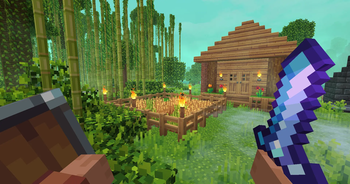
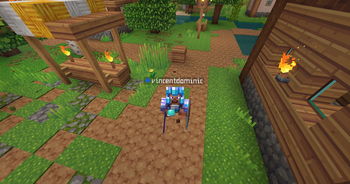
Minecraft, but better and prettier. This is the offical OptCraft, and yeah, its pretty good.
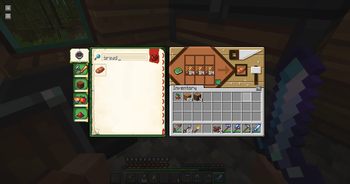
Minecraft itself looks a little boring. But this modpack changes that without take or creating any gameplay from the base game! And peformance is a big part of games, and this pack also has that! Enjoy beaudiful graphics and simple but sharp textures without stressing your computer at all! (most of the times xd)
OptCraft comes packed with mods that make Minecraft feel fresh and alive. Now you can enjoy smooth and minecrafty animations with Fresh Animations (FreshLX) And just some first person pleasure with Hold My Items! (Sapling.) And FA-Player Extension
TERMS OF USE
By downloading, installing, or using OptCraft, you agree to the following:
Personal Use Only: This modpack is meant for your own enjoyment. Don’t claim it as your own or redistribute it without permission.
Respect Mod Creators: All included mods belong to their original creators. Support them if you enjoy their work.
Fair Play: Use the pack on single-player or multiplayer servers that allow it. Don’t cheat or gain unfair advantages where it’s not allowed.
Provided As-Is: OptCraft comes as-is. We’re not responsible for crashes, lost worlds, corrupted saves, or angry chickens. Back up your stuff!
Sharing Rules: You can share the download link, but don’t re-upload the pack anywhere else without permission.
No Selling or Claiming: You may not modify, sell, or claim parts of this modpack as your own.
Have Fun Responsibly: Explore, build, punch trees, wander the amplified Nether, and take epic screenshots—but do it safely and responsibly.
Thanks for playing and enjoying OptCraft! Treat the mods, the world, and your computer with respect, and you’ll have a much better experience.
Available Versions
How to Set Up a OptCraft Server
Order Server
Choose at least 6 GB RAM (8 GB recommended for OptCraft). Based on player count: per 5 players.
Install Modpack in Dashboard
Open the modpack browser in the dashboard, search for "OptCraft" and click "Install". The fabric loader and Minecraft 1.21.5 are configured automatically.
Start Server & Play
Start the server – all mods are loaded automatically. Share the server IP with friends and play together!
Frequently Asked Questions
OptCraft server crashes or won't start – what to do?
Most common causes: insufficient RAM or wrong fabric loader. Check latest.log for "OutOfMemoryError" → increase RAM to at least 8 GB. For "Mixin" or "ClassNotFoundException" errors: modpack version and loader don't match. With Mado Hosting, loader and Minecraft version are auto-configured on modpack install – preventing most startup issues.
How much RAM does a OptCraft server really need?
Minimum 6 GB, recommended 8 GB for stable performance. per 5 players. Important: Minecraft modpacks need more RAM than vanilla – plan extra per additional player. With Mado Hosting, you can scale RAM up live at any time without data loss (from €12/month).
Can I add custom mods to OptCraft without conflicts?
Yes, but check compatibility: only use mods for the same loader (fabric) and same Minecraft version (1.21.5). Common issues: ID conflicts with recipe mods and incompatible coremod versions. The Mado dashboard mod browser only shows compatible mods and warns about known conflicts.
OptCraft server lagging – performance tips
1) Increase RAM to 8 GB+. 2) Reduce server view-distance to 8 (server.properties). 3) Pre-generate chunks with the "Chunky" plugin. 4) Use /spark profiler to check which mods consume the most tick time. With Mado Hosting, all servers run on NVMe SSDs with dedicated CPU cores – eliminating hardware as a bottleneck.
Similar Modpacks
![Cobblemon Official Modpack [Fabric]](https://cdn.modrinth.com/data/5FFgwNNP/e7f9ee2e9d361623847853fe2ddce42f519ee64f.png)
![COBBLEVERSE - Pokemon Adventure [Cobblemon]](https://cdn.modrinth.com/data/Jkb29YJU/581ecf54530972afb18a04660afd820f2f24f6c7.png)
![Better MC [FABRIC] - BMC2](https://cdn.modrinth.com/data/shFhR8Vx/a19c2bcb51d38f32f138d3607e91cb2b7b8e387f_96.webp)


![Better MC [FORGE] - BMC4](https://cdn.modrinth.com/data/4BV47HRn/7f5ef7cc61b2593609aabef3ed07a866a4f11b73_96.webp)
Rent OptCraft Server
Start your own server with automatic modpack installation.
Supported Versions
Start your OptCraft Server now
From €12.00/month with 8 GB RAM for the best performance.
Configure Server →