
Opti Boost Craft
Elevate your Minecraft experience with this mod pack. Enjoy improved FPS, reduced stutters, and lag-free gameplay, striking the perfect balance between performance and visuals.
About this Modpack

What is Opti-Boost-Craft?
Dive into a superior Minecraft experience with OptiBoostCraft, a thoughtfully curated mod pack designed to elevate your gameplay. This collection seamlessly integrates performance-enhancing mods, expertly crafted by various talented creators, to improve FPS, reduce stutters, and eliminate lag. Enjoy smoother, more responsive gameplay as OptiBoostCraft optimizes resource allocation and employs advanced algorithms to enhance your Minecraft world without compromising visual quality.
Essential Notes
It's essential to note that OptiBoostCraft includes mods created by other talented individuals, and credit is duly given to their respective creators. This mod pack strikes the perfect balance between aesthetics and performance, ensuring an immersive adventure through blocky landscapes. Whether you're exploring vast terrains, battling formidable foes, or constructing intricate structures, OptiBoostCraft guarantees a lag-free and visually stunning experience. Transform your Minecraft journey today with OptiBoostCraft, and discover the impressive synergy of carefully selected mods that redefine how you perceive and enjoy the world of Minecraft.
Version 1.0.0
Introducing "OptiBoostCraft," a revolutionary mod pack designed to enhance your Minecraft gaming experience by significantly improving in-game FPS, minimizing stutters, and eliminating lag. Carefully curated and meticulously optimized, OptiBoostCraft combines a variety of performance-enhancing mods to ensure smoother and more enjoyable gameplay.
This mod pack addresses common performance issues that players encounter, utilizing advanced optimization techniques and resource management. With streamlined code and efficient algorithms, OptiBoostCraft prioritizes the allocation of system resources, resulting in a noticeable boost in frame rates. Say goodbye to frustrating lag spikes and choppy gameplay as OptiBoostCraft works seamlessly to provide a fluid and immersive Minecraft adventure.
OptiBoostCraft doesn't compromise on visual quality either. The mod pack fine-tunes graphical settings to strike the perfect balance between performance and aesthetics. You'll experience improved graphics without sacrificing the smoothness of your gameplay, making it an ideal choice for both casual players and dedicated enthusiasts.
Whether you're exploring vast landscapes, engaging in epic battles, or constructing intricate structures, OptiBoostCraft ensures that your Minecraft world runs effortlessly. Elevate your gaming experience and unlock the true potential of your hardware with the OptiBoostCraft mod pack – because every adventurer deserves a lag-free journey in the blocky realms of Minecraft.
Version 1.0.1
This Update includes a lot of new optimisations and massive improvements in Frames per second, Yet alone having any impact on visual fidelity, lists of mods included are: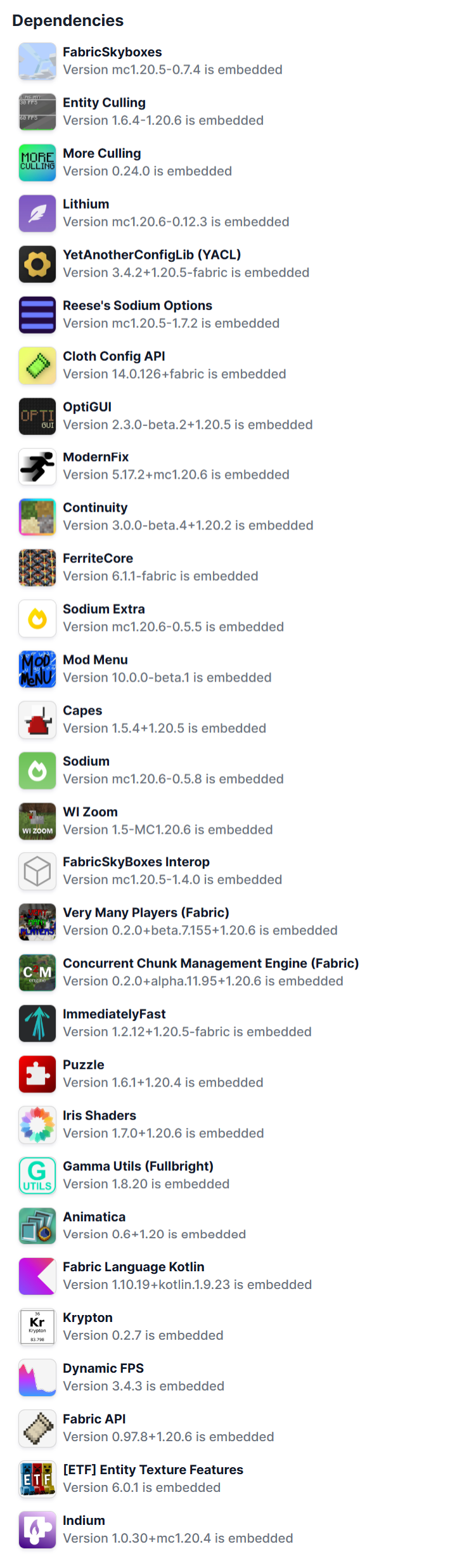
Available Versions
How to Set Up a Opti Boost Craft Server
Order Server
Choose at least 4 GB RAM (6 GB recommended for Opti Boost Craft). Based on player count: per 8 players.
Install Modpack in Dashboard
Open the modpack browser in the dashboard, search for "Opti Boost Craft" and click "Install". The fabric loader and Minecraft 26.1.2 are configured automatically.
Start Server & Play
Start the server – all mods are loaded automatically. Share the server IP with friends and play together!
Frequently Asked Questions
Opti Boost Craft server crashes or won't start – what to do?
Most common causes: insufficient RAM or wrong fabric loader. Check latest.log for "OutOfMemoryError" → increase RAM to at least 6 GB. For "Mixin" or "ClassNotFoundException" errors: modpack version and loader don't match. With Mado Hosting, loader and Minecraft version are auto-configured on modpack install – preventing most startup issues.
How much RAM does a Opti Boost Craft server really need?
Minimum 4 GB, recommended 6 GB for stable performance. per 8 players. Important: Minecraft modpacks need more RAM than vanilla – plan extra per additional player. With Mado Hosting, you can scale RAM up live at any time without data loss (from €8/month).
Can I add custom mods to Opti Boost Craft without conflicts?
Yes, but check compatibility: only use mods for the same loader (fabric) and same Minecraft version (26.1.2). Common issues: ID conflicts with recipe mods and incompatible coremod versions. The Mado dashboard mod browser only shows compatible mods and warns about known conflicts.
Opti Boost Craft server lagging – performance tips
1) Increase RAM to 6 GB+. 2) Reduce server view-distance to 8 (server.properties). 3) Pre-generate chunks with the "Chunky" plugin. 4) Use /spark profiler to check which mods consume the most tick time. With Mado Hosting, all servers run on NVMe SSDs with dedicated CPU cores – eliminating hardware as a bottleneck.
Similar Modpacks

![Cobblemon Official Modpack [Fabric]](https://cdn.modrinth.com/data/5FFgwNNP/e7f9ee2e9d361623847853fe2ddce42f519ee64f.png)
![COBBLEVERSE - Pokemon Adventure [Cobblemon]](https://cdn.modrinth.com/data/Jkb29YJU/581ecf54530972afb18a04660afd820f2f24f6c7.png)
![Better MC [FABRIC] - BMC2](https://cdn.modrinth.com/data/shFhR8Vx/a19c2bcb51d38f32f138d3607e91cb2b7b8e387f_96.webp)


Rent Opti Boost Craft Server
Start your own server with automatic modpack installation.
Supported Versions
Start your Opti Boost Craft Server now
From €8.00/month with 6 GB RAM for the best performance.
Configure Server →