
Optim
Optim is a Fabric modpack that aims to provide maximum performance with some common quality-of-life modifications to the game.
Screenshots
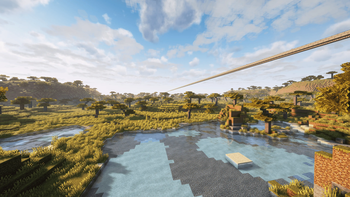


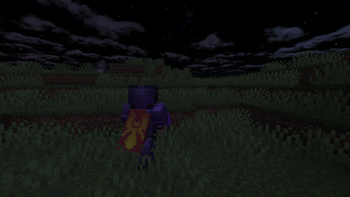

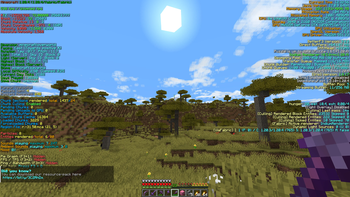
About this Modpack

Optim




Optim is a Fabric modpack that aims to provide maximum performance with some common quality-of-life modifications to the game. It is a highly opinionated selection of mods I intentionally handpicked to share my improved experience with the wider Minecraft community.
🌟 Features
Main Features
- Vanilla Parity - Doesn't add any new content to the game as it aims to be compatible with all Vanilla servers.
- Optifine Parity - Replacements for most Optifine features like Shaders, CEM, CIT, Animated & Connected Textures, Capes, Dynamic Lighting and Custom Sky Boxes.
- Regularly Updated - Actively maintained and updated to newer Minecraft versions.
- Optimized - Strives to provide the best possible performance while still having all the bells and whistles.
Other Features
- Replay Mod - The best way to record and capture replays.
- Roughly Enough Items - The go-to mod for browsing receipes.
- Auth Me - Has your client been launched for too long? Use the authenticate button in the server list. No need to restart.
- Improved Third Person - Minecraft's third-person mode is old and clunky, the new one allows you to turn the camera without turning your character.
- 3D-Skin-Layers - Makes skins look fabolous by improving rendering of the 3D layer.
- Wavey Capes - Capes now blow beautifully in the wind.


Stable releases can be downloaded from the platforms linked above.
🤝 Bugs & Feature Requests
If you happen to find any bugs or wish to request a feature, please open an issue on our issue tracker here. We provide bug report and feature request templates, so it is important that you fill out all the necessary information.
Making your issue easy to read and follow will usually result in it being handled faster. Failure to provide the requested information in an issue may result in it being closed.
🔧 Contributing
Contributions are always welcome! Please make sure to read our Contributor's Guide before submitting any pull requests.
We also ask that you adhere to our Contributor Code of Conduct to ensure this community remains a place where all feel welcome to participate.
❤️ Acknowledgments
Optim was created because I grew tired of manually updating my personal selection of mods after every Minecraft update.
The following projects inspired, influenced and or helped me greatly when creating Optim:
- mc-modpack-kit - Used to scaffold this GitHub repository.
- Packwiz - Exceptional software making modpack maintenance and creation easy.
- Kami Chan Optimized - Inspired a few additions like fast-up-ping and Server Pinger Fixer.
📝 License
You can find the license this project is licensed under here. All mods & content are licensed under their respective authors' license.
Available Versions
How to Set Up a Optim Server
Order Server
Choose at least 4 GB RAM (6 GB recommended for Optim). Based on player count: per 8 players.
Install Modpack in Dashboard
Open the modpack browser in the dashboard, search for "Optim" and click "Install". The fabric loader and Minecraft 26.1.2 are configured automatically.
Start Server & Play
Start the server – all mods are loaded automatically. Share the server IP with friends and play together!
Frequently Asked Questions
Optim server crashes or won't start – what to do?
Most common causes: insufficient RAM or wrong fabric loader. Check latest.log for "OutOfMemoryError" → increase RAM to at least 6 GB. For "Mixin" or "ClassNotFoundException" errors: modpack version and loader don't match. With Mado Hosting, loader and Minecraft version are auto-configured on modpack install – preventing most startup issues.
How much RAM does a Optim server really need?
Minimum 4 GB, recommended 6 GB for stable performance. per 8 players. Important: Minecraft modpacks need more RAM than vanilla – plan extra per additional player. With Mado Hosting, you can scale RAM up live at any time without data loss (from €8/month).
Can I add custom mods to Optim without conflicts?
Yes, but check compatibility: only use mods for the same loader (fabric) and same Minecraft version (26.1.2). Common issues: ID conflicts with recipe mods and incompatible coremod versions. The Mado dashboard mod browser only shows compatible mods and warns about known conflicts.
Optim server lagging – performance tips
1) Increase RAM to 6 GB+. 2) Reduce server view-distance to 8 (server.properties). 3) Pre-generate chunks with the "Chunky" plugin. 4) Use /spark profiler to check which mods consume the most tick time. With Mado Hosting, all servers run on NVMe SSDs with dedicated CPU cores – eliminating hardware as a bottleneck.
Similar Modpacks

![Cobblemon Official Modpack [Fabric]](https://cdn.modrinth.com/data/5FFgwNNP/e7f9ee2e9d361623847853fe2ddce42f519ee64f.png)
![COBBLEVERSE - Pokemon Adventure [Cobblemon]](https://cdn.modrinth.com/data/Jkb29YJU/581ecf54530972afb18a04660afd820f2f24f6c7.png)
![Better MC [FABRIC] - BMC2](https://cdn.modrinth.com/data/shFhR8Vx/a19c2bcb51d38f32f138d3607e91cb2b7b8e387f_96.webp)


Rent Optim Server
Start your own server with automatic modpack installation.
Supported Versions
Start your Optim Server now
From €8.00/month with 6 GB RAM for the best performance.
Configure Server →