
Optimine
Optimine is a performance-focused modpack that boosts FPS, reduces lag, and keeps Minecraft smooth and stable even in large worlds.
Screenshots

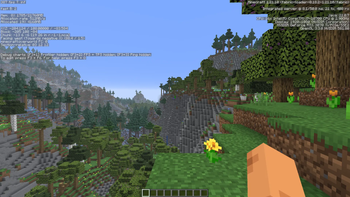
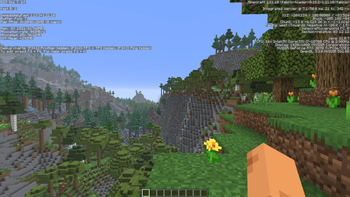
About this Modpack
ENGLISH VERSION
Support me: https://dalink.to/synd1c4t
Optimine is a modpack for players who want Minecraft with smooth FPS, minimal lag, and a user-friendly interface.
It focuses purely on performance optimization and includes mods that improve FPS, reduce lag, and make the game stable even with a large world.
It is ideal for players who value smooth gameplay, efficiency, and stability.
PERFORMANCE OPTIMIZATION
Many mods in this build improve performance, reduce lag, and make gameplay smoother:
Sodium – replaces the graphics engine, improves FPS and smoothness, reduces lag on low-end PCs
Lithium – optimizes game logic, reducing load on the server and client
FerriteCore – reduces memory usage for blocks and chunks
C2ME – improves multithreading and speeds up world processing
EntityCulling, MoreCulling – renders only what is needed, reducing GPU load
ImmediatelyFast – speeds up animations for a snappier experience
Noxesium – optimizes internal game mechanics for performance
Thoroughfabric – additional optimizations for smoother gameplay
These mods make the gameplay easy, stable, and fast, even with many mods or large worlds.
AESTHETICS
Iris + Sodium – optimized visual effects without major performance cost
CreativeCore, Framework – support for mods with visual enhancements
LIBRARIES AND MOD SUPPORT
Fabric API, Architectury, Cloth Config, ModMenu, Balm, Cicada-lib – ensure compatibility and allow customization for all mods, keeping the pack stable and flexible
If you enjoy my modpack and want to support me, you can do so here (DonationAlerts):
https://dalink.to/synd1c4t
Every contribution motivates me to continue sharing modpacks, adding useful features, and improving the gameplay experience.
THX :3
РУССКАЯ ВЕРСИЯ
Поддержать меня: https://dalink.to/synd1c4t
Optimine [Syndicat] — это сборка модов для игроков, которые хотят Minecraft с плавным FPS, минимальными лагами и удобным интерфейсом.
Она полностью сосредоточена на оптимизации производительности и включает моды, которые повышают FPS, снижают лаги и делают игру стабильной даже в больших мирах.
Идеальна для игроков, которые ценят плавный геймплей, эффективность и стабильность.
ОПТИМИЗАЦИЯ ПРОИЗВОДИТЕЛЬНОСТИ
Многие моды в сборке улучшают производительность, снижают лаги и делают игру более плавной:
Sodium – заменяет графический движок, улучшает FPS и плавность, снижает лаги на слабых ПК
Lithium – оптимизирует логику игры, снижая нагрузку на сервер и клиент
FerriteCore – уменьшает использование памяти для блоков и чанков
C2ME – улучшает многопоточность и ускоряет обработку мира
EntityCulling, MoreCulling – отрисовывают только то, что нужно, снижая нагрузку на GPU
ImmediatelyFast – ускоряет анимации для более отзывчивого геймплея
Noxesium – оптимизирует внутренние механики игры для производительности
Thoroughfabric – дополнительные оптимизации для плавного геймплея
Эти моды делают игровой процесс лёгким, стабильным и быстрым, даже при большом количестве модов или огромном мире.
ЭСТЕТИКА
Iris + Sodium – оптимизированные визуальные эффекты без сильной нагрузки на ПК
CreativeCore, Framework – поддержка модов с визуальными улучшениями
БИБЛИОТЕКИ И ПОДДЕРЖКА МОДОВ
Fabric API, Architectury, Cloth Config, ModMenu, Balm, Cicada-lib – обеспечивают совместимость и настройку всех модов, делая сборку стабильной и гибкой
Если вам нравится моя сборка и вы хотите поддержать меня, вы можете сделать это здесь (DonationAlerts):
https://dalink.to/synd1c4t
Любая поддержка мотивирует меня продолжать делиться модпаками, добавлять полезные функции и улучшать игровой опыт :3
Available Versions
How to Set Up a Optimine Server
Order Server
Choose at least 4 GB RAM (6 GB recommended for Optimine). Based on player count: per 8 players.
Install Modpack in Dashboard
Open the modpack browser in the dashboard, search for "Optimine" and click "Install". The fabric loader and Minecraft 1.21.10 are configured automatically.
Start Server & Play
Start the server – all mods are loaded automatically. Share the server IP with friends and play together!
Frequently Asked Questions
Optimine server crashes or won't start – what to do?
Most common causes: insufficient RAM or wrong fabric loader. Check latest.log for "OutOfMemoryError" → increase RAM to at least 6 GB. For "Mixin" or "ClassNotFoundException" errors: modpack version and loader don't match. With Mado Hosting, loader and Minecraft version are auto-configured on modpack install – preventing most startup issues.
How much RAM does a Optimine server really need?
Minimum 4 GB, recommended 6 GB for stable performance. per 8 players. Important: Minecraft modpacks need more RAM than vanilla – plan extra per additional player. With Mado Hosting, you can scale RAM up live at any time without data loss (from €8/month).
Can I add custom mods to Optimine without conflicts?
Yes, but check compatibility: only use mods for the same loader (fabric) and same Minecraft version (1.21.10). Common issues: ID conflicts with recipe mods and incompatible coremod versions. The Mado dashboard mod browser only shows compatible mods and warns about known conflicts.
Optimine server lagging – performance tips
1) Increase RAM to 6 GB+. 2) Reduce server view-distance to 8 (server.properties). 3) Pre-generate chunks with the "Chunky" plugin. 4) Use /spark profiler to check which mods consume the most tick time. With Mado Hosting, all servers run on NVMe SSDs with dedicated CPU cores – eliminating hardware as a bottleneck.
Rent Optimine Server
Start your own server with automatic modpack installation.
Supported Versions
Start your Optimine Server now
From €8.00/month with 6 GB RAM for the best performance.
Configure Server →