
Optimized Realism
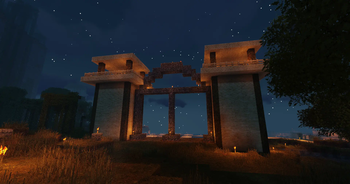
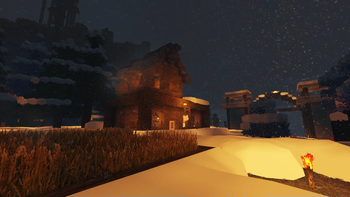
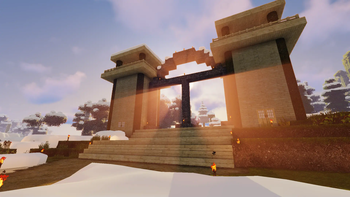
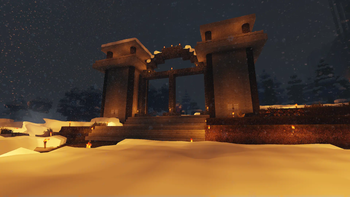
Optimized graphical and audio realism designed for vanilla servers!
Screenshots


About this Modpack
So, you want graphical & audio realism? You also want optimization? Oh, you also want to play on vanilla servers? And you want your favorite QoL mods too? And you don't want to spend time configuring, just plug and play? For free?
Damn. That's a lot to ask for. Well, we made it anyway.
Introducing Optimized Realism!
The all-in-one optimized graphical & audio realism modpack specially designed for vanilla servers!
Features:
- High-Quality Graphical Realism
- Immersive & Dynamic audio realism
- Realistic yet unobtrusive physics
- Optimized Performance
- Pre-configured for plug & play
- Your favorite QoL mods
- Customizable
- Optional RPG-style third-person mode
- Various polishes with animations and UI reworks (you can remove if you dislike)
Mods
Advancement Plaques, Ambient Environment, AmbientSounds, BadOptimizations, BetterF3, Better Third Person, Bookshelf, CameraOverhaul, Controlling, CreativeCore, DarkTitleBar, Detail Armor Bar, Drip Sounds (Fabric), Dynamic Surroundings: Fabric Edition, Fog Looks Good Now (Fabric), Forge Config API Port, HitParticles, Iceberg, ImmediatelyFast, ImmersiveThunder, InvMove, Item Borders, Jade 🔍, Legendary Tooltips, LinsAPI, Mouse Tweaks, Paxi, Pick Up Notifier, Presence Footsteps, Prism, Puzzles Lib, Searchables, Shoulder Surfing Reloaded, Smooth Scrolling Refurbished, Sounds, Stylish Effects, Tool Stats, Update ME!, WI Zoom, YUNG's API, YUNG's Menu Tweaks, Adventure Redefined, AppleSkin, Architectury API, Balm, Blur (Fabric), Cake Chomps, Chat Heads, Chat Signing Hider, Clear Enchanting, Cloth Config API, Collective, CompleteConfig, Configured, Continuity, Cubes Without Borders, Drippy Loading Screen, Dynamic Crosshair, Embeddium, Enhanced Attack Indicator, Enhanced Searchability, [EMF] Entity Model Features, [ETF] Entity Texture Features, Exit Confirmation, Fabric API, Fabric Language Kotlin, FancyMenu, FastDoll, FerriteCore, First-person Model, Flow, glore_blocks.json, glore_brightness.json, Held Item Info, Hide Scoreboard When F3, Iris Shaders, Item Suggestions Not Require Mod Name, Just Enough Items, Konkrete, LambDynamicLights, Language Reload, LibJF, Lithium, Log More Info, Make Bubbles Pop, Melody, Memory Leak Fix, MidnightLib, Model Gap Fix, ModernFix, Mod Menu, M.R.U, No Resource Pack Warnings, Not Enough Animations, OptiGUI, Panorama Screens, Physics Mod, playerAnimator, Puzzle, Real Arrow Tip, Screenshot to Clipboard, Seamless Loading Screen , Serious Player Animations, Shulker Box Tooltip, Simple Health Bar, 3D Skin Layers, SmoothMenu Refabricated, Sodium Extra, Sound Physics Remastered, Sprint Indicator, Starlight (Fabric), ThirdPersonBoating, Tiny Item Animations, ToolTipFix, Volume Fix, YetAnotherConfigLib,Available Versions
How to Set Up a Optimized Realism Server
Order Server
Choose at least 6 GB RAM (8 GB recommended for Optimized Realism). Based on player count: per 5 players.
Install Modpack in Dashboard
Open the modpack browser in the dashboard, search for "Optimized Realism" and click "Install". The fabric loader and Minecraft 1.20.4 are configured automatically.
Start Server & Play
Start the server – all mods are loaded automatically. Share the server IP with friends and play together!
Frequently Asked Questions
Optimized Realism server crashes or won't start – what to do?
Most common causes: insufficient RAM or wrong fabric loader. Check latest.log for "OutOfMemoryError" → increase RAM to at least 8 GB. For "Mixin" or "ClassNotFoundException" errors: modpack version and loader don't match. With Mado Hosting, loader and Minecraft version are auto-configured on modpack install – preventing most startup issues.
How much RAM does a Optimized Realism server really need?
Minimum 6 GB, recommended 8 GB for stable performance. per 5 players. Important: Minecraft modpacks need more RAM than vanilla – plan extra per additional player. With Mado Hosting, you can scale RAM up live at any time without data loss (from €12/month).
Can I add custom mods to Optimized Realism without conflicts?
Yes, but check compatibility: only use mods for the same loader (fabric) and same Minecraft version (1.20.4). Common issues: ID conflicts with recipe mods and incompatible coremod versions. The Mado dashboard mod browser only shows compatible mods and warns about known conflicts.
Optimized Realism server lagging – performance tips
1) Increase RAM to 8 GB+. 2) Reduce server view-distance to 8 (server.properties). 3) Pre-generate chunks with the "Chunky" plugin. 4) Use /spark profiler to check which mods consume the most tick time. With Mado Hosting, all servers run on NVMe SSDs with dedicated CPU cores – eliminating hardware as a bottleneck.
Similar Modpacks
![Cobblemon Official Modpack [Fabric]](https://cdn.modrinth.com/data/5FFgwNNP/e7f9ee2e9d361623847853fe2ddce42f519ee64f.png)
![COBBLEVERSE - Pokemon Adventure [Cobblemon]](https://cdn.modrinth.com/data/Jkb29YJU/581ecf54530972afb18a04660afd820f2f24f6c7.png)
![Better MC [FABRIC] - BMC2](https://cdn.modrinth.com/data/shFhR8Vx/a19c2bcb51d38f32f138d3607e91cb2b7b8e387f_96.webp)


![Better MC [FORGE] - BMC4](https://cdn.modrinth.com/data/4BV47HRn/7f5ef7cc61b2593609aabef3ed07a866a4f11b73_96.webp)
Rent Optimized Realism Server
Start your own server with automatic modpack installation.
Supported Versions
Start your Optimized Realism Server now
From €12.00/month with 8 GB RAM for the best performance.
Configure Server →