
Optimus
A performance modpack with Optifine parity and some visual increments. 26.1.2
About this Modpack





🛈 New version numbering system starting with 26.1
Starting with 26.1, our version numbering system will change: 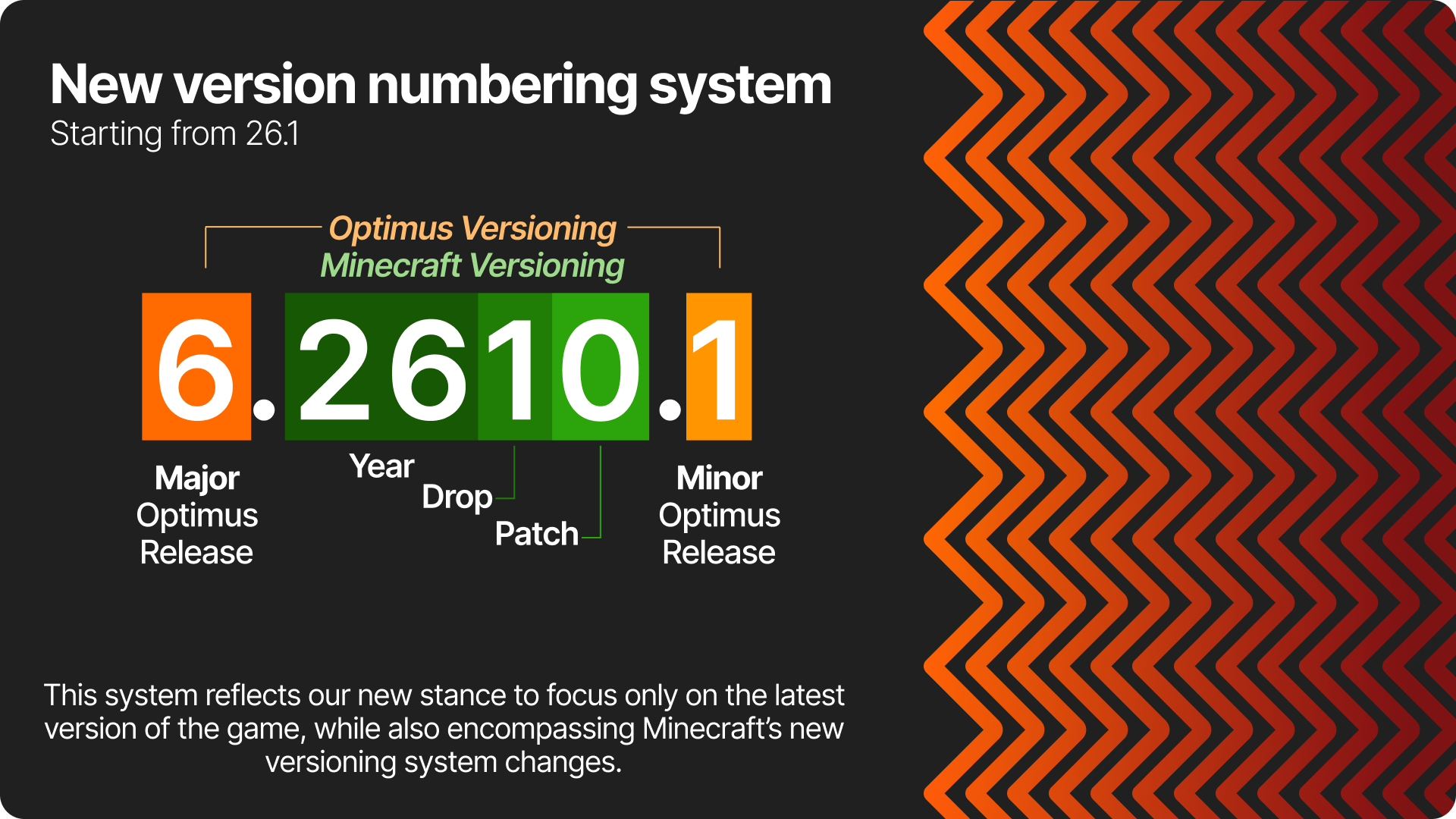
⁉️ Why Optimus?
🔥 Blazing fast performance
Optimus is based on Adrenaline, onme of the greatest performance packs available. It greatlty improves minecraft's performance by default, and Optimus goes further to add a few mods not bundled by default
📦 Everything you need is already prepackaged
Just install and go! Optimus provides a great lenght of QoL client-side tweaks, whilst keeping maximum performance.
🧡 Made with love.
Optimus is a passion project, born long before the first public release. I've been building performance modpacks for 7 years (due to tremendous need lol), and Optimus itself was born 3 years ago.
✒️ Good design.
Come on, don't you love the orange arrows?!
❔ Why not just use OptiFine?
OptiFine's methods are and have always been extremaly invasive. This leads to a lot of issues with other mods, and also slows down updates. Also, it doesn't offer the same boost in performance today as it did on older versions, when it was at it's peak.
Parity status for version 5.x:
Click to expand
| Feature | 1.21.5 |
|---|---|
| Shaders | ✅ |
| Dynamic Lights | ✅ |
| Zoom | ✅ |
| Better Grass | ✅ |
| Connected Textures | ✅ |
| Custom Item Textures | ⛔ |
| Custom Entity Models | ✅ |
| Capes | ✅ |
| Animated Textures | ⛔ |
| Particle Control | ✅ |
| Detail Control | ✅ |
| Animation Control | ✅ |
| Miscellaneous Toggles | ✅ |
| Custom Colors | ✅ |
| Custom GUI | ✅ |
| Custom Sky | ⛔ |
| Emissive Blocks | ✅ |
| Emissive Entities | ✅ |
| Random Entities | ✅ |
| Resource pack splash screen | ✅ |
➕ What are the QoL features added?
- Hunger-related improvements, allowing you to preview hunger and saturation from foods and actually seing your current saturation;
- Overall UI and UX improvements (animations, toggleable dark mode, numbered hotbar texture, etc)
- Better keybind management
- Larger screenshots by pressing F9
- Access worlds from .minecraft everywhere
- Keeping chats across worlds and servers
- Ability to revert controversial game changes
- The basics:
The list goes on; play to check everything out!
ℹ️ Still unsure?
Check the wiki (coming soon!)
👤 Credits
Resource Packs
Optimus Core features VanillaTweaks;
Mod credits are featured on each version's dependency list.
Available Versions
How to Set Up a Optimus Server
Order Server
Choose at least 4 GB RAM (6 GB recommended for Optimus). Based on player count: per 8 players.
Install Modpack in Dashboard
Open the modpack browser in the dashboard, search for "Optimus" and click "Install". The fabric loader and Minecraft 26.1.2 are configured automatically.
Start Server & Play
Start the server – all mods are loaded automatically. Share the server IP with friends and play together!
Frequently Asked Questions
Optimus server crashes or won't start – what to do?
Most common causes: insufficient RAM or wrong fabric loader. Check latest.log for "OutOfMemoryError" → increase RAM to at least 6 GB. For "Mixin" or "ClassNotFoundException" errors: modpack version and loader don't match. With Mado Hosting, loader and Minecraft version are auto-configured on modpack install – preventing most startup issues.
How much RAM does a Optimus server really need?
Minimum 4 GB, recommended 6 GB for stable performance. per 8 players. Important: Minecraft modpacks need more RAM than vanilla – plan extra per additional player. With Mado Hosting, you can scale RAM up live at any time without data loss (from €8/month).
Can I add custom mods to Optimus without conflicts?
Yes, but check compatibility: only use mods for the same loader (fabric) and same Minecraft version (26.1.2). Common issues: ID conflicts with recipe mods and incompatible coremod versions. The Mado dashboard mod browser only shows compatible mods and warns about known conflicts.
Optimus server lagging – performance tips
1) Increase RAM to 6 GB+. 2) Reduce server view-distance to 8 (server.properties). 3) Pre-generate chunks with the "Chunky" plugin. 4) Use /spark profiler to check which mods consume the most tick time. With Mado Hosting, all servers run on NVMe SSDs with dedicated CPU cores – eliminating hardware as a bottleneck.
Similar Modpacks

![Cobblemon Official Modpack [Fabric]](https://cdn.modrinth.com/data/5FFgwNNP/e7f9ee2e9d361623847853fe2ddce42f519ee64f.png)
![COBBLEVERSE - Pokemon Adventure [Cobblemon]](https://cdn.modrinth.com/data/Jkb29YJU/581ecf54530972afb18a04660afd820f2f24f6c7.png)
![Better MC [FABRIC] - BMC2](https://cdn.modrinth.com/data/shFhR8Vx/a19c2bcb51d38f32f138d3607e91cb2b7b8e387f_96.webp)


Rent Optimus Server
Start your own server with automatic modpack installation.
Details
- License
- GNU Lesser General Public License v3.0 only
- Server-side
- Unsupported
- Client-side
- Required
Supported Versions
Start your Optimus Server now
From €8.00/month with 6 GB RAM for the best performance.
Configure Server →