
OPT
Only the Necessary To Make Your Game Smooth.
About this Modpack
DISCLAIMER
I use Performium as a modpack comparator, not because it's a bad modpack, but because it's one of the most famous ones. I selected it randomly, with no intention to offend either the creator or the modpack.
While other modpacks focus on pure performance, OPT offers stability and an almost stutter-free experience.
OPT doesn't limit itself to using the most famous mods. One of the main difficulties of this project was finding the truly important mods that actually make a difference in performance, without overloading the pack.

info: 12 chunks S / 12 chunks R 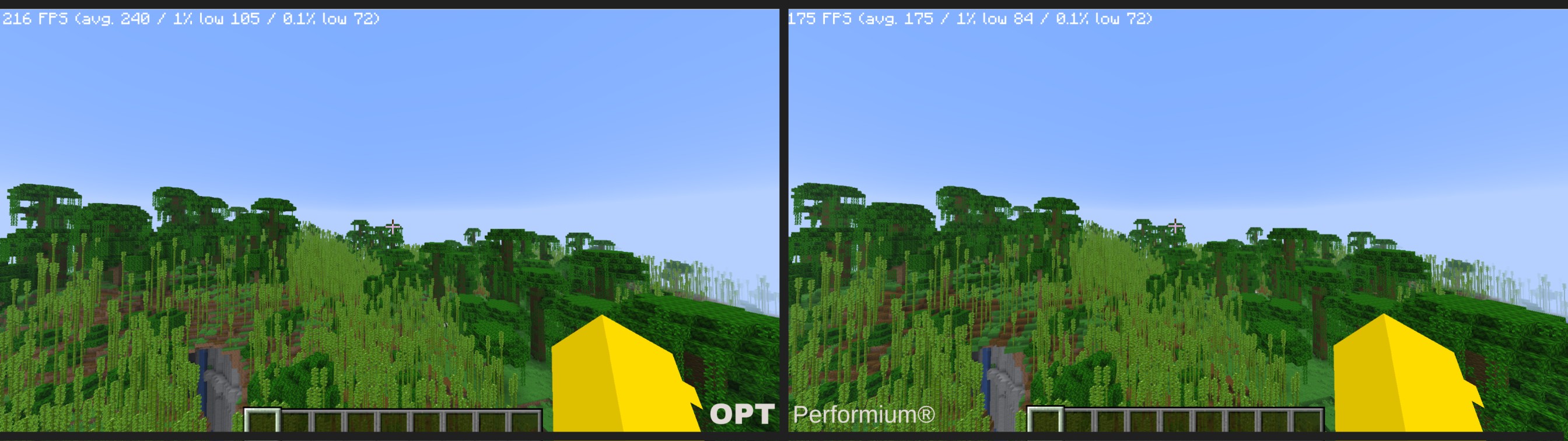 (the rest are the default configs of both)
- OPT (left side): 216 FPS
- Performium (right side): 175 FPS
- Tested looking at the same point and from the same position in both
- Here we can notice that the modpacks react the same way to motionless testing, both performing very well.
Now a chunk loading test:
everything was recorded under the same conditions
OPT

Performium

I didn't record the whole screen because it was drastically impacting the framerate, I'm sorry
- As you can see, that's the problem. The game starts to stutter as soon as you enter unloaded chunks, and it's not only a problem with Performium — it happens in almost every optimization modpack. OPT aims to mitigate this problem (as seen in the demonstration) and does so by using mods that fix most of the underlying clutter that causes it.

This was never supposed to be a published modpack. I was simply trying to optimize Minecraft, because every other modpack I tried had the same problems mentioned.
As I was working on this project, I noticed the rise of performance mods in the Minecraft community, many of which fix issues that no other mods do. These mods were real lifesavers for the project. I recommend checking out each one for more detailed descriptions.
All of the mods present here were handpicked to push Minecraft to the best of its capacity. I didn't just add what I thought was good — I tested every combination until I reached the final version.
It's worth remembering that most (if not all) of the mods can be updated to the latest version.
Available Versions
How to Set Up a OPT Server
Order Server
Choose at least 4 GB RAM (6 GB recommended for OPT). Based on player count: per 8 players.
Install Modpack in Dashboard
Open the modpack browser in the dashboard, search for "OPT" and click "Install". The fabric loader and Minecraft 26.1 are configured automatically.
Start Server & Play
Start the server – all mods are loaded automatically. Share the server IP with friends and play together!
Frequently Asked Questions
OPT server crashes or won't start – what to do?
Most common causes: insufficient RAM or wrong fabric loader. Check latest.log for "OutOfMemoryError" → increase RAM to at least 6 GB. For "Mixin" or "ClassNotFoundException" errors: modpack version and loader don't match. With Mado Hosting, loader and Minecraft version are auto-configured on modpack install – preventing most startup issues.
How much RAM does a OPT server really need?
Minimum 4 GB, recommended 6 GB for stable performance. per 8 players. Important: Minecraft modpacks need more RAM than vanilla – plan extra per additional player. With Mado Hosting, you can scale RAM up live at any time without data loss (from €8/month).
Can I add custom mods to OPT without conflicts?
Yes, but check compatibility: only use mods for the same loader (fabric) and same Minecraft version (26.1). Common issues: ID conflicts with recipe mods and incompatible coremod versions. The Mado dashboard mod browser only shows compatible mods and warns about known conflicts.
OPT server lagging – performance tips
1) Increase RAM to 6 GB+. 2) Reduce server view-distance to 8 (server.properties). 3) Pre-generate chunks with the "Chunky" plugin. 4) Use /spark profiler to check which mods consume the most tick time. With Mado Hosting, all servers run on NVMe SSDs with dedicated CPU cores – eliminating hardware as a bottleneck.
Similar Modpacks

![Cobblemon Official Modpack [Fabric]](https://cdn.modrinth.com/data/5FFgwNNP/e7f9ee2e9d361623847853fe2ddce42f519ee64f.png)
![COBBLEVERSE - Pokemon Adventure [Cobblemon]](https://cdn.modrinth.com/data/Jkb29YJU/581ecf54530972afb18a04660afd820f2f24f6c7.png)
![Better MC [FABRIC] - BMC2](https://cdn.modrinth.com/data/shFhR8Vx/a19c2bcb51d38f32f138d3607e91cb2b7b8e387f_96.webp)


Rent OPT Server
Start your own server with automatic modpack installation.