
Oria Legacy
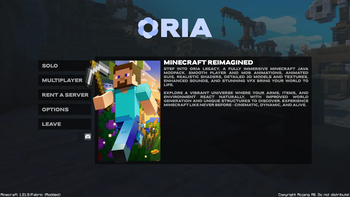
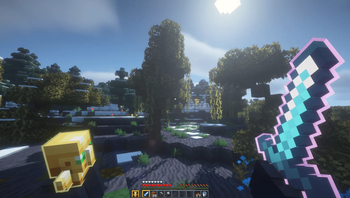
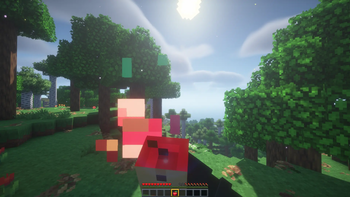
Oria Legacy is a Vanilla+ Minecraft modpack focused on fluid animations, realistic shaders, 3D models, enhanced sounds, and cinematic visuals. It improves world generation and immersion while preserving the core Minecraft gameplay.
Screenshots
About this Modpack

𝒮𝓅𝑒𝒸𝒾𝒶𝓁 𝓉𝒽𝒶𝓃𝓀𝓈 𝓉𝑜 𝒜𝓇𝒸𝒽𝟣𝓋𝓌𝒶𝓎𝓈 𝒻𝑜𝓇 𝒷𝑒𝓁𝒾𝑒𝓋𝒾𝓃𝑔 𝒾𝓃 𝓉𝒽𝑒 𝓅𝓇𝑜𝒿𝑒𝒸𝓉
Oria Legacy is a Vanilla+ Minecraft Java modpack designed to bring the world to life.
With fluid animations, immersive visuals, and subtle gameplay enhancements, it transforms Minecraft into a modern, cinematic experience while staying true to its vanilla roots.
From animated players and mobs to visible arms, smooth GUIs, realistic shaders, 3D models, dynamic lighting, particles, and immersive sound design — every detail is carefully crafted to feel natural and alive.
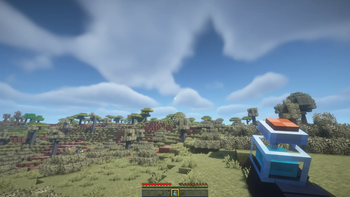
World generation has been fully enhanced with unique terrain, structures, and exploration features across the Overworld, Nether, and End. Combined with quality-of-life improvements and performance optimizations, Oria Legacy delivers a polished and engaging Vanilla+ experience.

Immersive Animations
Fluid player and mob movements, visible arms, animated items, armor, and weapons.
Advanced Graphics
Realistic shaders, dynamic lighting, 3D textures, visual effects, and interactive particles.
Animated GUIs
Modern, smooth, and interactive interfaces with seamless transitions.
Enhanced Sounds & Ambience
Immersive environmental audio, entity sounds, and atmospheric music.
Exploration & World
Expanded terrain generation, unique structures, mini-biomes, waypoints, and chunk loaders.
Gameplay Improvements
New items, weapons, armor, backpacks, interactive objects, and subtle visual feedback.
Optimizations & Performance
Powered by Sodium, Lithium, Iris, FerriteCore, Entity Culling, and more.

| Category | Mods |
|---|---|
| Animations & Models | Fresh Animations · PDB3D’s Blocky Armor Stands · Just Expressions · Better Third Person · I See My Armored Hand · Glowing 3D Armor · 3D Skin Layers · 3D Lights · Just 3D Armors HMI · 3D Harnesses x Fresh Animations · Hold My Items · 2D Projectiles · Item Interactions Mod · Better Minecarts · 3D Trims · Visual: Armor Trims · Actually 3D Stuff |
| Graphics & Shaders | BSL Shaders · Subtle Effects · Visual Effects+ · Particle Rain · Particle Interactions · Emissive Pack |
| GUI & Interface | Smooth GUI · GUI Revision Dark · FancyMenu · Chat Animation · Animated Typing · Better Statistics Screen · Custom Crosshair Mod · Tiny Item Animations · Blur+ · InvMove |
| World Generation & Structures | TerraBlender · Terralith · Moog’s Structure Lib · MVS · MES · MNS · Towns and Towers · Waystones · Chunk Loaders |
| Gameplay | Carry On · Backpacks · Farmer’s Delight · More Delight · Zoomify · Essential |
| Sound & Ambience | Ambient Environment · AmbientSounds · Constant Music · Sound Physics Remastered · Simple Voice Chat · ESF |
| Utilities & Libraries | SuperMartijn642 Core & Config Lib · Forge Config API Port · YetAnotherConfigLib (YACL) · Fabric API · Architectury API · TCDCommons API · MaLiLib · Mod Menu · Text Placeholder API · LibJF |
| Decoration & Building | Macaw’s Furniture · Enhanced Flower Pots · Too Many Paintings |
| Exploration & Navigation | Xaero’s World Map · Nature’s Compass |
| Performance & Optimization | Sodium · Sodium Extra · Lithium · Entity Culling · BadOptimizations · ImmediatelyFast · FerriteCore · Iris Shaders |

Just Enought Items
Available Versions
How to Set Up a Oria Legacy Server
Order Server
Choose at least 6 GB RAM (8 GB recommended for Oria Legacy). Based on player count: per 5 players.
Install Modpack in Dashboard
Open the modpack browser in the dashboard, search for "Oria Legacy" and click "Install". The fabric loader and Minecraft 1.21.8 are configured automatically.
Start Server & Play
Start the server – all mods are loaded automatically. Share the server IP with friends and play together!
Frequently Asked Questions
Oria Legacy server crashes or won't start – what to do?
Most common causes: insufficient RAM or wrong fabric loader. Check latest.log for "OutOfMemoryError" → increase RAM to at least 8 GB. For "Mixin" or "ClassNotFoundException" errors: modpack version and loader don't match. With Mado Hosting, loader and Minecraft version are auto-configured on modpack install – preventing most startup issues.
How much RAM does a Oria Legacy server really need?
Minimum 6 GB, recommended 8 GB for stable performance. per 5 players. Important: Minecraft modpacks need more RAM than vanilla – plan extra per additional player. With Mado Hosting, you can scale RAM up live at any time without data loss (from €12/month).
Can I add custom mods to Oria Legacy without conflicts?
Yes, but check compatibility: only use mods for the same loader (fabric) and same Minecraft version (1.21.8). Common issues: ID conflicts with recipe mods and incompatible coremod versions. The Mado dashboard mod browser only shows compatible mods and warns about known conflicts.
Oria Legacy server lagging – performance tips
1) Increase RAM to 8 GB+. 2) Reduce server view-distance to 8 (server.properties). 3) Pre-generate chunks with the "Chunky" plugin. 4) Use /spark profiler to check which mods consume the most tick time. With Mado Hosting, all servers run on NVMe SSDs with dedicated CPU cores – eliminating hardware as a bottleneck.
Similar Modpacks
![Cobblemon Official Modpack [Fabric]](https://cdn.modrinth.com/data/5FFgwNNP/e7f9ee2e9d361623847853fe2ddce42f519ee64f.png)
![COBBLEVERSE - Pokemon Adventure [Cobblemon]](https://cdn.modrinth.com/data/Jkb29YJU/581ecf54530972afb18a04660afd820f2f24f6c7.png)
![Better MC [FABRIC] - BMC2](https://cdn.modrinth.com/data/shFhR8Vx/a19c2bcb51d38f32f138d3607e91cb2b7b8e387f_96.webp)


![Better MC [FORGE] - BMC4](https://cdn.modrinth.com/data/4BV47HRn/7f5ef7cc61b2593609aabef3ed07a866a4f11b73_96.webp)
Rent Oria Legacy Server
Start your own server with automatic modpack installation.
Supported Versions
Start your Oria Legacy Server now
From €12.00/month with 8 GB RAM for the best performance.
Configure Server →