
ORICHILL Client
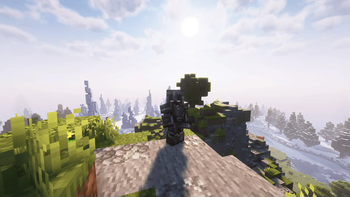
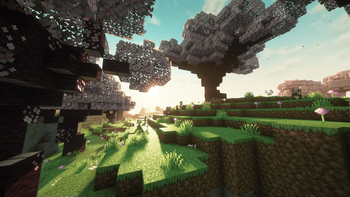
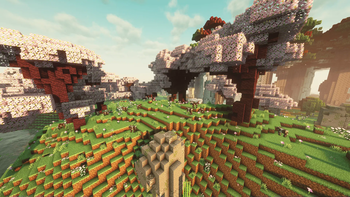
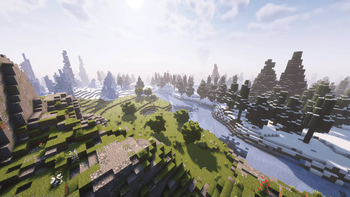
ORICHILL Client - ORICHILL server client aimed at improving visuals and optimization for better gameplay on the server.
Screenshots

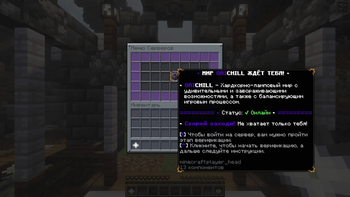
About this Modpack
📖 General information about the client
ORICHILL Client - A client for the ORICHILL server, aiming to optimize with the Fabulously Optimized mod-pack, as well as improving the visuals to make the player's gameplay something more beautiful.
This mod-pack with resource packs was made in order to immediately provide the optimal client variant for playing on the server ORICHILL. It improves the visual component and emphasizes the important aspects of the game on it. Anyone who wants to improve their game can download and try this mod-pack. It will definitely not leave you disappointed.
🍃 What is included in this client?
🤗 Mod-Packs:
😉 Mods that were added outside of the Mod-Pack:
- BindCommands
- Crash Assistant
- 3D Skin Layers
- Not Enough Animations
- Mouse Tweaks
- ViaFabricPlus
- In-Game Account Switcher
- Simple Voice Chat
- Sounds
- Euphoria Patches
- Immersive Hotbar
- Scribble
- BadOptimizations
- AsyncPackScan
- Async
- Options Profiles
- Emotecraft (Version 2.0.1+)
- ┖ For Emotecraft the SPEMOTES ALL emote pack was installed
- Marlow's Crystal Optimizer (Version 4.0.2+)
- Hold My Items (Version 4.0.2+)
- Remember My Txt (Version 4.0.2+)
- Respackopts (Version 5.0.0+)
- Smooth Scrolling (Version 5.0.0+)
- Achievements Optimizer (Version 5.0.0+)
- Reflex AntiLag (Version 5.0.0+)
- ModernFix-mVUS (Version 5.0.0+)
List of removed mods
- Visible Offhand (Removed from 3.0.1+)
- AsyncParticles (Removed from 5.0.0)
- Raknetify (Removed from 5.0.0)
😍 Shaders
- Complementary Shaders - Reimagined (untuned)
- Complementary Shaders - Unbound (tuned)
- ComplementaryReimagined + EuphoriaPatches (tuned)
- ComplementaryUnbound + EuphoriaPatches (tuned)
- Photon Shaders (tuned)
😁 Resource Packs:
- 3D Ladders
- Animated items (emissive)
- Assorted Allays x Fresh Animations
- Better cherry tree
- Better Flame Particles
- Big Bed Pack [LERT]
- Blinking Ender Eyes
- Chat Reporting Helper
- Chests Reimagined
- Fancy Crops
- Fast Better Grass
- Fresh Animations
- Fresh Animations - Extensions
- Fresh Food
- Fresh Leaf Litter
- Fresh Music Discs
- Fresh Skeleton Physics
- HUD Icon Overhaul
- Low Fire
- Low Shield
- Mandala's GUI - Dark mode
- Mod Menu Helper
- Mossy's Better Dirt
- Os' Colorful Cobblestone
- Realistic Light Sources
- Simple Grass Flowers
- Slim Fire
- Soul Ghast
- Spawned Eggs
- Spryzeen's Knight Armor
- Tasty Items
- Tender Dragon
- Translations for Sodium
- AmongstReality's Bow
- Bray's Zombie Overhaul + Fresh Animations
- Drodi's Illagers x Fresh Animation
- Fishy's Enchantment Table
- Epic Dragon Death Sound Effect
- Mandala's GUI: Dark Mode - ETF Patch
- Oxidation nuances(more copper oxidize state)
- Simplified Dragon Egg
- Fresh Flower Pots
- Fresh Flower Pots Rotated
- Slightly Squidier
- Improved Mace Hammer
- Fresh Animations: Player Extension (Version 4.0.2+)
- Fast Better Grass For Simple Grass Flowers (Version 5.0.0+)
Removed Resource Packs
- FA_fix - A resource pack created by us to make minor improvements while fixing some issues in - FreshAnimations. (Was removed in version 3.1.1 due to the new version FreshAnimation 1.10.0)
- Fresh Moves (Removed 4.0.2+)
- VT villager variations for Fresh Animations (Removed 4.0.2+)
Also, if you can allocate more than 4GB of RAM, then use these launch flags:
-XX:+IgnoreUnrecognizedVMOptions -XX:+UnlockExperimentalVMOptions -Dfile.encoding=UTF-8 -Djava.awt.headless=true -XX:+AlwaysPreTouch -XX:+DisableExplicitGC -XX:MaxDirectMemorySize=1024G -XX:+UseZGC -XX:+ZGenerational -XX:-ZProactive -XX:ZYoungCompactionLimit=20 -XX:ZFragmentationLimit=20 -XX:ZUncommitDelay=6 -XX:ZCollectionIntervalMinor=1.2 -XX:ZCollectionIntervalMajor=30.0
SYSTEM REQUIREMENTS:
(The results were made based on shaders)
⚠️ MINIMALS:
- CPU: INTEL CORE I5-2500f or AMD RYZEN 5 1600
- GPU: NVIDIA GTX 760 or AMD RADEON R9 270X
- RAM: 16 GB
✅ RECOMMENDED:
- CPU: INTEL CORE I5-6600K or AMD R5 3600
- GPU: NVIDIA GTX 1070 or AMD RADEON RX 580
- RAM: 16-32 GB
Available Versions
How to Set Up a ORICHILL Client Server
Order Server
Choose at least 4 GB RAM (6 GB recommended for ORICHILL Client). Based on player count: per 8 players.
Install Modpack in Dashboard
Open the modpack browser in the dashboard, search for "ORICHILL Client" and click "Install". The fabric loader and Minecraft 1.21.11 are configured automatically.
Start Server & Play
Start the server – all mods are loaded automatically. Share the server IP with friends and play together!
Frequently Asked Questions
ORICHILL Client server crashes or won't start – what to do?
Most common causes: insufficient RAM or wrong fabric loader. Check latest.log for "OutOfMemoryError" → increase RAM to at least 6 GB. For "Mixin" or "ClassNotFoundException" errors: modpack version and loader don't match. With Mado Hosting, loader and Minecraft version are auto-configured on modpack install – preventing most startup issues.
How much RAM does a ORICHILL Client server really need?
Minimum 4 GB, recommended 6 GB for stable performance. per 8 players. Important: Minecraft modpacks need more RAM than vanilla – plan extra per additional player. With Mado Hosting, you can scale RAM up live at any time without data loss (from €8/month).
Can I add custom mods to ORICHILL Client without conflicts?
Yes, but check compatibility: only use mods for the same loader (fabric) and same Minecraft version (1.21.11). Common issues: ID conflicts with recipe mods and incompatible coremod versions. The Mado dashboard mod browser only shows compatible mods and warns about known conflicts.
ORICHILL Client server lagging – performance tips
1) Increase RAM to 6 GB+. 2) Reduce server view-distance to 8 (server.properties). 3) Pre-generate chunks with the "Chunky" plugin. 4) Use /spark profiler to check which mods consume the most tick time. With Mado Hosting, all servers run on NVMe SSDs with dedicated CPU cores – eliminating hardware as a bottleneck.
Similar Modpacks

![Cobblemon Official Modpack [Fabric]](https://cdn.modrinth.com/data/5FFgwNNP/e7f9ee2e9d361623847853fe2ddce42f519ee64f.png)
![COBBLEVERSE - Pokemon Adventure [Cobblemon]](https://cdn.modrinth.com/data/Jkb29YJU/581ecf54530972afb18a04660afd820f2f24f6c7.png)
![Better MC [FABRIC] - BMC2](https://cdn.modrinth.com/data/shFhR8Vx/a19c2bcb51d38f32f138d3607e91cb2b7b8e387f_96.webp)


Rent ORICHILL Client Server
Start your own server with automatic modpack installation.
Details
- License
- BSD 3-Clause "New" or "Revised" License
- Server-side
- Optional
- Client-side
- Required
Supported Versions
Start your ORICHILL Client Server now
From €8.00/month with 6 GB RAM for the best performance.
Configure Server →