
Panorama
A create-focused technology and magic pack.
Screenshots
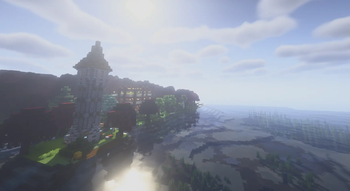
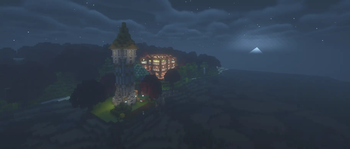
About this Modpack
Panoramic
A create-first modpack with a focus on travel and exploration, with a nod towards the olden days of Minecraft modpacks
Theming
This modpack serves as a reasonable "kitchen sink" type pack; rather than add anything and everything, it takes the traditional approach of utilising big mods to frame a general playthrough, with all the optimization gifted by modern Minecraft
In general, the technological focus is on the Create mod, extending (via New Age) into Ad Astra for additional worlds to explore, as well as the freedom of movement with jetpacks (as well as a few parkour-based mods)
As well as tech, this pack contains several of the major magic mods, in Spectrum and the RPG series, with dungeons and villages to make the world feel more alive
As well as new mods, we also bring back some old favourites in the form of Hephaestus (Tinkers Construct) and Travelers Backpacks (adventures backpacks) for easy access for older mod users, as well as Applied Energistics 2 for storage and Ad Astra (Galacticraft)
Below is a list of mods and what they do, in brief, so that people can dive into them:
- Create - the modern standard for tech mods, with an easy-to-use Ponder UI (hold W on some items)
- Spectrum - a fully featured magic mod, with a book, reminding us of old Thaumcraft
- Valkyrie Skies - moving block ships, the top-end of Archimedes Ships like mods
- Aquamirae - deep sea creatures and ship graveyards
- Simply Skills and the RPG series - a suite of mods in the style of RPG classes, spells are added to items using a spellbinding table, and a skill tree to specialise can also be seen (by default k, will need to be reminded)
- Minecraft Comes Alive - to make villagers more realistic
- Applied Energistics - the classic tech storage mod
- Dungeons Arise - very fancy dungeons
- Ad Astra - a modern version of Galacticraft, with many planets and moons to explore
- Zenith - a port of Apothesis adding various oddities including fancy weapon prefixes and suffixes
- Computer Craft
- Let's Do series, adding tea, coffee, many foods, beer and wine using neat mechanics (as seen in-game)
- Immersive Melodies - instruments that play songs
- Automobility - adds cars/carts with real-ish physics
- Better Archaeology - museum-worthy artifacts
- Nifty Carts - AstikorCarts, horse carts with ploughs and storage and
hopefully that covers most of the content mods, and something for everyone
Available Versions
How to Set Up a Panorama Server
Order Server
Choose at least 6 GB RAM (8 GB recommended for Panorama). Based on player count: per 5 players.
Install Modpack in Dashboard
Open the modpack browser in the dashboard, search for "Panorama" and click "Install". The fabric loader and Minecraft 1.20.1 are configured automatically.
Start Server & Play
Start the server – all mods are loaded automatically. Share the server IP with friends and play together!
Frequently Asked Questions
Panorama server crashes or won't start – what to do?
Most common causes: insufficient RAM or wrong fabric loader. Check latest.log for "OutOfMemoryError" → increase RAM to at least 8 GB. For "Mixin" or "ClassNotFoundException" errors: modpack version and loader don't match. With Mado Hosting, loader and Minecraft version are auto-configured on modpack install – preventing most startup issues.
How much RAM does a Panorama server really need?
Minimum 6 GB, recommended 8 GB for stable performance. per 5 players. Important: Minecraft modpacks need more RAM than vanilla – plan extra per additional player. With Mado Hosting, you can scale RAM up live at any time without data loss (from €12/month).
Can I add custom mods to Panorama without conflicts?
Yes, but check compatibility: only use mods for the same loader (fabric) and same Minecraft version (1.20.1). Common issues: ID conflicts with recipe mods and incompatible coremod versions. The Mado dashboard mod browser only shows compatible mods and warns about known conflicts.
Panorama server lagging – performance tips
1) Increase RAM to 8 GB+. 2) Reduce server view-distance to 8 (server.properties). 3) Pre-generate chunks with the "Chunky" plugin. 4) Use /spark profiler to check which mods consume the most tick time. With Mado Hosting, all servers run on NVMe SSDs with dedicated CPU cores – eliminating hardware as a bottleneck.
Similar Modpacks
![Cobblemon Official Modpack [Fabric]](https://cdn.modrinth.com/data/5FFgwNNP/e7f9ee2e9d361623847853fe2ddce42f519ee64f.png)
![COBBLEVERSE - Pokemon Adventure [Cobblemon]](https://cdn.modrinth.com/data/Jkb29YJU/581ecf54530972afb18a04660afd820f2f24f6c7.png)
![Better MC [FABRIC] - BMC2](https://cdn.modrinth.com/data/shFhR8Vx/a19c2bcb51d38f32f138d3607e91cb2b7b8e387f_96.webp)


![Better MC [FORGE] - BMC4](https://cdn.modrinth.com/data/4BV47HRn/7f5ef7cc61b2593609aabef3ed07a866a4f11b73_96.webp)
Rent Panorama Server
Start your own server with automatic modpack installation.
Supported Versions
Start your Panorama Server now
From €12.00/month with 8 GB RAM for the best performance.
Configure Server →