
Pasta's Cobblemon Experience v2
A custom modpack made for myself and my friends. Focuses on Cobblemon and Create, with support of smaller content mods that expands on adventuring and exploration to supplement Cobblemon, as well as performance mods.
Screenshots
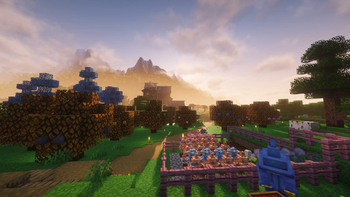
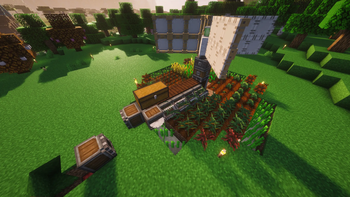
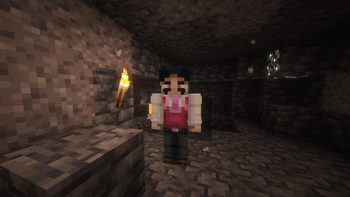
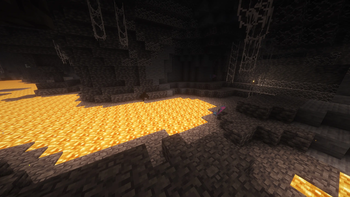
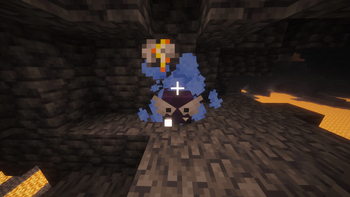
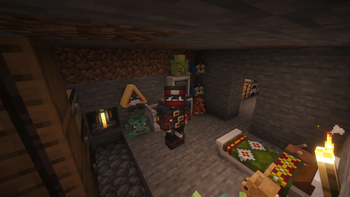
About this Modpack
DETAILED DESCRIPTION
A modpack I've been working on and tweaking privately for over two years now, made public for the sake of easy sharing and updating.
This modpack is centered around the Cobblemon and Create mods. Everything else besides those two are mods that complement these two in various ways (exploration, building and combat primarily) or just add small features that I think are fun and works well alongside everything else.
The modpack also includes most common performance optimization mods (Sodium, etc) and Iris, as well as some extra mods for the Optifine-free Optifine experience for those who wish to use resource packs.
TECHNICAL SPECIFICATIONS
IMPORTANT: Sometimes between updates there will be tweaks for config files. When that is the case, going into your mod install folder and deleting the "config" folder as well as "options.txt" may be necessary. It will be mentioned at the top of the new version's changelog if that's the case.
RAM needed: While the hardware I have at hand for testing the minimum specs are limited; based on my tests with my laptop from 2019 with mid-range specs for its time, you need at minimum 6GB of RAM to run this pack (won't launch at lower amounts), and recommended RAM would be around 8-10GB to be on the safe side.
All datapacks included in the modpack are loaded automatically without needing to manually install them into your world save. If you want to add more datapacks and want them to apply to all your worlds, just add them to the "datapack" folder in your base install location.
If you want to run this mod on a server, you can get the necessary server files from this page: https://modrinth.com/project/pastas-cobblemon-server-experience-v2
You don't need to download the server version of the modpack if you don't want to; the singleplayer version can be installed onto a server too, but some mods need to be deleted for the server to be able to launch. You'll also have extra mods on your server that are clientside-only and only takes up more space and potentially makes the server boot up slower, but the option is there in case you prefer it.
CUSTOM POKÉMON SPAWNPOOL
For the most part, this modpack uses the normal spawn conditions included by Cobblemon, Mega Showdown and MissingMons. There are some that has been changed from their default or entirely new spawning conditions for Pokémon that are included but don't have them. Here is a list of all the spawn conditions added by me:
Legendary/Mythical/Otherwise noteworthy Pokémon
All these Pokémon appear in the Ultra-Rare bracket under the following conditions:
Articuno
Must be above Y=199. Must be in a biome with the "#cobblemon:is_freezing" tag. Only appears in the rain (snow). There need to be a Ice Stone Block nearby.
Zapdos
Must be above Y=199. Must be in a biome with the "#cobblemon:is_plateau" tag. Only appears in a thunderstorm. There need to be a Thunder Stone Block nearby.
Moltres
Must be above Y=199. Must be in a biome with the "#cobblemon:is_volcanic" tag. Only appears in clear weather. There need to be a Fire Stone Block nearby.
Mewtwo
Must be in a Stronghold (vanilla or Yung's) or Underground Bunker. There need to be a Restoration Tank or Fossil Analyzer nearby.
Mew
Must be in a Jungle Temple (vanilla or Yung's), Archaeological Site or a Jungle/Savanna Digsite of any size.
Ho-oh
Must be above Y=199. Must be in a Flower Forest, Auroral Garden or Mystic Grove. Only appears in clear weather.
Lugia
Must be above Y=199. Must be in a biome with the "#cobblemon:is_ocean" or "#cobblemon:is_frozen_ocean" tag. Only appears in a thunderstorm.
Rayquaza
Must be above Y=299. Must be in the Overworld. Only appears in clear weather.
Giratina
Must be in the End. Must be under cover from the skies. There need to be a Dusk Stone Block nearby.
Bloodmoon Ursaluna
Appears in all the same conditions that a normal Ursaluna could spawn, except it has to be nighttime and the moon phase has to be a full moon.
Misc
Burmy, Wormadam (both Plant Cloak), Cherubi and Cherrim: Same spawn conditions they have in Mega Showdown, but with the addition of needing any kind of leaf blocks nearby.
MISC INFO
The version of CobbleMotion included in this pack has been modified slightly. I removed all files related to the Eeveelutions, as the pack already have Eeveelutions Reimagined, and the animations in it are really good as-is. This was done with the original creator (Lenkagari)'s permission.
Permission

I've included a few mods that are toggled off in-game by default.
- Leawind's Third Person is fantastic, but the camera behaves incorrectly when riding a Create train or riding a Pokémon. If you want to use Leawind's, I'd recommend setting up a keybind to let you toggle the mod on and off at will.
- No shader is active by default for performance reasons.
On top of that, the following mods are in the modpack but aren't enabled at all unless you activate them:
- Chat Animation: It causes rendering glitches for models in vaious UI elements.
- Dismount Entity: Prevents players from riding along on Pokémon that can hold multiple people. Can be enabled without consequence if you just want to play solo.
- Tectonic: Fantastic world gen, but very taxing on servers especially. Enable if you have a good gaming PC.
- WorldEdit: Only necessary for those who wishes to use it.
Worlds from v1 does technically transfer to v2, but since I were unable to get the mod Blockus to run through Sinytra, you'll end up having a lot of holes and floating ores underground. Some things, like equipment in your Trinket slots and items stored in non-vanilla storage containers will only partially or not at all survive the move. It's up to you if it's worth the move, but if you do: be sure to put all things listed above inside of vanilla chests or barrels first.
I haven't made a Github repository for this modpack, but I'll change that so that bugs can be reported if this actually gets downloaded by more than just my friends lol.
The modpack icon is heavily based on this comic made by u/ProfessorNoodless.
MODS INCLUDED
- [EMF] Entity Model Features
- [ETF] Entity Texture Features
- Accessories
- Accessories Compatibility Layer
- Advancements Reloaded (AdvancementInfo)
- Amendments
- Animatica Foxified
- AppleSkin
- Appliances [Cobblemon]
- Archers (RPG Series)
- Architect's Palette
- Armory (RPG Series)
- Arsenal (RPG Series)
- Arts & Crafts
- ATi Structures - Vanilla Edition
- Better Clouds
- BetterF3
- BetterGrassify
- Biomes O' Plenty
- Bountiful Blocks
- Chat Animation [Smooth Chat] (disabled by default)
- Chat Heads
- Cherished Worlds
- Chipped
- Client Sort
- Cobble EMI Stuff
- CobbleFurnies
- Cobblemarks+ (Cobblemon)
- Cobblemon
- Cobblemon Capture XP
- Cobblemon Counter
- Cobblemon Fight or Flight Reborn
- Cobblemon Integrations
- Cobblemon Pokenav
- Cobblemon Unchained
- Cobblemon: Max Repel
- Cobblemon: Mega Showdown
- Cobblemon: Parting Gifts
- Cobbreeding
- Colorwheel
- Combat Roll
- Comforts
- Cool Rain Reforged
- Corpse
- Corpse x Curios API Compat
- Create
- Create Deco
- Create Encased
- Create JEI Compat
- Create Slice & Dice
- Create: Bells & Whistles
- Create: Copycats+
- Create: Design n' Decor
- Create: Dynamic Lights
- Create: Enchantment Industry
- Create: Escalated
- Create: Extended Wrenches
- Create: Interiors
- Create: Mob Spawners
- Create: Oxidized
- Create: Power Loader
- Create: Threaded Trains
- Create: Vibrant Vaults
- Critical Strike
- Curios API
- Custom FOV
- Customizable Elytra
- Cut Through
- Damage Numbers
- Default Options
- Dismount Entity (disabled by default)
- Display Delight
- Double Doors
- Easy Anvils
- Elytra Physics
- Elytra Slot
- EMI
- EMI Addon: Extra Mod Integrations
- EMI Enchanting
- EMI Loot
- Emotecraft
- Enchantment Descriptions
- Enhanced Block Entities NEOFORGED
- Entity Culling
- Exposure
- Factory Blocks
- Falling Leaves (NeoForge/Forge)
- Farmer's Delight
- FerriteCore
- Forgetful Sniffer
- Friends&Foes (Forge/Neoforge)
- Fruits Delight
- Giant Spawn
- Gliders
- Goblin Traders (Curseforge link)
- Handcrafted
- Immersive Melodies
- In Control!
- Iris Shaders
- It Takes a Pillage Continuation
- Item Flicker
- Item Highlighter
- Jade
- Jade Addons (Neo/Forge)
- Jewelry (RPG Series)
- Leawind's Third Person
- Lithium
- Lucky's Wardrobe
- Mech Trowel
- Mega Showdown Item Pack
- MES - Moog's End Structures
- MissingMons [cobblemon]
- MmmMmmMmmMmm
- Model Gap Fix
- ModernFix
- More Culling
- More Mouse Tweaks
- MoreCobblemonTweaks
- Mouse Tweaks
- Moyai
- MrCrayfish's Furniture Mod: Refurbished (Curseforge link)
- Mutant Monsters
- Nature's Compass
- NeoContinuity
- No Chat Reports
- No Chat Restrictions
- No Enderman Grief
- No Resource Pack Warnings forge
- Noisium (Link excluded due to mod being unlisted)
- Not Enough Animations
- Notes
- Nyf's Spiders
- OpenHUD
- Packet Fixer
- Paladins & Priests (RPG Series)
- Paxi
- Pick Up Notifier
- Polytone
- Radical Cobblemon Trainers
- Reese's Sodium Options
- Relics (RPG Series)
- Resource Pack Overrides
- Revault
- Ribbits
- Rogues & Warriors (RPG Series)
- Runes
- Rustic Delight
- ScalableLux
- Showcase Item
- Shulker Box Tooltip
- Simple Fog Control
- Simple Hats
- Simple Music Control
- SimpleTMs: TMs and TRs for Cobblemon
- Simply Tools
- Skill Tree (RPG Series)
- Soaring Phantoms
- Sodium
- Sodium Dynamic Lights
- Sodium Extras
- Sodium Shadowy Path Blocks
- Sophisticated Backpacks
- Sophisticated Backpacks Create Integration
- Sophisticated Storage
- Sophisticated Storage Create Integration
- Soul Fire'd
- Steam 'n' Rails Neoforge
- Straw Statues
- Subtle Effects
- Sunken Spires
- Supplementaries
- Tectonic (disabled by default)
- Tempad
- Thirsty Copper
- TooManyRecipeViewers
- Towns and Towers
- Trash Cans
- Underground Bunkers
- Urkaz Moon Tools
- VanitySlots
- Village Taverns (RPG Series)
- Wabi-Sabi Structures
- Wakes Reforged
- Wan's Ancient Beasts
- Wizards (RPG Series)
- Xaero's World Map
- Yeehaw Towns!
- Yeetus Experimentus
- Your Options Shall Be Neoforged (YOSBR)
- YUNG's Better Desert Temples
- YUNG's Better Dungeons
- YUNG's Better End Island
- YUNG's Better Jungle Temples
- YUNG's Better Mineshafts
- YUNG's Better Nether Fortresses
- YUNG's Better Ocean Monuments
- YUNG's Better Strongholds
- YUNG's Better Witch Huts
- YUNG's Extras
LIBRARY MODS & DEPENDENCIES
- Architectury API
- Athena
- AzureLib Armor
- BaguetteLib
- Balm
- Bookshelf
- Caelus API
- Cloth Config API
- Cobblemon Tim Core
- Cobweb
- Collective
- Create: Dragons Plus
- CreateiveCore
- Cristel Lib
- Cryonic Config
- Forge Config API Port
- Forgified Fabric API
- Framework (Curseforge link)
- Fzzy Config
- Geckolib
- GlitchCore
- Iceberg
- JinxedLib
- Kotlin for Forge
- LibX
- Lithostitched
- Moog's Structure Lib (moogs_structures)
- Moonlight Lib
- oωo (owo-lib)
- playerAnimator
- Prickle
- Prometheus
- Pufferfish's Skills
- Puzzles Lib
- Radical Cobblemon Trainers API
- Ranged Weapon API
- Resourceful Config
- Resourceful Lib
- Shield API
- Sodium Options API
- Sophisticated Core
- Spell Engine
- Spell Power Attributes
- Structure Pool API
- SuperMartijn642's Config Lib
- SuperMartijn642's Core Lib
- TerraBlender
- YetAnotherConfigLib (YACL)
- YUNG's API
DATAPACKS INCLUDED
- CobbleMotion v1.4.1 (modified with permission)
- MES - Biomes O' Plenty Compat Pack (Curseforge link)
- Pasta's Custom Additions
- Tim's Ultimately Comprehensive Cobblemon Edits of Destiny
RESOURCE PACKS INCLUDED
- Arid's Immersive Resprites
- Cobblemon 3D Pokenavs
- Cobblemon Accessories & More
- CobbleMotion v1.4.1 (modified with permission)
- Comforts Modernized
- Eeveelutions Reimagined
- Fully Hisuian Starters (Cobblemon) (Optional, not enabled by default)
- Mega Showdown Repolished
- Radical Cobblemon Trainer Textures Plus
SHADERPACKS INCLUDED
Due to some changes in how Create renders its things, not all shaderpacks work properly when run alongside Create v6. Be sure to look up if your is, if you want to use a shader not included in the modpack.
WHY MAKE THIS SO SOON AFTER V1?
It was always the plan to make a v2. I've already been puzzling with running my modpack in MC 1.21.1 for a long time, at least since Cobblemon 1.6 came out. I was simply waiting for Create Fabric to be ported to MC 1.21.1, which it still hasn't.
After one weekend's worth of playing on Pasta's Cobblemon Experience v1 with some friends, basically everyone wanted to make the move to the latest Cobblemon due to how much further behind Cobblemon 1.5 are. Besides the mostly completed Fabric version of v2, I also had a prototype of v2 on Neoforge already, so I just used it as a base and ported over as much as I could from both Fabric v1 and Fabric v2 (which ended up being most of them) and found suitable replacers for the few that didn't in no time at all. Therefore, v2 now fully embraces Neoforge over Fabric.
Available Versions
How to Set Up a Pasta's Cobblemon Experience v2 Server
Order Server
Choose at least 6 GB RAM (8 GB recommended for Pasta's Cobblemon Experience v2). Based on player count: per 5 players.
Install Modpack in Dashboard
Open the modpack browser in the dashboard, search for "Pasta's Cobblemon Experience v2" and click "Install". The neoforge loader and Minecraft 1.21.1 are configured automatically.
Start Server & Play
Start the server – all mods are loaded automatically. Share the server IP with friends and play together!
Frequently Asked Questions
Pasta's Cobblemon Experience v2 server crashes or won't start – what to do?
Most common causes: insufficient RAM or wrong neoforge loader. Check latest.log for "OutOfMemoryError" → increase RAM to at least 8 GB. For "Mixin" or "ClassNotFoundException" errors: modpack version and loader don't match. With Mado Hosting, loader and Minecraft version are auto-configured on modpack install – preventing most startup issues.
How much RAM does a Pasta's Cobblemon Experience v2 server really need?
Minimum 6 GB, recommended 8 GB for stable performance. per 5 players. Important: Minecraft modpacks need more RAM than vanilla – plan extra per additional player. With Mado Hosting, you can scale RAM up live at any time without data loss (from €12/month).
Can I add custom mods to Pasta's Cobblemon Experience v2 without conflicts?
Yes, but check compatibility: only use mods for the same loader (neoforge) and same Minecraft version (1.21.1). Common issues: ID conflicts with recipe mods and incompatible coremod versions. The Mado dashboard mod browser only shows compatible mods and warns about known conflicts.
Pasta's Cobblemon Experience v2 server lagging – performance tips
1) Increase RAM to 8 GB+. 2) Reduce server view-distance to 8 (server.properties). 3) Pre-generate chunks with the "Chunky" plugin. 4) Use /spark profiler to check which mods consume the most tick time. With Mado Hosting, all servers run on NVMe SSDs with dedicated CPU cores – eliminating hardware as a bottleneck.
Similar Modpacks
![Cobblemon Official Modpack [Fabric]](https://cdn.modrinth.com/data/5FFgwNNP/e7f9ee2e9d361623847853fe2ddce42f519ee64f.png)
![COBBLEVERSE - Pokemon Adventure [Cobblemon]](https://cdn.modrinth.com/data/Jkb29YJU/581ecf54530972afb18a04660afd820f2f24f6c7.png)
![Better MC [FABRIC] - BMC2](https://cdn.modrinth.com/data/shFhR8Vx/a19c2bcb51d38f32f138d3607e91cb2b7b8e387f_96.webp)


![Better MC [FORGE] - BMC4](https://cdn.modrinth.com/data/4BV47HRn/7f5ef7cc61b2593609aabef3ed07a866a4f11b73_96.webp)
Rent Pasta's Cobblemon Experience v2 Server
Start your own server with automatic modpack installation.
Supported Versions
Start your Pasta's Cobblemon Experience v2 Server now
From €12.00/month with 8 GB RAM for the best performance.
Configure Server →