
Perfect Vanilla
Perfect Vanilla — pure Minecraft, perfectly optimized for performance and stability.
Screenshots
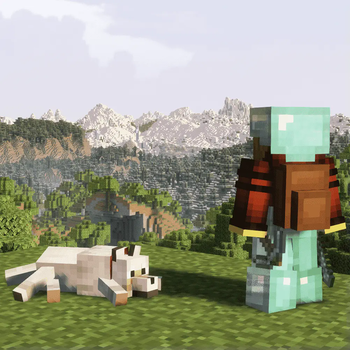
About this Modpack

Perfect Vanilla — The Refined Minecraft Experience
 |
 |
 |
|---|---|---|
| High-performance gameplay with custom tuning | Quality-of-life enhancements that keep it vanilla | Polished visuals & sound designed for immersion |
🧭 About This Modpack
Perfect Vanilla redefines how Minecraft should feel — smooth, stable, and immersive, while staying completely faithful to the original game.
It focuses on technical performance, aesthetic refinement, and user comfort, without changing the game’s core identity.
Every improvement is subtle but meaningful: faster chunk loading, optimized memory handling, enhanced lighting, more natural audio, and intelligent interface tweaks — all built on top of the pure vanilla foundation.
This modpack doesn’t add new blocks, tools, or biomes.
Instead, it enhances Minecraft’s core systems, visual fidelity, and responsiveness, ensuring that everything looks, sounds, and performs better — just as it should.
⚙️ Key Features
- ⚡ Optimized performance — faster world generation, smoother frame pacing
- 🧠 Smart QoL tools — improved inventory, crafting, and interface usability
- 🎨 Enhanced visuals & sound — handcrafted shaders, subtle ambient effects
- 🧩 Full mod compatibility — no conflicts or game-breaking dependencies
- 🔧 Lightweight structure — easy to maintain, quick to update
- 🛠️ Stable foundation — designed for long-term worlds and continuous play
🖥️ System Requirements
| Component | Minimum | Recommended |
|---|---|---|
| RAM | 8 GiB | 12 GiB + |
| VRAM | 4 GiB | 8 GiB + |
| GPU | GTX 1060 / RX 580 | RX 7900 XT / RTX 4070 + |
| Storage | SSD | NVMe SSD |
⚠️ Usage Notes
- Singleplayer Focus: Perfect Vanilla is primarily designed for single-player gameplay.
Some client-side mods may conflict with multiplayer anti-cheat systems. - Performance Impact: System stability depends on CPU frequency, temperature, and driver configuration.
- Launchers: Use a third-party launcher such as Prism or ATLauncher for easy installation and management.
- RAM Allocation: At least 8 GiB is required; 12 GiB is recommended for maximum performance.
🧩 Philosophy & Maintenance
Perfect Vanilla is maintained as a personal, long-term project dedicated to refining the vanilla experience —
not to reinvent it. Updates focus on optimization, compatibility, and technical excellence.
The philosophy is simple:
“Enhance everything — change nothing.”
By avoiding unnecessary complexity and respecting the vanilla core, Perfect Vanilla delivers a stable, elegant, and timeless Minecraft experience for purists and performance enthusiasts alike.
✨ Perfect Vanilla — Where the original game meets modern optimization. ✨
Description version 3.0
Available Versions
How to Set Up a Perfect Vanilla Server
Order Server
Choose at least 6 GB RAM (8 GB recommended for Perfect Vanilla). Based on player count: per 5 players.
Install Modpack in Dashboard
Open the modpack browser in the dashboard, search for "Perfect Vanilla" and click "Install". The fabric loader and Minecraft 1.21.1 are configured automatically.
Start Server & Play
Start the server – all mods are loaded automatically. Share the server IP with friends and play together!
Frequently Asked Questions
Perfect Vanilla server crashes or won't start – what to do?
Most common causes: insufficient RAM or wrong fabric loader. Check latest.log for "OutOfMemoryError" → increase RAM to at least 8 GB. For "Mixin" or "ClassNotFoundException" errors: modpack version and loader don't match. With Mado Hosting, loader and Minecraft version are auto-configured on modpack install – preventing most startup issues.
How much RAM does a Perfect Vanilla server really need?
Minimum 6 GB, recommended 8 GB for stable performance. per 5 players. Important: Minecraft modpacks need more RAM than vanilla – plan extra per additional player. With Mado Hosting, you can scale RAM up live at any time without data loss (from €12/month).
Can I add custom mods to Perfect Vanilla without conflicts?
Yes, but check compatibility: only use mods for the same loader (fabric) and same Minecraft version (1.21.1). Common issues: ID conflicts with recipe mods and incompatible coremod versions. The Mado dashboard mod browser only shows compatible mods and warns about known conflicts.
Perfect Vanilla server lagging – performance tips
1) Increase RAM to 8 GB+. 2) Reduce server view-distance to 8 (server.properties). 3) Pre-generate chunks with the "Chunky" plugin. 4) Use /spark profiler to check which mods consume the most tick time. With Mado Hosting, all servers run on NVMe SSDs with dedicated CPU cores – eliminating hardware as a bottleneck.
Similar Modpacks
![Cobblemon Official Modpack [Fabric]](https://cdn.modrinth.com/data/5FFgwNNP/e7f9ee2e9d361623847853fe2ddce42f519ee64f.png)
![COBBLEVERSE - Pokemon Adventure [Cobblemon]](https://cdn.modrinth.com/data/Jkb29YJU/581ecf54530972afb18a04660afd820f2f24f6c7.png)
![Better MC [FABRIC] - BMC2](https://cdn.modrinth.com/data/shFhR8Vx/a19c2bcb51d38f32f138d3607e91cb2b7b8e387f_96.webp)


![Better MC [FORGE] - BMC4](https://cdn.modrinth.com/data/4BV47HRn/7f5ef7cc61b2593609aabef3ed07a866a4f11b73_96.webp)
Rent Perfect Vanilla Server
Start your own server with automatic modpack installation.
Supported Versions
Start your Perfect Vanilla Server now
From €12.00/month with 8 GB RAM for the best performance.
Configure Server →