
Performance Optimization Patch
A performance optimization patch bundle, suitable for all vanilla survival players and redstone players.
Screenshots

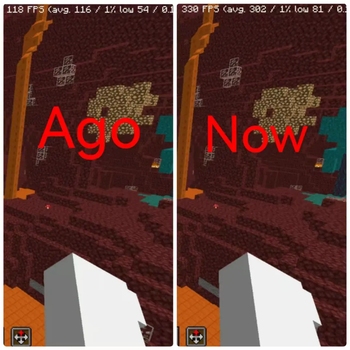
About this Modpack
"Performance Optimization Patch" is an integration pack focused on enhancing game performance, designed to address issues like lag, frame drops, and slow loading—with a particular focus on meeting the core needs of vanilla survival players and redstone enthusiasts.
This pack features carefully selected lightweight, highly compatible optimization mods, covering core functions such as memory management, rendering optimization, and accelerated resource loading. No complex configuration is required to make the game run smoother. For vanilla survival players, it improves frame rate stability during exploration and building, reduces terrain loading lag, all without disrupting the original gameplay atmosphere. For redstone enthusiasts, its latency optimization for redstone circuits ensures complex contraptions operate precisely, avoiding logic errors caused by frame rate fluctuations.
All mods have undergone rigorous testing to ensure compatibility with vanilla mechanics and safety. Whether you’re an explorer seeking a smooth survival experience or a tech-savvy player delving into redstone logic, you’ll enjoy a more stable gaming experience with this pack. Feedback on usage issues is welcome!
「性能优化补丁」是一款专注于提升游戏运行效率的整合包,专为解决卡顿、掉帧、加载缓慢等问题设计,尤其适配原版生存玩家与红石玩家的核心需求。
整合包精选轻量且兼容性强的优化模组,覆盖内存管理、渲染优化、资源加载加速等核心功能,无需复杂配置即可让游戏更流畅。对于原版生存玩家,它能在不破坏原版玩法氛围的前提下,提升探索、建造时的帧率稳定性,减少地形加载卡顿;对于红石玩家,其针对红石电路的延迟优化可保障复杂装置精准运行,避免因帧率波动导致的逻辑错误。
所有模组均经过严格测试,确保与原版机制兼容且安全可靠。无论你是追求流畅生存体验的探索者,还是钻研红石逻辑的技术玩家,都能通过它获得更稳定的游戏感受,欢迎反馈使用中的问题!
Available Versions
How to Set Up a Performance Optimization Patch Server
Order Server
Choose at least 6 GB RAM (8 GB recommended for Performance Optimization Patch). Based on player count: per 5 players.
Install Modpack in Dashboard
Open the modpack browser in the dashboard, search for "Performance Optimization Patch" and click "Install". The fabric loader and Minecraft 1.21.11 are configured automatically.
Start Server & Play
Start the server – all mods are loaded automatically. Share the server IP with friends and play together!
Frequently Asked Questions
Performance Optimization Patch server crashes or won't start – what to do?
Most common causes: insufficient RAM or wrong fabric loader. Check latest.log for "OutOfMemoryError" → increase RAM to at least 8 GB. For "Mixin" or "ClassNotFoundException" errors: modpack version and loader don't match. With Mado Hosting, loader and Minecraft version are auto-configured on modpack install – preventing most startup issues.
How much RAM does a Performance Optimization Patch server really need?
Minimum 6 GB, recommended 8 GB for stable performance. per 5 players. Important: Minecraft modpacks need more RAM than vanilla – plan extra per additional player. With Mado Hosting, you can scale RAM up live at any time without data loss (from €12/month).
Can I add custom mods to Performance Optimization Patch without conflicts?
Yes, but check compatibility: only use mods for the same loader (fabric) and same Minecraft version (1.21.11). Common issues: ID conflicts with recipe mods and incompatible coremod versions. The Mado dashboard mod browser only shows compatible mods and warns about known conflicts.
Performance Optimization Patch server lagging – performance tips
1) Increase RAM to 8 GB+. 2) Reduce server view-distance to 8 (server.properties). 3) Pre-generate chunks with the "Chunky" plugin. 4) Use /spark profiler to check which mods consume the most tick time. With Mado Hosting, all servers run on NVMe SSDs with dedicated CPU cores – eliminating hardware as a bottleneck.
Similar Modpacks

![Cobblemon Official Modpack [Fabric]](https://cdn.modrinth.com/data/5FFgwNNP/e7f9ee2e9d361623847853fe2ddce42f519ee64f.png)
![COBBLEVERSE - Pokemon Adventure [Cobblemon]](https://cdn.modrinth.com/data/Jkb29YJU/581ecf54530972afb18a04660afd820f2f24f6c7.png)
![Better MC [FABRIC] - BMC2](https://cdn.modrinth.com/data/shFhR8Vx/a19c2bcb51d38f32f138d3607e91cb2b7b8e387f_96.webp)


Rent Performance Optimization Patch Server
Start your own server with automatic modpack installation.
Supported Versions
Start your Performance Optimization Patch Server now
From €12.00/month with 8 GB RAM for the best performance.
Configure Server →