
Performium Reborn
Lightweight vanilla+ optimization modpack, UI and QoL stuff, fork of Performium
Screenshots
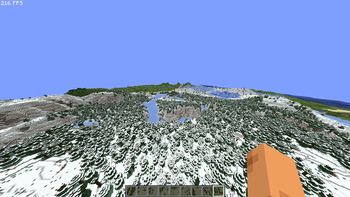
About this Modpack
About
Performium Reborn is a fork of Performium modpack. A lightweight (about 50 mods) vanilla+ modpack focused on essential improvements: optimization, borderless fullscreen, quality-of-life tweaks, smooth UI animations, and other must-have features every player installs first
My project is different (hopefully for the better) from the original, so if you need a direct sequel without changes, try Performium: Continued
Differences from other modpacks
Unlike other modpacks, Performium Reborn contains a Voxy mod and does not use unnecessary mods (like CalcMod, which is shoved into each optimization modpack) so that the build remains lightweight
Concept
Designed as a clean, stable base for both regular gameplay and building your own modpacks. You can create any forks, please mention the original
Also
Looking for a modpack with VulkanMod? Check out Vulkanium
Neoforge
You can find the neoforge version here
Mods
- 3d-Skin-Layers
- AppleSkin
- BadOptimizations
- Better Advancements
- BetterF3
- Blur+
- ChatAnimation
- Chunky
- Cloth Config v20
- Concurrent Chunk Management Engine
- Continuity
- Cubes Without Borders
- EntityCulling
- Fabric API
- Fabric Language Kotlin
- Fast IP Ping
- FastQuit
- FerriteCore
- Forge Config API Port
- Fzzy Config
- GUI Tween
- Gamma Utils
- Held Item Info
- ImmediatelyFast
- Iris
- Ixeris
- Krypton
- Language Reload
- Lithium
- MidnightLib
- Mod Menu
- ModernFix
- More Culling
- Mouse Tweaks
- Noisium
- Packet Fixer
- Placeholder API
- Remove Reloading Screen
- ScalableLux
- Simple Voice Chat
- Smooth Scroll
- Smooth Skies
- Sodium
- Sodium Extra
- Subtitles+
- Very Many Players
- Voxy
- YetAnotherConfigLib
- Zoomify
- kennytv's epic force close loading screen mod for Fabric
Usage tips
Highly recomended pregenerate world with chunky before playing:
- /chunky center
- /chunky radius
- /chunky shape circle
- /chunky start
Versioning System
vX.Y
- Major version (
X) — large/game-changing updates that significantly affect the modpack experience (new core mods, major reworks, etc.) - Minor version (
Y) — smaller additions, tweaks, fixes
Example: v1.0
The modpack also has an internal release state shown on Modrinth:
- Alpha — incomplete or unstable, many planned mods/features may be missing
- Beta — mostly complete, but some non-critical mods may still be outdated or unavailable
- Release — intended feature set is fully implemented and stable
The release state is not included in the modpack name, since it only reflects how complete the current version is relative to its intended mod list
Available Versions
How to Set Up a Performium Reborn Server
Order Server
Choose at least 4 GB RAM (6 GB recommended for Performium Reborn). Based on player count: per 8 players.
Install Modpack in Dashboard
Open the modpack browser in the dashboard, search for "Performium Reborn" and click "Install". The fabric loader and Minecraft 26.1.2 are configured automatically.
Start Server & Play
Start the server – all mods are loaded automatically. Share the server IP with friends and play together!
Frequently Asked Questions
Performium Reborn server crashes or won't start – what to do?
Most common causes: insufficient RAM or wrong fabric loader. Check latest.log for "OutOfMemoryError" → increase RAM to at least 6 GB. For "Mixin" or "ClassNotFoundException" errors: modpack version and loader don't match. With Mado Hosting, loader and Minecraft version are auto-configured on modpack install – preventing most startup issues.
How much RAM does a Performium Reborn server really need?
Minimum 4 GB, recommended 6 GB for stable performance. per 8 players. Important: Minecraft modpacks need more RAM than vanilla – plan extra per additional player. With Mado Hosting, you can scale RAM up live at any time without data loss (from €8/month).
Can I add custom mods to Performium Reborn without conflicts?
Yes, but check compatibility: only use mods for the same loader (fabric) and same Minecraft version (26.1.2). Common issues: ID conflicts with recipe mods and incompatible coremod versions. The Mado dashboard mod browser only shows compatible mods and warns about known conflicts.
Performium Reborn server lagging – performance tips
1) Increase RAM to 6 GB+. 2) Reduce server view-distance to 8 (server.properties). 3) Pre-generate chunks with the "Chunky" plugin. 4) Use /spark profiler to check which mods consume the most tick time. With Mado Hosting, all servers run on NVMe SSDs with dedicated CPU cores – eliminating hardware as a bottleneck.
Similar Modpacks

![Cobblemon Official Modpack [Fabric]](https://cdn.modrinth.com/data/5FFgwNNP/e7f9ee2e9d361623847853fe2ddce42f519ee64f.png)
![COBBLEVERSE - Pokemon Adventure [Cobblemon]](https://cdn.modrinth.com/data/Jkb29YJU/581ecf54530972afb18a04660afd820f2f24f6c7.png)
![Better MC [FABRIC] - BMC2](https://cdn.modrinth.com/data/shFhR8Vx/a19c2bcb51d38f32f138d3607e91cb2b7b8e387f_96.webp)


Rent Performium Reborn Server
Start your own server with automatic modpack installation.
Supported Versions
Start your Performium Reborn Server now
From €8.00/month with 6 GB RAM for the best performance.
Configure Server →