
PhasMC's Creative Modpack
A Vanilla+ Modpack centered around stunning terrain, graphics, and quality of life for creative servers.
Screenshots
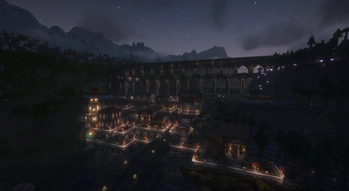




About this Modpack
PhasMC's Creative Modpack
PhasMC's Creative Modpack is a lightweight, high-performance Vanilla+ suite designed to transform the creative multiplayer experience. Born out of the practical needs of our own server group, this pack bridges the gap between client-side building tools and stunning visual presentation, making it the ultimate workspace for collaborative building and world-building projects.
🛠️ Built for Builders
This pack integrates the absolute pinnacle of modern creative tools, ensuring you have total control over your canvas:
Axiom & WorldEdit: Massive architectural shifts require powerful tools. Command the landscape with unmatched editor tools and real-time building capabilities.

Better Command Block UI: Streamlines logic, script management, and server automation with a vastly improved interface.
🏔️ Redefined Horizons
Vanilla generation is blown wide open with a massive, zero-lag overhaul to every dimension:
Overworld: Powered by Tectonic and Terralith for breathtaking, sweeping mountain ranges, deep valleys, and diverse biological biomes.

The Nether & The End: Explorable overhauls via Incendium and Nullscape, turning dark dimensions into epic, expansive landscapes.

Distant Horizons: Enjoy unbelievable render distances without melting your computer, making huge collaborative build projects visible from miles away.
⚡ Next-Gen Performance & Visuals
Never compromise on frame rates. The pack is meticulously optimized for both high-end rigs and budget hardware:
The Rendering Core: Powered by Sodium, Iris, and Entity Culling for incredibly smooth performance.

Immersive Atmosphere: Ships out of the box with Complementary Shaders (Unbound), paired with Sound Physics Remastered and LambDynamicLights for deep audio-visual immersion.

Network Optimized: Features Lithium and FerriteCore to reduce memory footprints and maintain server-to-client synchronicity.
⚙️ Installation & Usage Notes
Environment: Optimized for both Client and Server. For the absolute best multiplayer synchronicity (especially with world generation and mapping), it is highly recommended to run this on both sides.

Axiom Notice: For multiplayer usage of Axiom, please ensure you obtain the appropriate temporary or commercial license directly from their official Discord community.
Why we publicised this pack:
"This is the first public upload of PhasMC's Creative Modpack, persisting across multiple of our own group's servers. After seeing how much success it brought to our internal projects, we realized this toolkit would be of immense utility to the wider Minecraft community. Build together, performantly." -- Apollo767
Available Versions
How to Set Up a PhasMC's Creative Modpack Server
Order Server
Choose at least 4 GB RAM (6 GB recommended for PhasMC's Creative Modpack). Based on player count: per 8 players.
Install Modpack in Dashboard
Open the modpack browser in the dashboard, search for "PhasMC's Creative Modpack" and click "Install". The fabric loader and Minecraft 1.21.11 are configured automatically.
Start Server & Play
Start the server – all mods are loaded automatically. Share the server IP with friends and play together!
Frequently Asked Questions
PhasMC's Creative Modpack server crashes or won't start – what to do?
Most common causes: insufficient RAM or wrong fabric loader. Check latest.log for "OutOfMemoryError" → increase RAM to at least 6 GB. For "Mixin" or "ClassNotFoundException" errors: modpack version and loader don't match. With Mado Hosting, loader and Minecraft version are auto-configured on modpack install – preventing most startup issues.
How much RAM does a PhasMC's Creative Modpack server really need?
Minimum 4 GB, recommended 6 GB for stable performance. per 8 players. Important: Minecraft modpacks need more RAM than vanilla – plan extra per additional player. With Mado Hosting, you can scale RAM up live at any time without data loss (from €8/month).
Can I add custom mods to PhasMC's Creative Modpack without conflicts?
Yes, but check compatibility: only use mods for the same loader (fabric) and same Minecraft version (1.21.11). Common issues: ID conflicts with recipe mods and incompatible coremod versions. The Mado dashboard mod browser only shows compatible mods and warns about known conflicts.
PhasMC's Creative Modpack server lagging – performance tips
1) Increase RAM to 6 GB+. 2) Reduce server view-distance to 8 (server.properties). 3) Pre-generate chunks with the "Chunky" plugin. 4) Use /spark profiler to check which mods consume the most tick time. With Mado Hosting, all servers run on NVMe SSDs with dedicated CPU cores – eliminating hardware as a bottleneck.
Similar Modpacks

![Cobblemon Official Modpack [Fabric]](https://cdn.modrinth.com/data/5FFgwNNP/e7f9ee2e9d361623847853fe2ddce42f519ee64f.png)
![COBBLEVERSE - Pokemon Adventure [Cobblemon]](https://cdn.modrinth.com/data/Jkb29YJU/581ecf54530972afb18a04660afd820f2f24f6c7.png)
![Better MC [FABRIC] - BMC2](https://cdn.modrinth.com/data/shFhR8Vx/a19c2bcb51d38f32f138d3607e91cb2b7b8e387f_96.webp)


Rent PhasMC's Creative Modpack Server
Start your own server with automatic modpack installation.
Details
- License
- GNU General Public License v3.0 or later
- Server-side
- Optional
- Client-side
- Optional
Supported Versions
Start your PhasMC's Creative Modpack Server now
From €8.00/month with 6 GB RAM for the best performance.
Configure Server →