
Photocraft
A modpack for those that love to explore, live in the moment and capture memories of beautiful Minecraft landscapes, can be played in any difficulty!
Screenshots
About this Modpack
Photocraft - A Minecraft Adventure in Frames
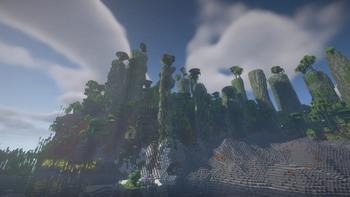
Step into a world of wonder and discovery with Photocraft, a modpack where exploration meets artistry! Traverse through a vast array of lush, hand-crafted biomes—from misty redwood valleys and glowing mushroom groves to windswept desert plateaus and icy tundra lakes. Each environment is teeming with life, both familiar and fantastical.
Encounter new animals and friendly creatures that bring the world to life: fluttering butterflies, curious foxes, soaring hawks, and mythical beasts hiding deep within enchanted forests. The world feels alive and vibrant, perfect for peaceful exploration and immersive storytelling.
Photocraft is rich with diverse structures and hidden dungeons, waiting to be uncovered. Explore sunken temples, skyborne islands, and underground crypts—sometimes filled with puzzles, traps, and legendary loot.
At the heart of the experience is a unique twist: photography. With customizable in-game cameras, players can capture moments in time, document rare mobs, scenic views, or fleeting phenomena. Build a personal gallery, take challenging photos, develop your photographs and hang them up for the world to see.
Whether you’re an adventurer, collector, or creator, Photocraft invites you to see Minecraft in a whole new light—one snapshot at a time.
This modpack is designed for exploration and fun in mind, it has been designed to be played in any difficulty mode you wish.
You'll see Minecraft in a whole new way, with Photocraft.
Available Versions
How to Set Up a Photocraft Server
Order Server
Choose at least 6 GB RAM (8 GB recommended for Photocraft). Based on player count: per 5 players.
Install Modpack in Dashboard
Open the modpack browser in the dashboard, search for "Photocraft" and click "Install". The fabric loader and Minecraft 1.20.1 are configured automatically.
Start Server & Play
Start the server – all mods are loaded automatically. Share the server IP with friends and play together!
Frequently Asked Questions
Photocraft server crashes or won't start – what to do?
Most common causes: insufficient RAM or wrong fabric loader. Check latest.log for "OutOfMemoryError" → increase RAM to at least 8 GB. For "Mixin" or "ClassNotFoundException" errors: modpack version and loader don't match. With Mado Hosting, loader and Minecraft version are auto-configured on modpack install – preventing most startup issues.
How much RAM does a Photocraft server really need?
Minimum 6 GB, recommended 8 GB for stable performance. per 5 players. Important: Minecraft modpacks need more RAM than vanilla – plan extra per additional player. With Mado Hosting, you can scale RAM up live at any time without data loss (from €12/month).
Can I add custom mods to Photocraft without conflicts?
Yes, but check compatibility: only use mods for the same loader (fabric) and same Minecraft version (1.20.1). Common issues: ID conflicts with recipe mods and incompatible coremod versions. The Mado dashboard mod browser only shows compatible mods and warns about known conflicts.
Photocraft server lagging – performance tips
1) Increase RAM to 8 GB+. 2) Reduce server view-distance to 8 (server.properties). 3) Pre-generate chunks with the "Chunky" plugin. 4) Use /spark profiler to check which mods consume the most tick time. With Mado Hosting, all servers run on NVMe SSDs with dedicated CPU cores – eliminating hardware as a bottleneck.
Similar Modpacks
![Cobblemon Official Modpack [Fabric]](https://cdn.modrinth.com/data/5FFgwNNP/e7f9ee2e9d361623847853fe2ddce42f519ee64f.png)
![COBBLEVERSE - Pokemon Adventure [Cobblemon]](https://cdn.modrinth.com/data/Jkb29YJU/581ecf54530972afb18a04660afd820f2f24f6c7.png)
![Better MC [FABRIC] - BMC2](https://cdn.modrinth.com/data/shFhR8Vx/a19c2bcb51d38f32f138d3607e91cb2b7b8e387f_96.webp)


![Better MC [FORGE] - BMC4](https://cdn.modrinth.com/data/4BV47HRn/7f5ef7cc61b2593609aabef3ed07a866a4f11b73_96.webp)
Rent Photocraft Server
Start your own server with automatic modpack installation.
Supported Versions
Start your Photocraft Server now
From €12.00/month with 8 GB RAM for the best performance.
Configure Server →