
Pinky
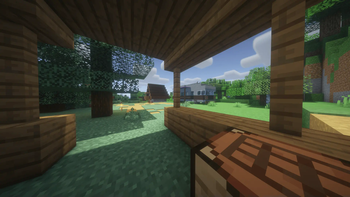
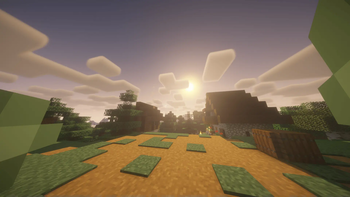
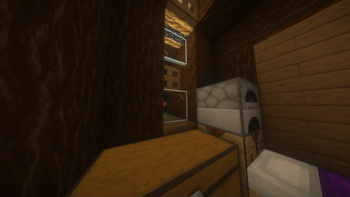
Modpack with many mods that make minecraft look more fancy and have better gameplay
Screenshots

About this Modpack
Pinky
Pinky is an extensive Minecraft modpack crafted to significantly enhance the gameplay experience and make it much more engaging. It features a large collection of mods focused on performance optimization, graphical improvements, quality-of-life features, and introducing exciting new gameplay elements.
Good Survival is the ideal choice for players seeking a richer, more challenging, and visually stunning survival adventure in Minecraft.
What mods it have:
List of mods
From version: 1.0.4- Architectury API
- Better Mount HUD
- Sodium Extra
- FancyMenu
- Silk
- Sound Physics Remastered
- Fancy Beds
- Shulker Box Tooltip
- FallingTree
- Fresh Animations
- Optimum Realism
- Mod Menu
- Xaero's Minimap
- Voice Chat Interaction
- FerriteCore
- Sodium
- Lithium
- SuperMartijn642's Core Lib
- Faithful 64x
- Cloth Config API
- ukulib
- Fast IP Ping
- Searchables
- Fabric API
- oωo (owo-lib)
- Mouse Tweaks
- Chat Heads
- Pufferfish's Attributes
- BetterF3
- Distant Horizons
- Language Reload
- Yeahlows PVP Pack
- Traveler's Backpack
- Concurrent Chunk Management Engine (Fabric)
- Melody
- Veinminer
- Debugify
- Dramatic Skys
- Presence Footsteps
- Cardinal Components API
- uku's Armor HUD
- CraterLib
- BSL Shaders - Classic
- [ETF] Entity Texture Features
- Low On Fire
- Essential Mod
- Fast Better Grass
- Cherished Worlds
- Fabric Language Kotlin
- Pink Dreams
- ImmediatelyFast
- Better Than Mending
- No Pumpkin Blur
- TerraBlender
- AmbientSounds
- Dynamic FPS
- spark
- Iris Shaders
- Simple Voice Chat
- Jade 🔍
- Simple Discord RPC
- Visuality
- Remove Reloading Screen
- Status Effect Bars
- Zoomify
- Background - Photorealistic Forest
- Drip Sounds
- CreativeCore
- [EMF] Entity Model Features
- Capes
- Konkrete
- Just Enough Items (JEI)
- Complementary Shaders - Unbound
- Entity Culling
- Falling Leaves
- LambDynamicLights - Dynamic Lights
- YetAnotherConfigLib (YACL)
- Sit
- Controlling
- No Chat Reports
- Forge Config API Port
- Continuity
- Text Placeholder API
- Xaero's World Map
- Not Enough Animations
- Connected Glass
- Reese's Sodium Options
- Wavey Capes
- Fusion (Connected Textures)
- Dark Smooth GUI
- Crash Assistant
- Even Better Enchants
From where are the mods?
They are all from modrinth so don't worry there's no virus or anything like that
Did my computer will explode with that amout of mods?
Mods was test'ed on my laptop that have
- GPU: GTX 1650
- CPU: AMD Ryzen 5 4600H
- RAM: 8GB
- And it works (With BSL Classic sharders)
Tested on pc too!
- GPU: RTX 5070 TI
- CPU: Intel Core i5-14400F
- RAM: 32GB
- 60 FPS (Vsync) very smooth gameplay
It have any TXT?
Yeah it have:
TXT's
- Faithful 64x
- Optimum Realism
- Fancy Beds
- Pink Dreams
- Low On Fire
- Fast Better Grass
- Even Better Enchants
- Cherry Background
- Dark Smooth GUI
- Dramatic Skys
- No Pumpkin Blur
- Yeahlow's PVP Pack
It have any shaders?
List of shaders
- Complementary Shaders - Unbound
- BSL Shaders - Classic
Telegram soon
Available Versions
How to Set Up a Pinky Server
Order Server
Choose at least 6 GB RAM (8 GB recommended for Pinky). Based on player count: per 5 players.
Install Modpack in Dashboard
Open the modpack browser in the dashboard, search for "Pinky" and click "Install". The fabric loader and Minecraft 1.21.11 are configured automatically.
Start Server & Play
Start the server – all mods are loaded automatically. Share the server IP with friends and play together!
Frequently Asked Questions
Pinky server crashes or won't start – what to do?
Most common causes: insufficient RAM or wrong fabric loader. Check latest.log for "OutOfMemoryError" → increase RAM to at least 8 GB. For "Mixin" or "ClassNotFoundException" errors: modpack version and loader don't match. With Mado Hosting, loader and Minecraft version are auto-configured on modpack install – preventing most startup issues.
How much RAM does a Pinky server really need?
Minimum 6 GB, recommended 8 GB for stable performance. per 5 players. Important: Minecraft modpacks need more RAM than vanilla – plan extra per additional player. With Mado Hosting, you can scale RAM up live at any time without data loss (from €12/month).
Can I add custom mods to Pinky without conflicts?
Yes, but check compatibility: only use mods for the same loader (fabric) and same Minecraft version (1.21.11). Common issues: ID conflicts with recipe mods and incompatible coremod versions. The Mado dashboard mod browser only shows compatible mods and warns about known conflicts.
Pinky server lagging – performance tips
1) Increase RAM to 8 GB+. 2) Reduce server view-distance to 8 (server.properties). 3) Pre-generate chunks with the "Chunky" plugin. 4) Use /spark profiler to check which mods consume the most tick time. With Mado Hosting, all servers run on NVMe SSDs with dedicated CPU cores – eliminating hardware as a bottleneck.
Similar Modpacks
![Cobblemon Official Modpack [Fabric]](https://cdn.modrinth.com/data/5FFgwNNP/e7f9ee2e9d361623847853fe2ddce42f519ee64f.png)
![COBBLEVERSE - Pokemon Adventure [Cobblemon]](https://cdn.modrinth.com/data/Jkb29YJU/581ecf54530972afb18a04660afd820f2f24f6c7.png)
![Better MC [FABRIC] - BMC2](https://cdn.modrinth.com/data/shFhR8Vx/a19c2bcb51d38f32f138d3607e91cb2b7b8e387f_96.webp)


![Better MC [FORGE] - BMC4](https://cdn.modrinth.com/data/4BV47HRn/7f5ef7cc61b2593609aabef3ed07a866a4f11b73_96.webp)
Rent Pinky Server
Start your own server with automatic modpack installation.
Details
- License
- Creative Commons Attribution Non Commercial 4.0 International
- Server-side
- Required
- Client-side
- Required
Supported Versions
Start your Pinky Server now
From €12.00/month with 8 GB RAM for the best performance.
Configure Server →