
Pixalis Plus
Modpack enhancing the user experience for the Pixalis.pl Minecraft server
Screenshots
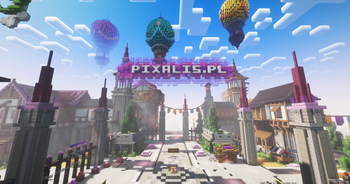
About this Modpack
Pixalis Plus
Polski Opis:
Pixalis Plus to opcjonalna, lekka paczka modów stworzona specjalnie, aby wzbogacić Twoje wrażenia z gry na serwerze Pixalis.PL.
Choć paczka nie jest wymagana do połączenia się z serwerem, dodaje ona szereg drobnych usprawnień typu Quality-of-Life oraz potężną optymalizację, dzięki której rozgrywka staje się znacznie płynniejsza. Wszystkie modyfikacje zostały starannie dobrane i zatwierdzone przez zespół Pixalis.PL, co gwarantuje pełną kompatybilność.
Paczka Pixalis Plus jest obecnie dostępna na wersję 1.21.11, która jest rekomendowanym wydaniem do gry na naszym serwerze.
Co zyskujesz dzięki paczce?
- Wbudowane Iris + Sodium – Standard w nowoczesnej optymalizacji. Ciesz się ogromnym skokiem FPS-ów i pełnym wsparciem dla shaderów.
- Maksymalna Wydajność – Skrócone czasy ładowania oraz stabilniejsza rozgrywka bez nagłych spadków płynności.
- Animowane Moby – Poczuj większą imersję dzięki odświeżonym animacjom stworzeń. Zwierzęta i potwory poruszają się teraz znacznie bardziej naturalnie i płynnie, co nadaje grze nowej jakości.
- Skiny 3D – Postać zyska dodatkową głębię. Druga warstwa skina (czapki, kurtki, detale) staje się trójwymiarowa, co wygląda znacznie lepiej niż standardowe, płaskie tekstury.
- Shulker Tooltips – Oszczędność czasu: podejrzyj zawartość Shulker Boxów w ekwipunku bez konieczności ich stawiania na ziemi.
- Dynamiczne Oświetlenie – Realizm i wygoda: trzymane w ręku pochodnie oświetlają teren wokół Ciebie.
- Opcja Fullbright – Pożegnaj całkowite ciemności. Stały efekt zbliżony do widzenia w nocy ułatwia budowanie i eksplorację najgłębszych jaskiń.
English Description:
Pixalis Plus is an optional, lightweight modpack specifically designed to enhance your gameplay experience on the Pixalis.PL server.
While the pack is not required to join the server, it introduces a variety of Quality-of-Life improvements and powerful optimizations for a much smoother experience. Every modification has been carefully selected and approved by the Pixalis.PL team to ensure full compatibility.
The Pixalis Plus pack is currently available for version 1.21.11, which is the recommended release for playing on our server.
Why use Pixalis Plus?
- Built-in Iris + Sodium – The gold standard in modern optimization. Enjoy a massive FPS boost and full shader support.
- Peak Performance – Faster loading times and more stable gameplay without sudden lag spikes.
- Animated Mobs – Increased immersion with refreshed entity animations. Animals and monsters now move more naturally, bringing a new level of quality to the world.
- 3D Skins – Give your character more depth. The second skin layer (hats, jackets, details) becomes three-dimensional, looking far better than standard flat textures.
- Shulker Tooltips – Time-saver: preview the contents of Shulker Boxes directly in your inventory without having to place them down.
- Dynamic Lighting – Realism meets convenience: torches and light sources illuminate the area while held in your hand.
- Fullbright Option – Say goodbye to pitch-black darkness. A permanent night-vision-like effect makes building and exploring the deepest caves effortless.
Available Versions
How to Set Up a Pixalis Plus Server
Order Server
Choose at least 4 GB RAM (6 GB recommended for Pixalis Plus). Based on player count: per 8 players.
Install Modpack in Dashboard
Open the modpack browser in the dashboard, search for "Pixalis Plus" and click "Install". The fabric loader and Minecraft 1.21.11 are configured automatically.
Start Server & Play
Start the server – all mods are loaded automatically. Share the server IP with friends and play together!
Frequently Asked Questions
Pixalis Plus server crashes or won't start – what to do?
Most common causes: insufficient RAM or wrong fabric loader. Check latest.log for "OutOfMemoryError" → increase RAM to at least 6 GB. For "Mixin" or "ClassNotFoundException" errors: modpack version and loader don't match. With Mado Hosting, loader and Minecraft version are auto-configured on modpack install – preventing most startup issues.
How much RAM does a Pixalis Plus server really need?
Minimum 4 GB, recommended 6 GB for stable performance. per 8 players. Important: Minecraft modpacks need more RAM than vanilla – plan extra per additional player. With Mado Hosting, you can scale RAM up live at any time without data loss (from €8/month).
Can I add custom mods to Pixalis Plus without conflicts?
Yes, but check compatibility: only use mods for the same loader (fabric) and same Minecraft version (1.21.11). Common issues: ID conflicts with recipe mods and incompatible coremod versions. The Mado dashboard mod browser only shows compatible mods and warns about known conflicts.
Pixalis Plus server lagging – performance tips
1) Increase RAM to 6 GB+. 2) Reduce server view-distance to 8 (server.properties). 3) Pre-generate chunks with the "Chunky" plugin. 4) Use /spark profiler to check which mods consume the most tick time. With Mado Hosting, all servers run on NVMe SSDs with dedicated CPU cores – eliminating hardware as a bottleneck.
Similar Modpacks

![Cobblemon Official Modpack [Fabric]](https://cdn.modrinth.com/data/5FFgwNNP/e7f9ee2e9d361623847853fe2ddce42f519ee64f.png)
![COBBLEVERSE - Pokemon Adventure [Cobblemon]](https://cdn.modrinth.com/data/Jkb29YJU/581ecf54530972afb18a04660afd820f2f24f6c7.png)
![Better MC [FABRIC] - BMC2](https://cdn.modrinth.com/data/shFhR8Vx/a19c2bcb51d38f32f138d3607e91cb2b7b8e387f_96.webp)


Rent Pixalis Plus Server
Start your own server with automatic modpack installation.
Supported Versions
Start your Pixalis Plus Server now
From €8.00/month with 6 GB RAM for the best performance.
Configure Server →