
Pixel Lens
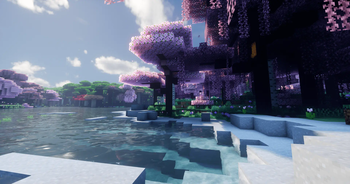
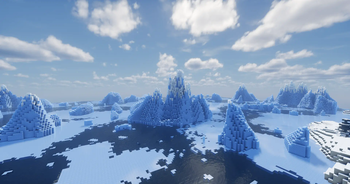
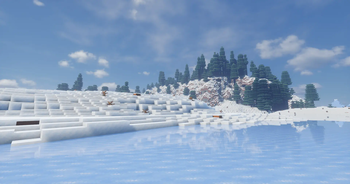
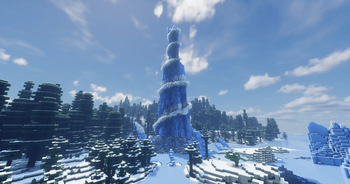
Pixel Lens is a light modpack that focuses on realistic landscapes, environments & photography.
Screenshots
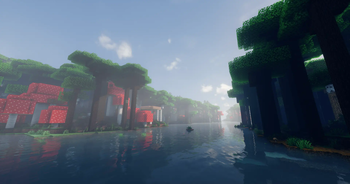
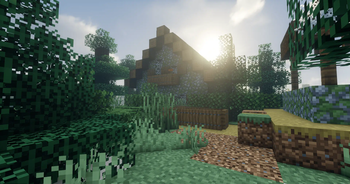
About this Modpack
Pixel Lens is a light modpack that focuses on realistic landscapes, environments & photography. The pack can be played in singleplayer or it can be thrown onto a server so you can explore and be creative with your friends!
It is recommended to use shaders to get the full experience so I've included 2 of my favorite shaders, Bliss and Complementary Unbound.
Found an issue with the pack or want to give feedback? I'd love to hear about it here in our Discord
Modlist:
- Ambient Sounds by creativemd
- Bliss Shaders by X0nk
- Complementary Shaders - Unbound by EminGT
- CreativeCore by creativemd
- Dynamic Surroundings: Fabric Edition by OreCruncher
- Exposure by mortuusars
- Fabric API by modmuss50
- Forge Config API Port by Fuzs
- Geckolib by Gecko
- Distant Horizons by jeseibel
- Indium by comp500
- Iris Shaders by coderbot
- JourneyMap by mysticdrew
- Just Enough Items by mezz
- Naturalist by crispytwig
- Particular by Chai
- Sodium by jellysquid
- Sound Physics Remastered by henkelmax
- Sushi Bar by Chai
- Terralith by Stardust Labs
- owo-lib by Wisp Forest
- All of YUNG's structures
- Real Camera by xTracr
- Gliders by Jeryn
- Immersive Paintings by Luke100000
- Lithium by jellysquid3
- Do A Barrel Roll by enjarai
- Traveler's Backpacks by Tiviacz1337
- Particle Rain by PigCart
I don't own any of the mods in this pack. All the mods are owned by their respective development teams. If you are the developer of one of the mods in my pack and wish to have it removed, please reach out to me via our Discord. (linked above)
Available Versions
How to Set Up a Pixel Lens Server
Order Server
Choose at least 6 GB RAM (8 GB recommended for Pixel Lens). Based on player count: per 5 players.
Install Modpack in Dashboard
Open the modpack browser in the dashboard, search for "Pixel Lens" and click "Install". The fabric loader and Minecraft 1.20.1 are configured automatically.
Start Server & Play
Start the server – all mods are loaded automatically. Share the server IP with friends and play together!
Frequently Asked Questions
Pixel Lens server crashes or won't start – what to do?
Most common causes: insufficient RAM or wrong fabric loader. Check latest.log for "OutOfMemoryError" → increase RAM to at least 8 GB. For "Mixin" or "ClassNotFoundException" errors: modpack version and loader don't match. With Mado Hosting, loader and Minecraft version are auto-configured on modpack install – preventing most startup issues.
How much RAM does a Pixel Lens server really need?
Minimum 6 GB, recommended 8 GB for stable performance. per 5 players. Important: Minecraft modpacks need more RAM than vanilla – plan extra per additional player. With Mado Hosting, you can scale RAM up live at any time without data loss (from €12/month).
Can I add custom mods to Pixel Lens without conflicts?
Yes, but check compatibility: only use mods for the same loader (fabric) and same Minecraft version (1.20.1). Common issues: ID conflicts with recipe mods and incompatible coremod versions. The Mado dashboard mod browser only shows compatible mods and warns about known conflicts.
Pixel Lens server lagging – performance tips
1) Increase RAM to 8 GB+. 2) Reduce server view-distance to 8 (server.properties). 3) Pre-generate chunks with the "Chunky" plugin. 4) Use /spark profiler to check which mods consume the most tick time. With Mado Hosting, all servers run on NVMe SSDs with dedicated CPU cores – eliminating hardware as a bottleneck.
Similar Modpacks
![Cobblemon Official Modpack [Fabric]](https://cdn.modrinth.com/data/5FFgwNNP/e7f9ee2e9d361623847853fe2ddce42f519ee64f.png)
![COBBLEVERSE - Pokemon Adventure [Cobblemon]](https://cdn.modrinth.com/data/Jkb29YJU/581ecf54530972afb18a04660afd820f2f24f6c7.png)
![Better MC [FABRIC] - BMC2](https://cdn.modrinth.com/data/shFhR8Vx/a19c2bcb51d38f32f138d3607e91cb2b7b8e387f_96.webp)


![Better MC [FORGE] - BMC4](https://cdn.modrinth.com/data/4BV47HRn/7f5ef7cc61b2593609aabef3ed07a866a4f11b73_96.webp)
Rent Pixel Lens Server
Start your own server with automatic modpack installation.
Supported Versions
Start your Pixel Lens Server now
From €12.00/month with 8 GB RAM for the best performance.
Configure Server →