
PoJo Optimizer
An optimization modpack built for Mojo, Pojav, or Zanith
Screenshots
About this Modpack
⚠️ UPDATE COMING WITH EVEN BETTER OPTIMIZATION AND CUSTOM CONFIG ⚠️
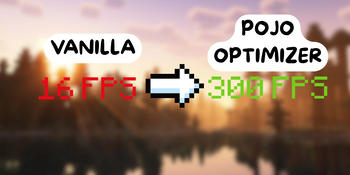
PoJo Optimizer is a modpack that contains 23 mods that specifically target performance. It's fully client-side, and doesn't changes how the game feels, instead it can get you over 3X FPS
❓ Why should I use PoJo Optimizer instead of Simply Optimized ?
Potato Optmizer contains more mods, while still having only 21. These were carefully chosen to optimize minecraft in almost any situations. Plus, tests have been made, with Simply Optmized, you get mostly 70 FPS with lag spikes (90 hz refresh rate), but with PoJo Optimizer, the frames are constantly at 90 fps. Plus, it was built for Mojo Launcher (pojav), zanith launcher or any java for android launcher.
In conclusion, if you want easy FPS on Android, definitaly try PoJo Optimizer.
All mods will be listed and explained down below :
⛰️ ImmediatelyFast
Improves the immediate mode rendering performance of the client.
🏃♂️ ModernFix
Improves performance, reduces memory usage, and fixes many bugs.
🔇 Stfu
Silences annoying or useless log messages to keep your console clean.
💎 Clumps
Merges XP orbs together to reduce lag and improve performance in farms.
🌐 Krypton
Optimizes Minecraft’s networking stack for better server and multiplayer performance.
👀 MoreCulling
Adds aggressive block face culling to reduce rendering load and boost FPS.
📦 Packet Fixer
Fixes packet-related issues and improves network reliability in certain situations.
💡 ScalableLux
Enhances lighting performance and scalability, especially useful on low-end devices.
🗺️ C2ME
Speeds up chunk loading and world generation using multi-threading.
📉 Dynamic FPS
Reduces FPS when the game is unfocused or idle to save battery and heat.
🪶 Lithium
General-purpose optimization mod improving game logic, physics, and AI performance.
🖼️ Super Resolution
Allow for custom game resolution (lower resolution ➙ higher FPS).
🐞 Debugify
Fixes many vanilla bugs that Mojang hasn’t addressed yet.
🧩 FNP Patcher
Applies compatibility and performance patches.
Better Block Entities (BBE)
Improves the rendering of block entities (like chests and signs) to boost performance without reducing visual quality.
🧱 FerriteCore
Reduces the memory usage of Minecraft in a few different ways.
➗ SuperFastMath
Replaces math operations with faster implementations to slightly boost performance.
🧊 BadOptimizations
A collection of mostly micro optimizations that add up to something bigger.
🔥 Sodium
Major rendering engine replacement that drastically increases FPS.
👁️ EntityCulling
Stops rendering entities that aren’t visible, improving performance.
🌊 ZFastNoise
Optimizes noise generation used in terrain and world generation.
Available Versions
How to Set Up a PoJo Optimizer Server
Order Server
Choose at least 6 GB RAM (8 GB recommended for PoJo Optimizer). Based on player count: per 5 players.
Install Modpack in Dashboard
Open the modpack browser in the dashboard, search for "PoJo Optimizer" and click "Install". The fabric loader and Minecraft 1.21.11 are configured automatically.
Start Server & Play
Start the server – all mods are loaded automatically. Share the server IP with friends and play together!
Frequently Asked Questions
PoJo Optimizer server crashes or won't start – what to do?
Most common causes: insufficient RAM or wrong fabric loader. Check latest.log for "OutOfMemoryError" → increase RAM to at least 8 GB. For "Mixin" or "ClassNotFoundException" errors: modpack version and loader don't match. With Mado Hosting, loader and Minecraft version are auto-configured on modpack install – preventing most startup issues.
How much RAM does a PoJo Optimizer server really need?
Minimum 6 GB, recommended 8 GB for stable performance. per 5 players. Important: Minecraft modpacks need more RAM than vanilla – plan extra per additional player. With Mado Hosting, you can scale RAM up live at any time without data loss (from €12/month).
Can I add custom mods to PoJo Optimizer without conflicts?
Yes, but check compatibility: only use mods for the same loader (fabric) and same Minecraft version (1.21.11). Common issues: ID conflicts with recipe mods and incompatible coremod versions. The Mado dashboard mod browser only shows compatible mods and warns about known conflicts.
PoJo Optimizer server lagging – performance tips
1) Increase RAM to 8 GB+. 2) Reduce server view-distance to 8 (server.properties). 3) Pre-generate chunks with the "Chunky" plugin. 4) Use /spark profiler to check which mods consume the most tick time. With Mado Hosting, all servers run on NVMe SSDs with dedicated CPU cores – eliminating hardware as a bottleneck.
Similar Modpacks


![Cobblemon Official Modpack [Fabric]](https://cdn.modrinth.com/data/5FFgwNNP/e7f9ee2e9d361623847853fe2ddce42f519ee64f.png)
![COBBLEVERSE - Pokemon Adventure [Cobblemon]](https://cdn.modrinth.com/data/Jkb29YJU/581ecf54530972afb18a04660afd820f2f24f6c7.png)
![Better MC [FABRIC] - BMC2](https://cdn.modrinth.com/data/shFhR8Vx/a19c2bcb51d38f32f138d3607e91cb2b7b8e387f_96.webp)

Rent PoJo Optimizer Server
Start your own server with automatic modpack installation.
Supported Versions
Start your PoJo Optimizer Server now
From €12.00/month with 8 GB RAM for the best performance.
Configure Server →